


|
Home / Technical Notes / Thermal Analysis / Radiation: Equations and Setting Method
Radiation: Equations and Setting Method
1. Heat Transfer by Radiation
Heat transfer across the distant faces by the electromagnetic waves is called radiation.
The intensity of radiation from a surface (i) is expressed as follows.

R: radiosity (intensity of radiation)
G: irradiative intensity
ρ: reflectivity
ε: emissivity *The sum of reflectivity and emissivity (ρ+ε) is 1. (Kirchhoff's law)
σ: Stefan-Boltzmann constant = 5.670373 x 10⁻⁸ [W/m2/K4]
θ: Temperature
The first item is reflection of the irradiation. The second item is the heat emission from the surface due to the surface temperature θ.
The heat flux at the surface (i) is expressed as below.

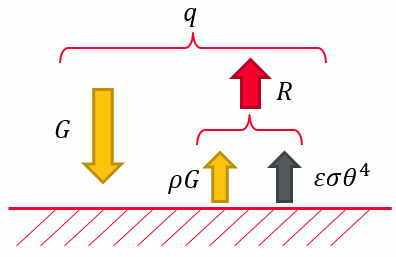
The relationship between R, G, and q is illustrated below.
G is calculated as follow.
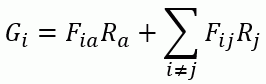
Fij: view factor between surface (k) and surface (j)
Fia: view factor between surface (i) and ambient
Ra: radiosity of ambient
Rj: radiosity of surface (j)
The surface (i) receives radiations from all surfaces that are visible from the surface (i).
The irradiation from where there is no surface is treated as irradiation from the ambient.
Assuming that the emissivity of the ambient is 1, the radiosity of the ambient is calculated as below using an ambient temperature.
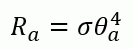
θa: ambient radiation temperature
The sum of view factors is 1. Fia is given as below.
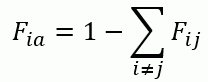
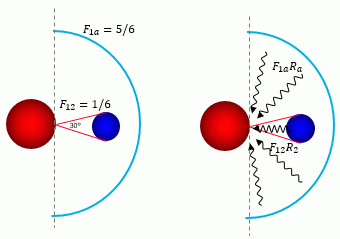
Below is an illustrative explanation of the view factor and the irradiation.
2D analysis is assumed. From a point 1 on the red surface, the blue object is seen in an angle range of 30 deg out of 180 deg.
The view factor is 30/180=1/6. The remainder (5/6) is an ambient view factor. The point 1 receives radiation weighted by the view factor from the ambient and the blue object.
2. Radiation Type
The ambient radiation and the surface-to-surface radiation are solved by Femtet.
The setup of the ambient radiation analysis is not complicated, but there are restrictions on the analysis conditions.
The surface-to-surface radiation analysis tends to consume longer time and use more memory, but accurate calculation is possible for the problem which the ambient radiation analysis cannot solve.
Ambient radiation (speed prioritized)
The radiation from the surface to the environment outside the model is taken into account.
The radiation to other surface is not taken into account. The radiation energy transmits through other objects.
It is assumed that the model is entirely surrounded by the ambient face with no obstacle in between.
From the surface (i), only ambient face is visible but no other faces. Therefore, the calculation assumes that Fia=1.
The heat flux from the surface to the ambient is calculated as below.
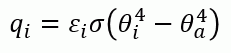
where θ is surface temperature of the boundary and θroom is room (ambient) temperature.
Note: If the view factor is not 1 due to the obstacles, concave radiation surface, or closed space,
use [surface-to-surface].
Surface-to-surface radiation (accuracy prioritized)
Radiation between the surfaces with this setting is taken into account.
The radiation from the surface to the environment outside the model is also taken into account.
Select this option to calculate the radiation between the distant objects or in the closed domain.
It takes longer time than the ambient radiation because this calculation requires radiation surface check, calculation of view factor Fij, and calculation of heat transfer across the surfaces.
By solving the simultaneous equations, the radiosity is calculated and the heat flux is given. If the number of surfaces is n, the number of equations is n.
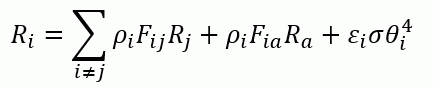
See [Radiation Surface Check] for more details.
3. Radiation Setting Method
3.1 Use default setting (outer boundary condition)
This method is used in most cases.
Solid surfaces are automatically detected and analyzed as radiation surfaces.
The solid surface contacting the fluid material is also a radiation surface.
The fluid surface and the interface of the solid materials are not radiation surfaces.
If the outer boundary condition is other than radiation such as temperature or heat transfer: convection,
the boundary conditions other than radiation are set to the perimeter regardless of fluid or solid.
Below are the examples of the radiation surface for the outer boundary condition.
|
|
Outer boundary condition |
Outer boundary condition |
|
Solid 1 and solid 2 are surrounded by the fluid |
|
|
|
Solid 1 and solid 2 surround the fluid |
|
|
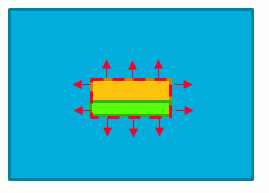
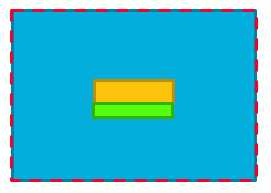
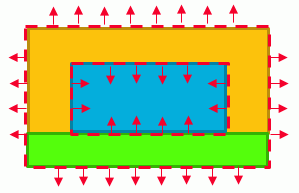
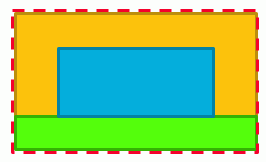
The settings are as follows.
1. For the outer boundary condition, set [ambient (speed prioritized)] or [surface-to-surface (accuracy prioritized)].
2. Set the emissivity.
3. If the boundary condition is other than radiation
For the boundary set on the solid surface, it is recommended to select [follow the outer boundary condition] as a radiation type.
Like the outer boundary condition, it is treated as a radiation surface.
These settings can be done all together at [Radiation Setting] on the [Thermal Analysis tab].
[Example 27: Radiation Blocked by a Disc (Steady-state Analysis) -Simple Setting-] and
[Example 15: Radiation and Cooling of IC inside a Case by Natural Convection (Closed Space and Open Space)]
are defined in this way.
3.2 Specify radiation surface individually
This method is used if there are not so many boundaries to set radiation, or if you want to limit the surfaces for the heat transfer.
Use this method for the radiation between the surfaces facing each other.
If there are many boundaries to set the radiation, the setting becomes difficult. It is recommended use the default setting (3.1).
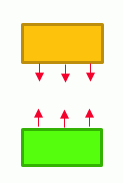
Below are the typical cases for "3.1 use default setting" and "3.2 specify radiation surfaces individually".
|
All surfaces of solid 1 and solid 2 are the radiation surfaces (3.1 Use default setting)
[Example 27: Radiation Blocked by a Disc (Steady-state Analysis) -Simple Setting-] |
|
|
The facing surfaces of solid 1 and solid 2 are the radiation surfaces (3.2 Specify radiation surfaces individually)
[Example 16: Radiation Blocked by a Disc (Steady-state Analysis)] |
|
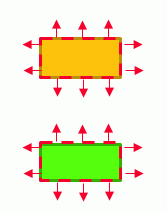
4. Emissivity Setting Method
There are three methods.
1. Default setting
Set at [Radiation Setting] on the [Thermal Analysis tab].
2. Specify on each body attribute
Set on the [Thermal Surface tab].
The value set by this method is used instead of the default value.
3. Specify for each boundary condition
On the [Thermal tab], select Individual Setting and set emissivity at [Individual Setting of Radiation].
The value set here supersedes the values set at 1 and 2 above.
The settings for the emissivity can be done all together at [Radiation Setting] on the [Thermal Analysis tab].
5. Ambient Temperature Setting
Typically, the ambient temperature set on the [Thermal Analysis tab] is used for the ambient radiation temperature.
To use other temperature, go to [Thermal tab], select Individual Setting and set ambient radiation temperature at [Individual Setting of Radiation].