Home / Executing Simulation / Motor Rotation Analysis / How to Perform the Motor Rotation Analysis
How to Perform the Motor Rotation Analysis
The detail of the motor rotation analysis is explained here.
See "Motor Rotation Analysis" for the overview.
|
|
-
Create the model
Prior to the analysis, create the model and set the material properties and the body attributes.
Register the current as a variable to make it angle-dependent.
See How to use the variables on [Variables].
|
|
|
|
-
Activate the motor rotation analysis dialog box.
Once the modeling is done, go to  on the [Model] tab on the [Model] tab
and click ▼ at the bottom of [Run Mesher/Solver]  . Then click [Motor Rotation Analysis] . Then click [Motor Rotation Analysis]  . .
|
|
|
|
-
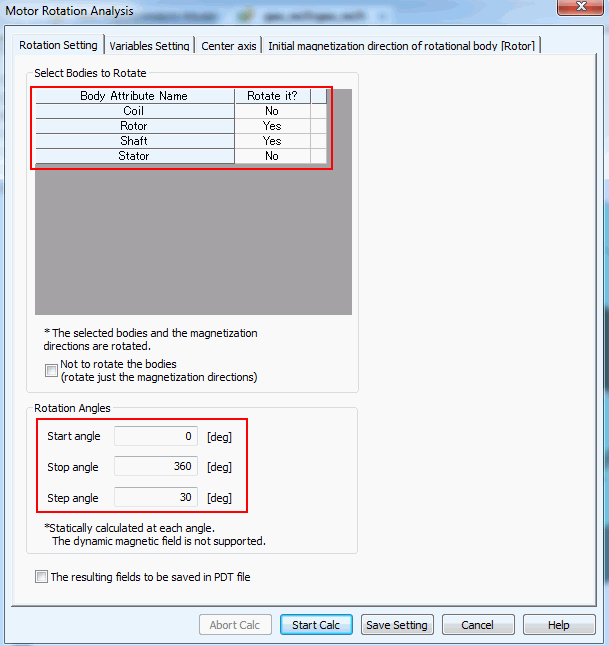
Select the bodies to rotate.
All the bodies marked with "Yes" are subjected to the rotation.
The bodies marked with "No" are not for rotation.
The selected bodies and the magnetization directions are rotated.
The torques calculated for the selected bodies are the results.
-
Set the rotation angles
Set the rotation angles in the table.
The angle is swept from the start value to the stop value at the specified step value.
|
|
|
|
-
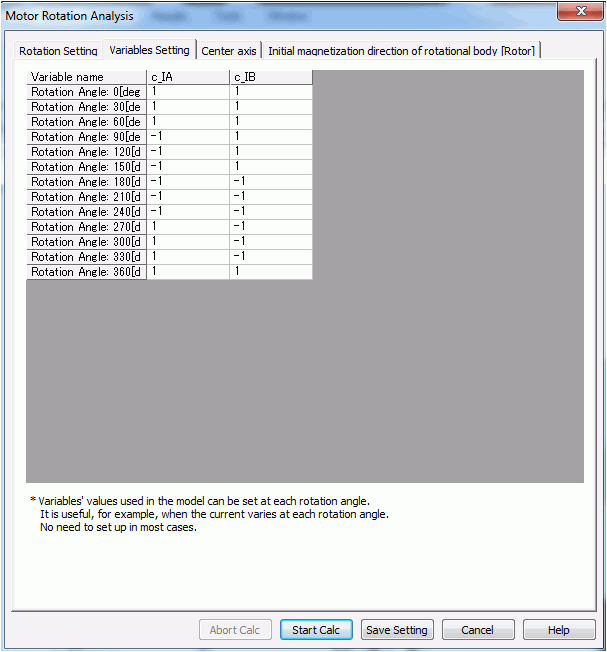
Set up the variables
The setup is done only when the coil current for each angle is needed.
Variables need to be specified for each angle in the table.
|
|
|
|
-
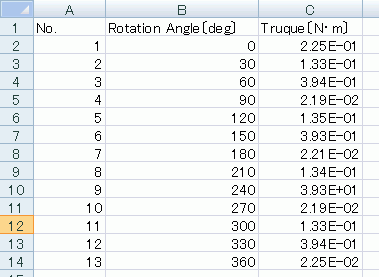
Execute the calculation
Click the Start Calculation button.
When the calculation is completed, the results will be output in a csv file as shown in the right.
|
|


