|
Home / Show Results / Result Field / Results at Specified Coordinates
Results at Specified Coordinates
On the [Results] tab, go to 
click [Results at Specified Coordinates]  . The results at the specified point will be calculated and shown.
-
If the location is on the border of elements, the average will be indicated.
"Averaging" can be switched on/off on [Contour Tab].
If the location is on the border of different materials, the calculation results for each will be output.
See also [Calculating Field Values].
Operations
|
|
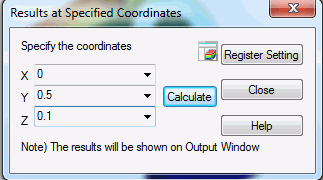
Enter the coordinates of the point of your interest, and press the Calculate button. The field values at that point will be output on Output Window. Mouse Pointer MethodInstead of the numerical entry, the points can be specified by mouse.
Register the SettingRegisters the setting on Project Tree. The coordinates and the calculated field values are registered. See also [Registering Results Display Setting]. |
Field to Calculate
In the selection box below, select the Field Type, Vector Component and Phase.

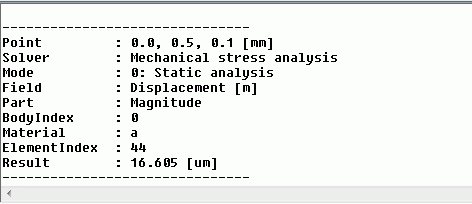
Result on Output Window
Point indicates the coordinates of the specified point. Result indicates the field of that point.
Result on Tooltips
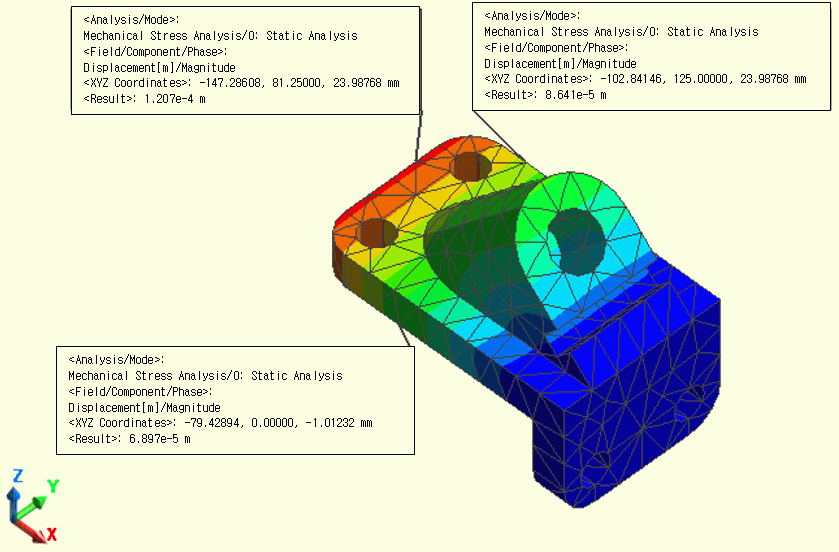
The tooltip at the specified point can show the result.
For the details, refer to "Tooltips".