


|
Home / Show Results / Characteristics by Charts / SYZ Matrix
SYZ Matrix
On the [Results] tab, go to  , click ▼ at the side of [Chart]
  .
.
Select [SYZ Matrix] on the submenu. The dialog box to set up the graphing the SYZ matrix will appear.
The graphing software Descartes manages the filing and the graphing of SYZ matrix.
This command is available for 3D electromagnetic harmonic analysis and piezoelectric analysis harmonic analysis.
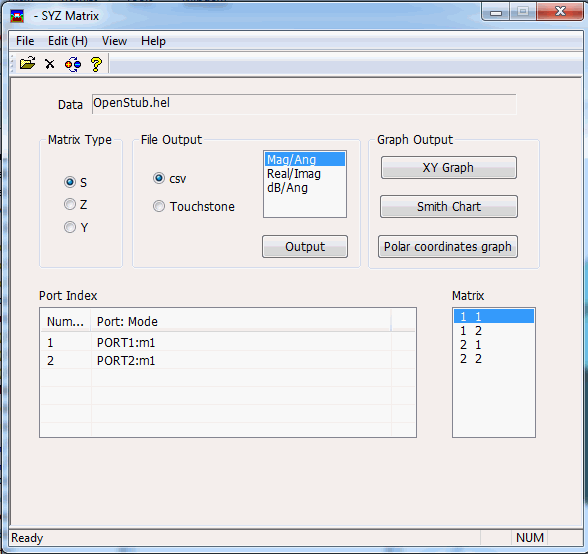
Functions
|
Item |
Notes |
|
Data |
Indicates the file names. |
|
Matrix Type |
Selects the matrix type: S: Scattering matrix, Z: Impedance matrix or Admittance matrix and the matrix elements to plot.
|
|
Port Index |
Indicates the matrix component numbers and the corresponding port names. The format is as follows. Matrix component number:Port name:m* (Example) 1:Port_001:m1
where * is the mode number. The mode number is usually 1, while the electromagnetic analysis might give more than 1 when there are multiple propagation modes. |
|
Graph Output |
Selects the graph type: XY graph, Smith chart or Polar graph
|
|
File Output |
Selects the file format: csv or Touchstone
|
|
Other Functions |
The following commands are in Edit:
The details are explained below.
|
|
The following commands are in Display:
These are convenient to check values.
|
Data Format for SYZ Matrix
The results for the characteristics are saved in the file with the hel extension for Hertz and the ray extension for Rayleigh.
Femtet can read Touchstone files with the s*p, z*p or y*p extension. as well.
Touchstone and csv are supported for data output.
Renormalize Function (Edit -> Renormalize)
Changes the port's reference impedance.
The reference impedance might not be clear in the electromagnetic analysis. In such a case, you cannot use the Renormalize function.
See [How to Renormalize] for the detail. See [Calculation for the Renormalize Founction].
De-Embedding Function (Edit -> De-embedding)
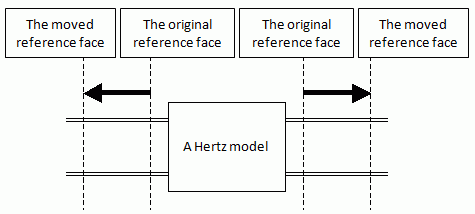
Calculates S-parameters when the ports are extended or shortened based on the propagation constant acquired at the original ports.
If Renormalize is set, De-embedding will be applied before applying Renormalize.
See [Calculation for the De-embedding Function].
Port Order Exchange/Balance Conversion (Edit --> Port Order Exchange/Balance Conversion
The port order can be exchanged. For the paired ports, P-parameters can be converted across the normal/common modes.
This is called the balance conversion.
Start from the Command Line
This software can be started from DOS prompt as well as from the Femtet menu.
syzgraph "1" "d:\test\test.pdt"