


|
Home / Examples / Stress Analysis [Galileo] / Example 53: Both Ends Supported Bar under Distributed Load
Example 53: Triangular Distributed Load
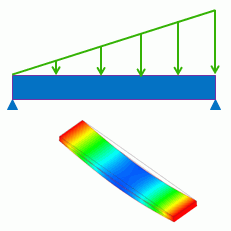
General
-
Triangular distributed load is applied on a bar with its ends are supported.
-
Set the distributed boundary conditions. See [How to Set Distributed Boundary Condition and Body Attribute] for more information.
-
The deformation, the displacement and the stress are solved.
-
Unless specified in the list below, the default conditions will be applied.
-
Obtain this session's project file. (Right-click and choose 'Save link as')
-
Results will vary depending on Femtet version and the PC environment.
Analysis Space
|
Item |
Settings |
|
Analysis Space |
3D |
|
Model Unit |
mm |
Analysis Conditions
The default conditions will be applied.
|
Item |
Settings |
|
Solver |
Stress Analysis [Galileo] |
|
Analysis Type |
Static Analysis |
|
Options |
N/A |
Model
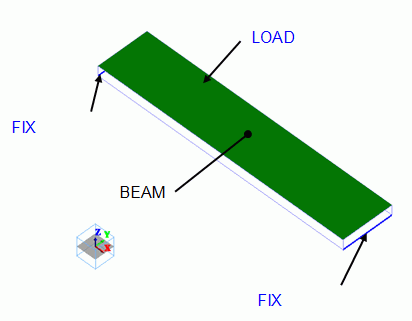
The bar is a rectangular solid body. The material is polycarbonate.
Distributed load is applied on the top face. Both edges of the bottom face is fixed in Z direction.
Body Attributes and Materials
|
Body Number/Type |
Body Attribute Name |
Material Name |
|
0/Solid |
BEAM |
002_Polycarbonate(PC) * |
* Available from the material DB
Boundary Conditions
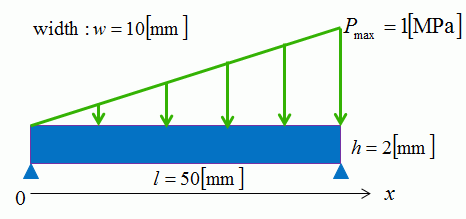
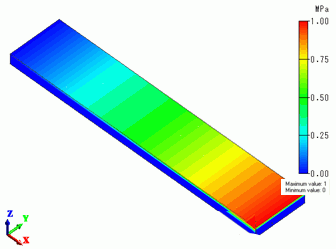
The pressure is applied gradually increasing from left to right as shown below.
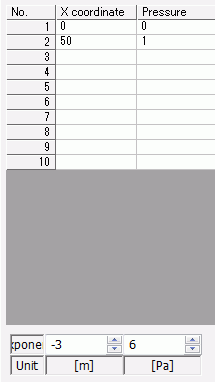
Distribution Data: Pressure = 0 at X = 0, Pressure = 1 [MPa] at X = 50 [mm].
|
Boundary Condition Name/Topology |
Tab |
Boundary Condition Type |
Settings |
|
FIX/Face |
Mechanical |
Displacement |
Select the Z Component. |
|
LOAD/Face |
Mechanical |
Pressure |
Select [Use distribution data].
[Coordinates-Pressure] Table
|
How to view the distribution
Click [Run Mesher] on the pull-down menu of [Run Mesher/Solver] and see the meshing result.
Select [Distributed pressure] at [Field] to view the entered distribution.
You may click [Run Mesher/Solver] instead. In that case, select [Mesh Information] at [Mode] and then select [Distributed pressure] at [Field].
The linearly changing pressure can be observed.
Results
The figure below is the gradation contour of Z component of Displacement.
It is a bottom view. The minimum value of displacement is shown.
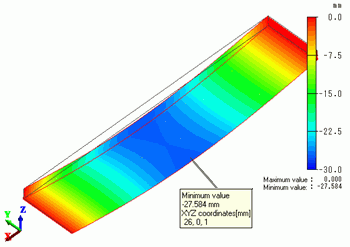
The lowest displacement is 27.584 [mm] at X = 26 [mm]
The formula
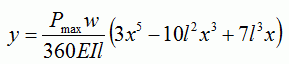
gives 27.297 [mm] at X = 25.967 [mm]
They are well matched.
Here,
y: Displacement, l, w, h: Dimensions of the bar, Pmax: Maximum pressure, x: Coordinate, E: Young's modulus, I: Second moment of area
Second moment of area for a rectangle section is given by

The contour indicates the X normal stress.
It is a bottom view. The maximum value of stress is shown.
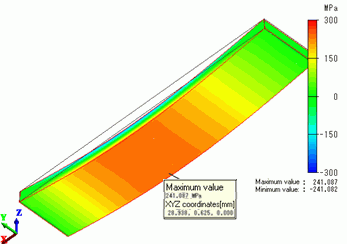
The maximum stress is 241.087 [MPa] at X = 28.938 [mm]
The formula
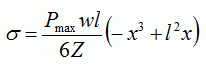
gives 240.563 [MPa] at X = 28.867 [mm]
They are well matched.
Here,
σ: Stress, l, w, h: Dimensions of the bar, Pmax: Maximum pressure, x: Coordinate, Z: Section modulus
Section modulus Z for a rectangle section is given by
