|
Home / Examples / Electromagnetic Analysis [Hertz] / Example 33: Propagation Mode in the Waveguide
Example 33: Propagation Mode in the Waveguide
General
-
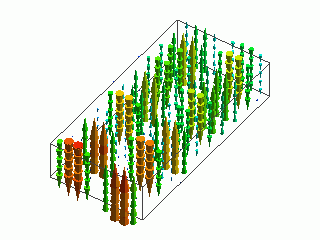
The Frequency response of the waveguide is analyzed.
-
Specific propagation mode can be selected for the analysis.
In this example, only TE20 will be analyzed.
The frequency will be changed from 10 GHz to 20 GHz at the 1 GHz interval.
-
The analysis consists of 2 stages: Step 1 involves obtaining the waveguide analysis mode number of TE20
and Step 2 involves selecting the propagation mode for further analysis.
First, the common settings for Steps 1 and 2 will be explained.
Then, Steps 1 and 2 will be explained sequentially.
-
S-parameters and the electromagnetic field distribution will be obtained.
-
Obtain this session's project file. (Right-click and choose 'Save link as')
-
Results will vary depending on Femtet version and the PC environment.
Common Settings
The common settings for Steps 1 and 2 are explained.
Analysis Space
|
Item |
Settings |
|
Analysis Space |
3D |
|
Model Unit |
mm |
Analysis Conditions
|
Item |
Settings |
|
Solver |
Electromagnetic Analysis [Hertz] |
|
Analysis Type |
Harmonic Analysis |
The harmonic analysis is set as follows.
|
Tab |
Setting Item |
Settings |
|
Mesh |
Element Type |
2nd-order Element |
|
Adaptive Meshing |
Select [Apply adaptive meshing]. |
|
|
Frequency-Dependent Meshing |
Reference Frequency: 20x109 [Hz] Select [The conductor bodies thicker than the skin depth constitute the boundary condition].
There are no conductive solid bodies in this analysis model. Therefore the setting above is irrelevant. |
Model
The waveguide is created as a box-shape solid body.
Set the port boundary condition to both ends of the waveguide body (WAVEGUIDE).
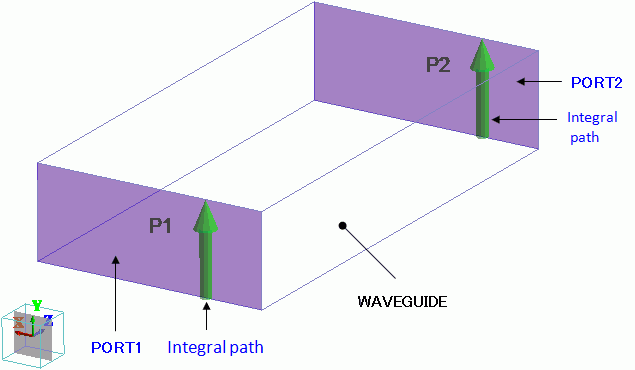
An integration path is set up on each I/O port.
The integral path has a function to specify the direction of 0-degree phase of the electric field generated at the port.
The phase is 0 degree when the magnitude of electric field near the integral path is maximum in the direction of the integral path.
If the ports have no integral paths, results could be given where each port has different direction of 0-degree phase.
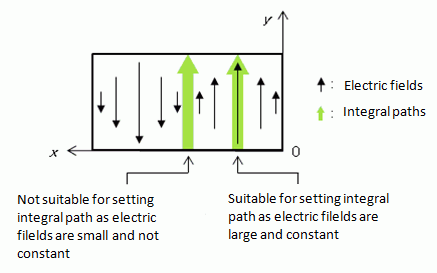
The distribution of the electric field TE20 of interest is shown below.
The integral path is positioned offset from the center, where the electric fields are both large and aligned.
Body Attributes and Materials
|
Body Number/Type |
Body Attribute Name |
Material Name |
|
0/Solid |
WAVEGUIDE |
000_Air * |
* Available from the material DB
Boundary Conditions
|
Boundary Condition Name/Topology |
Tab |
Boundary Condition Type |
Settings |
|
Outer Boundary Condition |
Electric |
Electric Wall |
|
Step 1: Identify the Waveguide Analysis Mode Number
In the electromagnetic analysis of Femtet, two kinds of numbers are assigned to one propagation mode.
One is the waveguide analysis mode number and the other is the waveguide mode number (waveguide mode number in 3D analysis).
When necessary, either number will be used to identify the propagation mode.
To analyze specific propagation mode, waveguide analysis mode number will be used.
-
See [How to Examine the Ports of Electromagnetic Analysis] for more information.
Analysis Conditions
Adding to the common settings, the analysis condition for Step 1 is set as follows.
In Step 1, it is required to use the maximum frequency of all frequencies of the target propagation mode for analysis.
In this example, TE20 mode is to be analyzed from 10 GHz to 20 GHz.
In Step 1, the maximum frequency is set to 20 GHz.
|
Tab |
Setting Item |
Settings |
|
Electromagnetic Analysis |
Options |
Select Execute the waveguide analysis only |
|
Harmonic Analysis |
Frequency |
20×109 [Hz] |
|
Sweep Type |
Select Single Frequency |
|
|
Sweep Setting |
Select Discrete Sweep * |
|
|
Input |
1.0 [W] |
|
|
Deselect Enable each port's individual weight setting for the superposed field display |
||
* As the analysis is performed at single frequency, any setting in Frequency Sweep Setting will have the same effect as discrete sweep.
Boundary Condition
Adding to the common settings, each boundary condition for Step 1 is set as follows.
|
Boundary Condition Name/Topology |
Tab |
Boundary Condition Type |
Settings |
|
PORT1/Face |
Electric |
Port |
Reference Impedance: Number of Modes: |
|
PORT2/Face |
Electric |
Port |
Reference Impedance: Number of Modes: |
Results
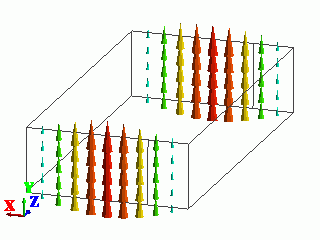
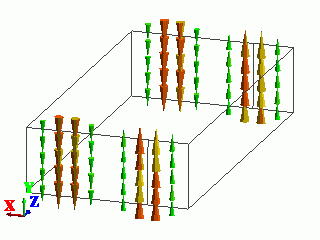
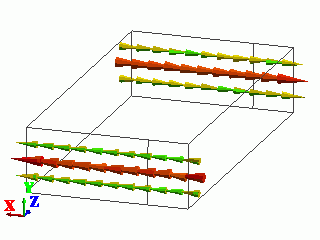
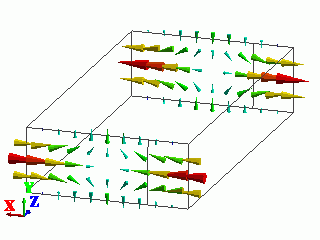
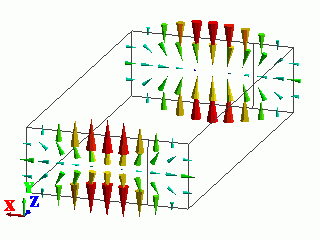
The electric field vectors and the propagation constant at the individual port are shown for each of 5 calculated modes as follows.
The propagation mode is also shown.
From the distribution of the electric field, the mode of "1: 2.000000E+010 Hz: (1)" is TE20.
The waveguide analysis mode number of TE20 is "1" which is shown in parentheses following the frequency.
|
Mode |
Electric Field Vectors |
Propagation Constant |
Propagation Mode |
|
0: 2.000000e+010Hz: (0) |
|
Port Name (Phase Constant) - j(Attenuation Constant) |
TE10 |
|
1: 2.000000e+010Hz: (1) |
|
Port Name (Phase Constant) - j(Attenuation Constant) |
TE20 |
|
2: 2.000000e+010Hz: (2) |
|
Port Name (Phase Constant) - j(Attenuation Constant) |
TE01 |
|
3: 2.000000e+010Hz: (3) |
|
Port Name (Phase Constant) - j(Attenuation Constant) |
TE11 |
|
4: 2.000000e+010Hz: (4) |
|
Port Name (Phase Constant) - j(Attenuation Constant) |
TM11 |
-
If the propagation mod of interest is not included in the calculated modes,
increase the Number of Modes to Acquire in the Waveguide Analysis and redo the analysis.
-
If "NG" is shown on the propagation constant of the propagation mode of interest,
the propagation mode cannot be used in the 3D analysis.
For Number of Modes Used in the Actual 3D Analysis, specify a larger number than the waveguide analysis mode number having "NG" notation.
Redo the analysis, and the "NG" notation will disappear.
The port number and the waveguide mode number (pxmy) will be shown.
From the calculation above, the waveguide analysis number of TE20 is identified as 1.
Step 2: Analyze the Selected Propagation Mode
Analysis Condition
Analysis conditions set in the Step 1 are changed for the Step 2 as follows.
|
Tab |
Setting Item |
Settings |
|
Electromagnetic Analysis |
Options |
Deselect Execute the waveguide analysis only. |
|
Harmonic analysis |
Sweep |
Minimum Frequency: 10 × 109 [Hz] |
|
Sweep Type |
Select [Linear Step by Frequency] |
|
|
Sweep Setting |
Select [Discrete Sweep] |
|
|
Input |
1.0 [W] |
|
|
Select [Enable each port's individual weight setting for the superposed field display] |
||
Boundary Conditions
The boundary conditions are changed as follows.
In [Propagation Mode Setting], select the waveguide analysis mode number which you want to analyze.
Select mode01 in [Select propagation modes] as the waveguide analysis mode number of TE20 is 1.
|
Boundary Condition Name/Topology |
Tab |
Boundary Condition Type |
Settings |
|
PORT1/Face |
Electric |
Port |
Reference Impedance: Number of Modes: |
|
PORT2/Face |
Electric |
Port |
Reference Impedance: Number of Modes: |
-
The number of modes shown in Select propagation mode is
the number of the Number of Modes to Acquire in the Waveguide Analysis.
If the waveguide analysis mode number of interest is not shown,
change the Number of Modes to Acquire in the Waveguide Analysis above.
Result 1: Fields
Examine the fields where TE20 enters from PORT1 as follows.
Identify the waveguide mode number of the propagation mode of interest, and
set up the fields viewing of the propagation mode of interest using the waveguide mode number.
First, identify the waveguide mode number of TE20.
On the [Results] tab, select Port in [Solver] and select the mode of the waveguide analysis mode number 1, which represents TE20,
from the maximum frequencies in [Mode]. The [Propagation Constant] dialog box will appear.
x and y in the notation of [pxmy] indicate the port number and the waveguide mode number respectively.
The propagation constants of the mode "51: (1)” with the waveguide analysis mode number 1 at the maximum frequency of 20 GHz are shown below. This indicates the waveguide mode number of TE20 is "1".
|
Propagation Constant |
|
Port Name (Phase Constant) - j(Attenuation Constant) PORT1 p1m1: 3.355935e+002 +j 0.000000e+000 PORT2 p2m1: 3.355964e+002 -j 2.527736e-027 |
The setting for viewing the field of TE20 is as follows.
Go to the [Results] tab. For [Solver], select Electromagnetic Analysis, and click [Field Superposition Setting].
MAG and PHASE can be set for each propagation mode at the port.
The notation [PortName: my] represents the boundary condition name of a port, PortName, and its waveguide mode number, y.
To view the fields where TE20 enters PORT1, set MAG of PORT1:m2 to "1" and other MAGs and PHASEs to "0".
Select the frequency and field of interest in [Mode] and [Field], respectively.
The fields where TE20 enters PORT1 can be viewed.
-
To view the fields where TE20 enters PORT1, set MAG of PORT2:m1 to "1".
For the details of [Field Superposition Setting], see[Field Superposition Setting].
With the set up in the [Field Superposition Setting] dialog box as below,
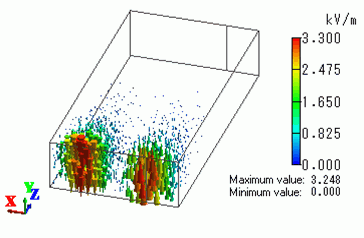
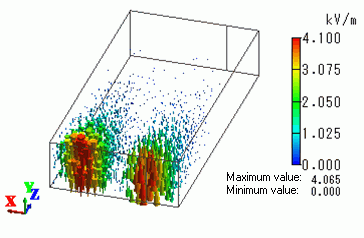
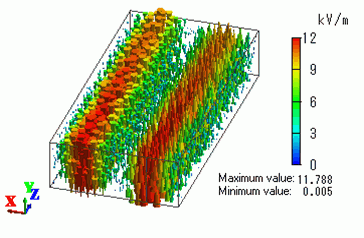
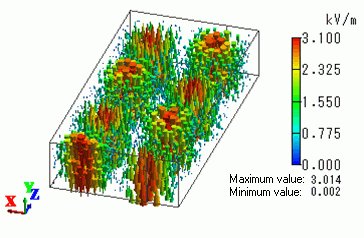
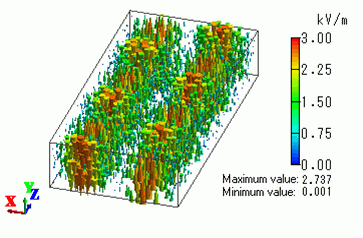
the electric field vector diagrams of some modes (frequencies) are shown below.
As seen in the electric field vector diagrams, if a frequency is lower than 12 GHz,
TE20 entering PORT1 does not propagate to PORT2.
|
Port Name |
MAG |
PHASE[deg] |
|
PORT1:m1 |
1.0 |
0.0 |
|
PORT2:m2 |
0.0 |
0.0 |
|
Mode |
Electric Field Vector Diagram |
|
0: 10.000000 GHz |
|
|
1: 11.000000 GHz |
|
|
2: 12.000000 GHz |
|
|
6: 16.000000 GHz |
|
|
10: 20.000000 GHz |
|
Result 2: S-Parameters
Examine the S-parameters of the waveguide.
Go to [Results] tab. Click [Charts] and select SYZ Matrix.
In the [SYZ Matrix] dialog box, Port Index indicates the suffixes of S-parameters
that correspond to each port and propagation mode.
Now, the Port Index shows as below.
|
Port Index |
|
1: PORT1:m1 |
In this example, the waveguide mode number 1 (m1) indicates TE20.
Therefore, each of the four S-parameters has the meaning as follows.
-
S(1, 1): The ratio of incident wave of TE20 to PORT1 and reflecting wave of TE20 at PORT1 when there is no incident wave to PORT2
-
S(1, 2): The ratio of incident wave of TE20 to PORT2 and transmitting wave of TE20 to PORT1 when there is no incident wave to PORT1
-
S(2, 1): The ratio of incident wave of TE20 to PORT1 and transmitting wave of TE20 to PORT2 when there is no incident wave to PORT2
-
S(2, 2): The ratio of incident wave of TE20 to PORT2 and reflecting wave of TE20 at PORT2 when there is no incident wave to PORT1
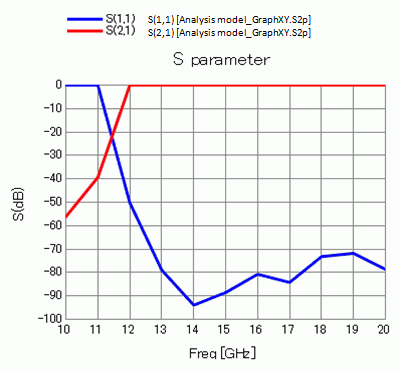
In the [SYZ Matrix] dialog box, select (1,1) and (2,1) for Matrix Elements and click [XY_Graph].
An S-parameters graph below will appear.
The graph indicates the transmittance of TE is small at frequencies lower than 12 GHz and high at frequencies higher than 12 GHz.
This confirms the result from the electric field vectors.