


|
Home / Show Results / Field Superposition Setting
Field Superposition Setting
This function is currently available for the harmonic analysis in the electromagnetic analysis and the piezoelectric analysis only.
On the [Analysis Condition Setting] dialog box, go to [Harmonics Analysis] tab, and select "Enable each port's individual weight setting for superposed fields display".
You will be able to set the weight for each port (the voltage boundary condition for the piezoelectric analysis) and view the superposed field.
-
On the [Model] tab, go to

select [Field Superposition Setting] 
Alternatively,
-
On the [Results] tab, go to

Press ▼ of [Graphics Setup] and sut up at [Field Superposition Setting] of the submenu.
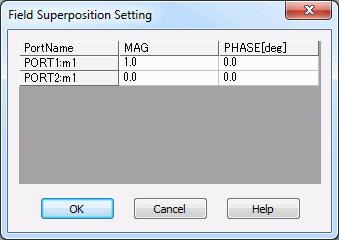
The weight [W] is given by [MAG] and [PHASE] for each port as follows:
W = MAG x Exp(j PHASE) (1)
where j is the imaginary unit. The field is multiplied by the calculated weight,
and the distributed fields are shown.
Electromagnetic Analysis
Field Superposition Setting in the electromagnetic analysis is used
mainly for three purposes as follows.
-
Analysis when the electricity is applied to multiple ports.
-
Analysis when the applied power (or voltage or amplitude of current) is changed at each port.
-
Analysis when specific propagation mode enters specific port.
Apply electricity to multiple ports.
If a model has multiple ports as in [Example 26: Patch Antenna Array of Electromagnetic Analysis],
Radiation radiation pattern can be analyzed when the electricity is applied to multiple ports.
Change input power per port
Superpose the electromagnetic waves input at each port and change the input power at each port.
In the case of the power port, the power of the electromagnetic waves is the basis for the interposition. It is determined by the input power on the Harmonic Analysis tab.
The input power is given in the expression below.
Pj = Pin × |wj|2 (2)
Pj: Input power of jth port [W]
Pin: Input power [W] set in [Analysis Condition Setting] dialog box - [Harmonics Analysis] tab
wj: Weight of jth port (given by Equation (1))
-
For voltage port, the input is MAG [V].
-
For current port, the input is MAG [A].
Change the propagation mode of incident wave
If a port has several propagation modes, by setting the field superposition,
you can change the propagation mode of incident wave and view the field.
Select Port in [Solver] and check the waveguide mode number of the propagation mode.
As an example, we use a waveguide model (Figure 1) of [Example 33: Propagation Mode in the Waveguide of Electromagnetic Analysis].
As the number of modes used in the 3D analysis, 3 is set for PORT1(port number: P1) and PORT2(port number: P2).
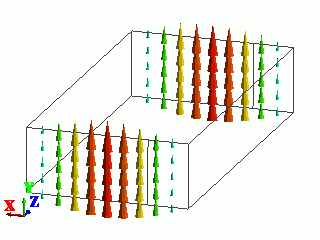
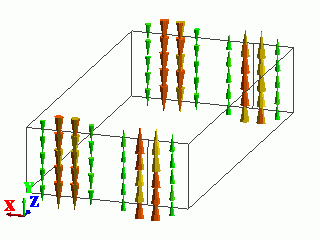
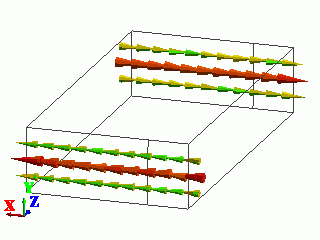
The table below shows the waveguide mode number (mx), the electric field of port, and the propagation mode which is acquired from the electric field.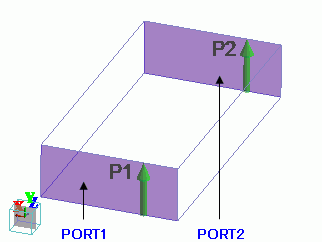
Figure 1:: Waveguide model
-
For the details of setting the Number of modes used in the actual analysis,
see [Port of Electromagnetic Analysis].
-
To check the waveguide mode number,
see [Example 33: Analysis of the Propagation Mode in the Waveguide] for the details.
|
Waveguide Mode Number |
Electric Field of Port |
Propagation Mode |
|
1 |
|
PORT1: TE10 |
|
2 |
|
PORT1: TE20 |
|
3 |
|
PORT1: TE01 |
Next, select Electromagnetic analysis in [Solver], and click [Field Superposition Setting] .
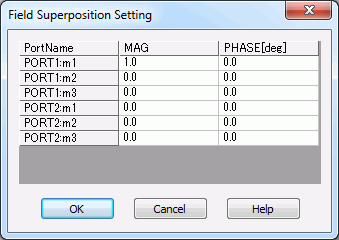
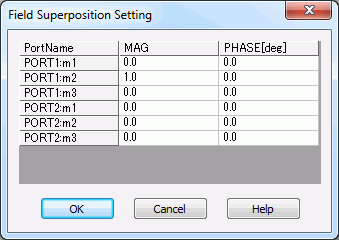
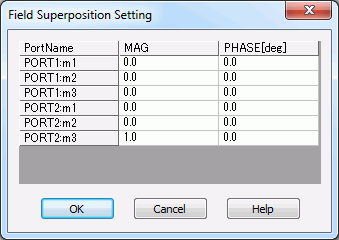
[PortName: mx] in [Field Superposition Setting] dialog box indicates
the incidence of the propagation mode of waveguide mode number x to the port PortName .
Input "1" at MAG for the port and propagation mode of the incident electromagnetic waves and "0" at other MAG.
Then, the field will show the results where the specific propagation mode enters the specific port.
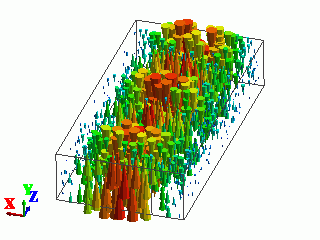
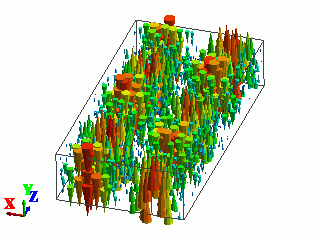
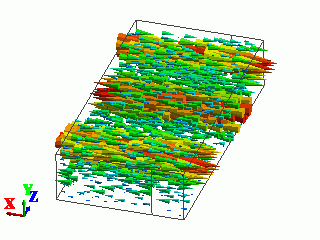
The list below shows the setting for the field superposition where the propagation mode is TE10 at PORT1, TE20 at PORT1, and TE01 at PORT2.
Electric field vectors are shown for each case.
|
Port for the Incident Electromagnetic Waves and |
Field Superposition Setting |
Electric Field Vectors |
|
PORT1 for TE10(m1) |
|
|
|
PORT1 for TE20(m2) |
|
|
|
PORT2 for TE01(m3) |
|
|
Piezoelectric Analysis
The fields for each electric potential-specified boundary condition are superposed. Mechanical loads also can be superposed by specifying the weight. Select "Voltage specified" in the boundary condition and enter the voltage and the phase. The voltage and the phase will be multiplied by the weight
Acoustic Analysis
The fields for each driving boundary condition (pressure and velocity) are superposed. For example, select pressure for the boundary condition and enter magnitude and phase. The weight will be multiplied by the values set in the boundary condition.