|
Home / Examples / Acoustic Analysis [Mach] / Example 11: Interference of Sound Waves (2D Transient Analysis)
Example 11: Interference of Sound Waves (2D Transient Analysis)
General
-
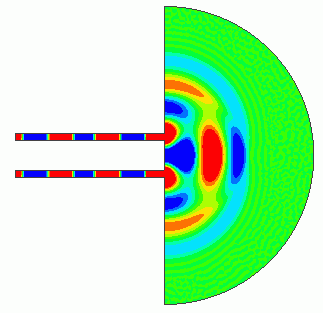
The interference in Example 3 in the harmonic analysis is reproduced in the transient analysis.
-
We will confirm that the sound pressure distribution shifts to the steady state over time and the result matches with that of the harmonic analysis.
-
Unless specified in the list below, the default conditions will be applied.
-
Obtain this session's project file. (Right-click and choose 'Save link as') Simulation time: 3 min 34 sec.
The project file contains two projects: transient analysis (Ex11_Trans) and harmonic analysis (Ex11_Harm) for comparison purpose.
-
Results will vary depending on Femtet version and the PC environment.
Analysis Space
|
Item |
Settings |
|
Analysis Space |
2D |
|
Model Unit |
m |
Analysis Conditions
Analysis conditions for the transient analysis are listed below.
|
Item |
Settings |
|
Solver |
Acoustic Analysis [Mach] |
|
Analysis Type |
Transient Analysis |
|
Options |
N/A |
The analysis conditions for the harmonic analysis are mostly the same as Example 3. The difference is that the analysis frequency for comparison is set to 1KHz only.
General mesh size on the Mesh tab is set to 0.02m.
Timestep on the transient analysis tab is set up as follows.
Set the finish time to 0.05 [s].
・Explicit Method
By selecting Automatic for the timestep, the timestep will be automatically set so as not to incur numerical instability.
The smaller maximum number of calculation steps can cause the interruption of calculation during processing. To avoid it, set the maximum number of calculation steps to 15000.
As the output could be enormous, set the output interval to 100 to limit the number of results.
・Implicit Method
By selecting Automatic for the timestep, the time step is automatically defined as one cycle of the input waveform divided by 12.
As the output could be enormous, set the output interval to 5 to limit the number of results.
|
Tab |
Setting Item |
Settings |
|
Mesh |
General Mesh Size: | 0.02 [m] |
|
Transient Analysis (Explicit Method)
|
Specify Solution Method |
Explicit Method |
|
Timestep |
Automatic |
|
|
Finish Time |
0.05 [s] |
|
|
Maximum Number of Calculation Steps |
15000 |
|
|
Specify the output interval |
Select |
|
|
Transient Analysis (Implicit Method) |
Specify Solution Method |
Implicit Method |
|
Timestep |
Automatic |
|
|
Finish Time |
0.05 [s] |
|
|
Maximum Number of Calculation Steps |
1000 |
|
|
Specify the output interval |
Select |
Model
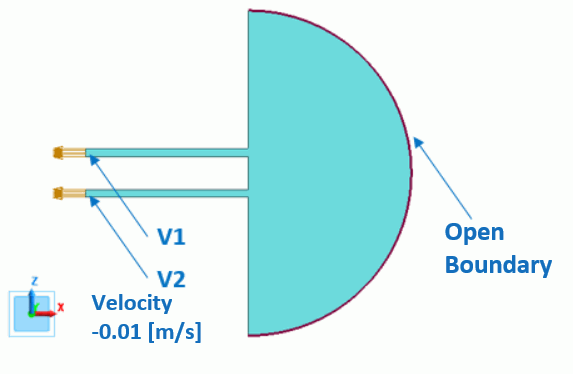
The model is created in 2D. A semi-circle and two rectangle sheet bodies form the air.
The [speed] boundary condition by the sine wave is set on the sound generating portion. The [open boundary] is set to the perimeter of the semi circle.
Body Attributes and Materials
|
Body Number/Type |
Body Attribute Name |
Material Name |
|
5/Sheet |
Air |
000_Air(*) |
* Available from the material DB
Boundary Conditions
The boundary conditions of open boundary and speed are set for the transient analysis. The pressure boundary in Example 3 for the harmonic analysis is changed to the speed boundary of 0.01 [m/s].
|
Boundary Condition Name/Topology |
Tab |
Boundary Condition Type |
Settings |
|
Open/Face |
Sound Wave |
Open Boundary |
- |
|
V1/Face |
Acoustic |
Speed (Sine Wave) |
-0.01 [m/s] |
|
V2/Face |
Acoustic |
Speed (Sine Wave) |
-0.01 [m/s] |
Results
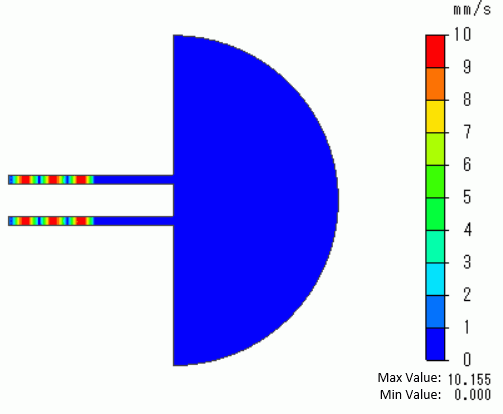
The gradation contour diagrams of the particle velocities are shown below. The diagrams show the 10th, 25th, and 40th step of the transient analysis.
For easy viewing, the maximum and minimum values are set to 10 [mm/s] and 0 [mm/s] respectively in the gradient contour diagram setting.
Note: For the explicit method, the time at each step depends on the mesh if the timestep is set to automatic.
Since meshing varies depending on the Femtet version, the time of each step can vary depending on the Femtet version.
10th Step [1.55 ms]
25th Step [3.86 ms]
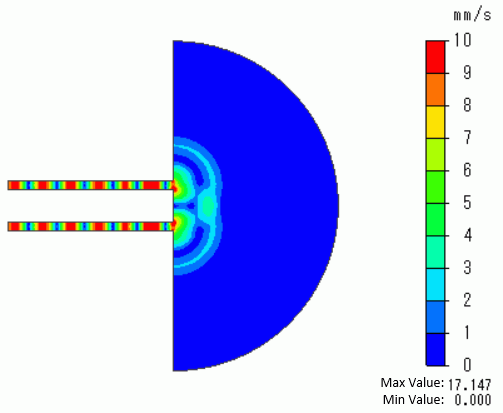
40th Step [6.18 ms]
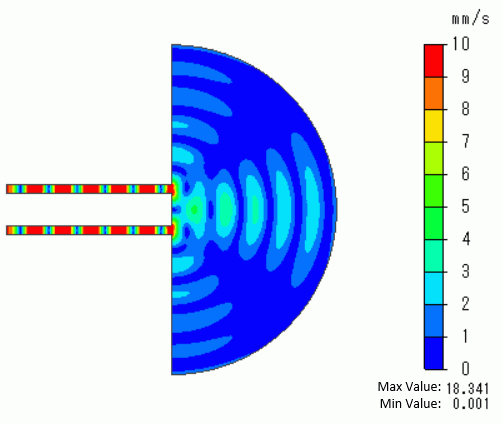
It can be observed that the interference pattern is generated by the propagating sound waves over time.
The contour diagrams below are the results of the harmonic analysis with the same analysis conditions as the transient analysis.
170th Step [26.3 ms] Harmonic Analysis [1 kHz, phase 0°]
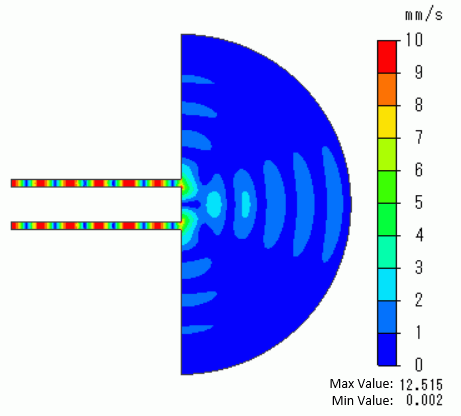
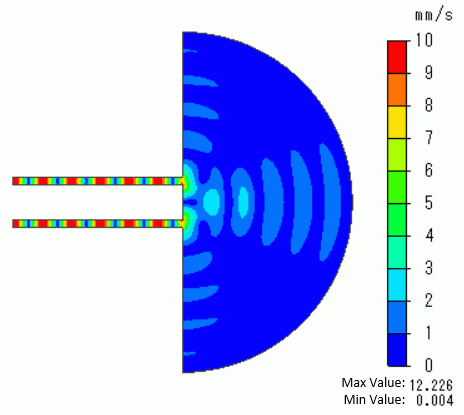
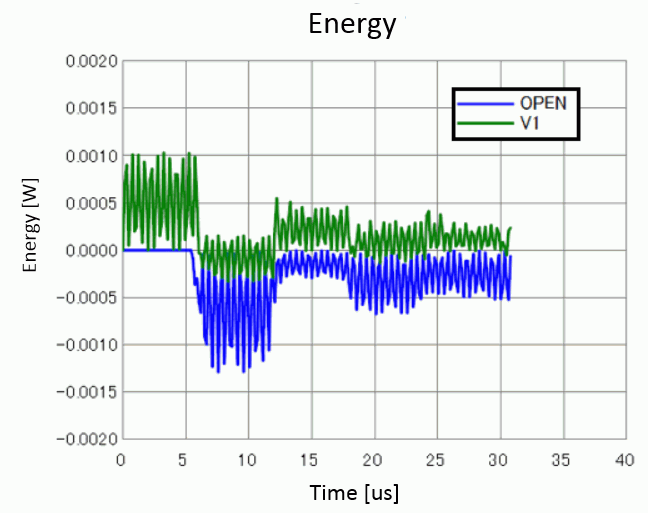
The transient analysis graph of radiation energy below shows the steady state is almost reached after time=25 ms ( approximately 160th step).
The gradation contour diagram of the particle velocity at the 170th step, which is in the steady state, is almost the same as that of the harmonic analysis.
It is verified that the results of the transient analysis are correct.
(Note: The results of the transient analysis change over time. It is not the case that the results after reaching the steady state match with those of the harmonic analysis at all times.)
The results match with a phase somewhere in the results of the harmonic analysis. In the case above, the result in the phase 0° is the same as that in the 170th step.)