


|
Home / Executing Simulation / Convergence of Adaptive Meshing
Convergence of Adaptive Meshing
When the adaptive meshing is being executed, the convergence status is displayed in the dialog box below automatically.
This dialog box can be reopened later as follows:

Click ▼ at [Run Mesher/Solver]  .
.
Then select [Convergence]  .
.
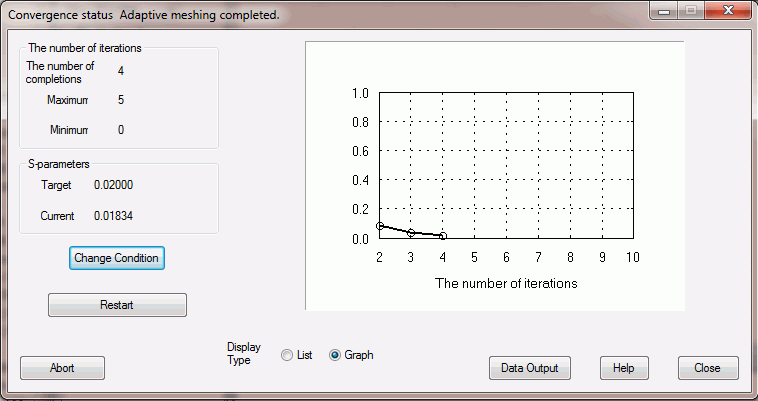
The functions of the buttons are explained below.
|
Buttons |
Notes |
|
Change Condition |
Changes the setting for the adaptive meshing. The detail is explained at [Adaptive Mesh Setting]. |
|
Restart |
Restarts meshing and calculation. If this button is pressed after the maximum number of iterations is increased or the tolerance is set tighter, the simulation will restart from the last calculation. This button will be [Finish at Next Iteration] during the adaptive meshing. If it is pressed, the maximum number of iterations will change to the next iteration. If unselected, the number will be back to the original value. |
|
Abort |
Aborts the simulation. It is the same function as the <Esc> key. |
|
Display Type |
Switches the display type. |
|
Data Output |
Saves the data of the convergence status in the csv format. |