


|
Home / Executing Simulation
Executing Simulation
If the analysis model is created and various conditions and attributes are set, you are ready for executing the simulation.
Proceed to run the mesher and the solver.
How to execute the simulation
On the [Model] tab, go to  , and click [Run Mesher/Solver]
  .
.
-
The simulation progress is shown on the output window.
After the meshing is completed, the number of meshes and the qualities of mesh are displayed.
The quality of mesh is considered to be good if the figure is closer to 1, in which case equilateral triangles or tetrahedrons are created.
If the quality is poor, it takes a longer time to converge. Less than 100 is preferred.
-
The mesh and element information is output in a project name_mes.csv file
-
When the history is being edited, the simulation cannot be executed.
-
While the adaptive meshing is being performed, the dialog box for [Convergence of Adaptive Meshing] will appear.
-
See also How to Process Multiple Projects.
How to abort the simulation
Press the <ESC> key.
You will be asked if you want to abort. Click the [Yes] button.
If the dialog box of progress, Viewing Convergence and Intermediate Results, is shown, click the [Abort] button.
You will be asked if you want to abort. Click the [Yes] button.
Calculation Finished
The [Calculation Finished] dialog box will show up when the calculation finishes.
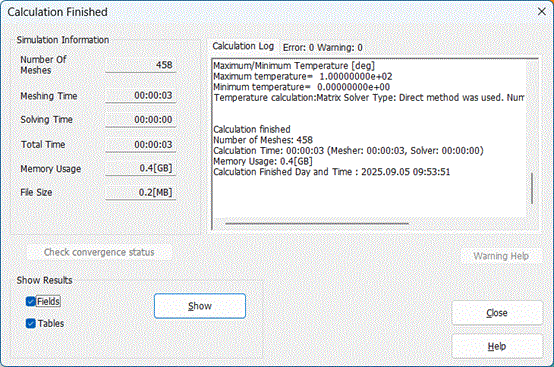
Refer to [Calculation Finished Dialog] for more details.