


|
Home / User Interface / General settings / Mouse
Mouse
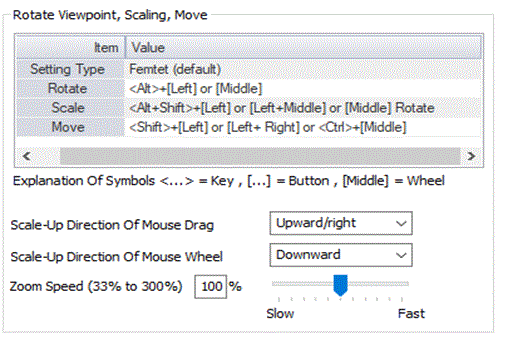
|
Setting Item |
Notes |
|
Setting Type |
Switches the mouse operation type. Depending on the type, Rotate/Zoom/Move/Scale-up direction of mouse drag/Scale-up direction of mouse wheel are switched. |
|
Rotate |
Changes the viewpoint rotation. |
|
Zoom |
Changes the viewpoint zoom. |
|
Move |
Changes the viewpoint movement. |
|
Scale-up direction of mouse drag |
Sets the scale-up direction of the viewpoint by mouse drag. |
|
Scale-up direction of mouse wheel |
Sets the scale-up direction of the viewpoint by mouse wheel. |
|
Zoom speed |
Sets the zoom speed of the mouse operation. |
Mouse Operation for Each Setting Type
|
Setting Type |
Femtet (default) |
Type A |
Type B |
Type C |
Type D |
Type E |
|
Rotate |
Femtet |
Type 01 |
Type 02 |
Type 03 |
Type 01 |
Type 04 |
|
Scale |
Femtet |
Type 01 |
Type 02 |
Type 03 |
Type 04 |
Type 01 |
|
Move |
Femtet |
Type 01 |
Type 02 |
Type 01 |
Type 03 |
Type 02 |
|
Scale-up direction of mouse drag |
Upper right |
Upper left |
Lower right |
Upper left |
Lower right |
Upper left |
|
Scale-up direction of mouse wheel |
Downward |
Downward |
Upward |
Downward |
Downward |
Upward |
Setting Type
|
Setting Item |
Notes |
|
Femtet (default) |
Turns on the default operation setting. |
|
Type A Type B Type C Type D Type E |
Turns on the defined operation setting. See the table above. |
|
Custom |
Setting type will be switched to Custom when Rotate/Zoom/Move/Scale-up direction of mouse drag/Scale-up direction of mouse wheel are changed individually. Once the Custom settings are saved, those settings will be applied when Custom is selected in future operation. |
Rotate Type
|
Setting Item |
Operation |
|
|
Femtet (default) |
<Alt>+[Left] or [Middle] |
<Alt> + |
|
|
||
|
Type 01 |
[Middle] |
|
|
Type 02 |
<F4>+[Left] |
<F4> + |
|
Type 03 |
<Shift>+[Middle] |
<Shift> + |
|
Type 04 |
[Middle+Right] |
|
|
Type 05 |
[Left+Middle] |
|
|
Type 06 |
<Ctrl>+[Middle] |
<Ctrl> + |
|
Type 07 |
[Right] |
|
Zoom Type
|
Setting Item |
Operation |
|
|
Femtet (default) |
<Alt+Shift>+[Left] or [Left+Middle] or [Middle] Rotate |
<Alt + Shift> + Drag Drag |
 Drag Drag |
||
 Rotate Rotate |
||
|
Type 01 |
<Shift>+[Middle] or [Middle] Rotate |
<Shift> + Drag Drag |
| Rotate |
||
|
Type 02 |
<F3>+[Left] or [Middle] Rotate |
<F3> +Drag |
| Rotate |
||
|
Type 03 |
<Ctrl+Shift>+[Middle] or [Middle] Rotate |
<Ctrl + Shift> +Drag |
| Rotate |
||
|
Type 04 |
<Ctrl>+[Middle] or [Middle] Rotate |
<Ctrl> + |
| Rotate |
||
|
Type 05 |
[Left+Middle] or [Middle] Rotate |
Drag |
| Rotate |
||
Move Type
|
Setting Item |
Operation |
|
|
Femtet (default) |
<Shift>+[Left] or [Left+ Right] or <Ctrl>+[Middle] |
<Shift> +Drag |
 Drag Drag |
||
| <Ctrl> +Drag |
||
|
Type 01 |
<Ctrl>+[Middle] |
<Ctrl> +Drag |
|
Type 02 |
[Middle] |
Drag |
|
Type 03 |
<Shift>+[Middle] |
<Shift> +Drag |
|
Type 04 |
[Middle+Right] |
Drag |
|
Type 05 |
<Ctrl>+[Left] |
<Ctrl> +Drag |
|
Type 06 |
<F2>+[Left] |
<F2> +Drag |
|
Type 07 |
[Right] |
 Drag Drag |
Scale-up Direction of Mouse Drag
|
Setting Item |
Operation |
|
Upward/right (default) |
Scales up when dragging in upward or right direction, scales down when dragging in downward or left direction. |
|
Upward/left |
Scales up when dragging in upward or left direction, scales down when dragging in downward or right direction. |
|
Downward/right |
Scales up when dragging in downward or right direction, scales down when dragging in upward or left direction. |
|
Downward/left |
Scales up when dragging in downward or left direction, scales down when dragging in upward or right direction. |
Scale-up Direction of Mouse Wheel
|
Setting Item |
Operation |
|
Upward |
Scales up with upward rotation, scales down with downward rotation. |
|
Downward (default) |
Scales up with downward rotation, scales down with upward rotation. |