


|
Home / Parametric Analysis / Output setting for calculated values
Output Setting for Calculated Values
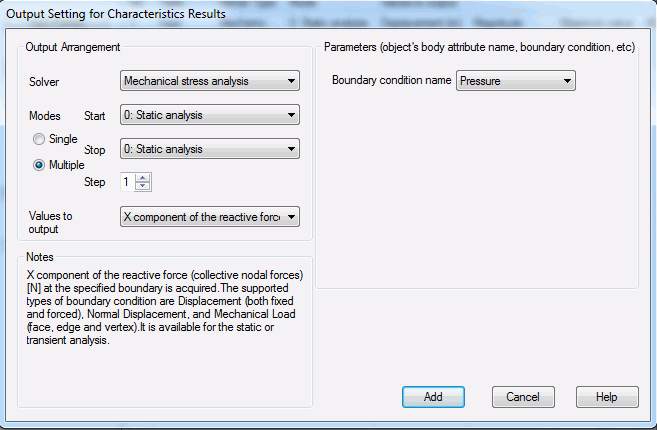
This dialog manages the output arrangement for the calculated values such as the external/reactive force, the capacitance, the inductance, etc.
The specified items are saved in a csv file after the calculation.
See "Parametric Analysis" for the overview.
See "How to Proceed with the Parametric Analysis" for the procedure.
|
Setting Items |
Notes |
|
Solver |
Allows you to select a solver. There will be multiple solvers listed for multiphysics analysis. |
|
Modes |
Allows you to select the mode. There is just one mode for static analysis. For other analyses, there are multiple modes.
The number at the beginning is the index. If Multiple is selected, all the modes are set in the specified steps swept from Start to Stop. |
|
Values to output |
Allows you to select the values to output.
|
|
Notes |
Parameters and conditions relating to the selected characteristics are explained. |
|
Parameters |
Specifies the parameters required for the calculated values. The parameters depend on the selected characteristics. The parameters are explained in Notes.
|
|
Add |
Adds the setting to the list. |