Femtet Help/Manual
 

Home / Parametric Analysis / Output Setting for Field Values

Output Setting for Field Values

This dialog manages the output arrangement for the field calculation results such as the mechanical stress, the electric field, the temperature, etc.

The specified items are saved in a csv file after the calculation.


See [Parametric Analysis] for the overview.

See [How to Proceed with the Parametric Analysis] for the procedure.
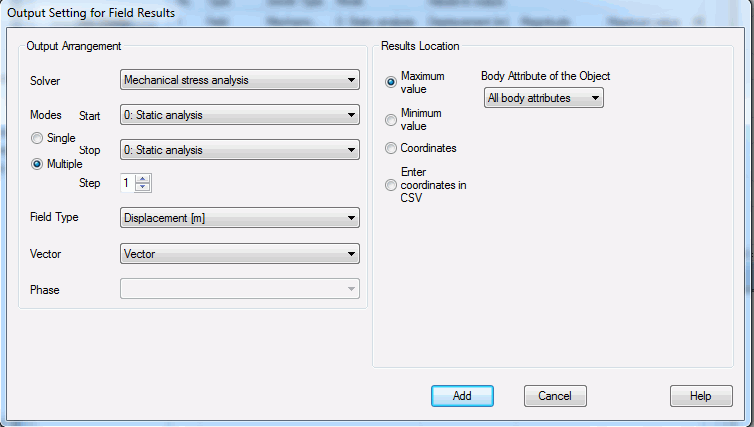


Setting Items

Notes

Solver

Allows you to select a solver.

There are multiple solvers listed for the multiphysics analysis.

Modes

Allows you to select the mode.

There will be just one mode for static analysis. For other analyses, there will be multiple modes.

  • Frequencies in the harmonic analysis

  • Resonant modes in the resonant analysis

  • Time steps in the transient analysis


The number at the initial is the index.


If Multiple is selected, all the modes can be set in the specified steps swept from Start to Stop.

Field Type

Allows you to select the field.

Vector

Allows you to select the vector component.

Phase

Allows you to select the phase.

Location for Acquiring Results

* Explained here for general cases. See the next section for the cases of electromagnetic waves directivity and sound waves directivity.


Designates the location to acquire the results.


  • Maximum Value
    The maximum value and its coordinates are output.
    The bodies which are subject to the maximum value calculation can be specified with the body attributes.
     

  • Minimum Value
    The minimum value and its coordinates are output.
    The bodies which are subject for the minimum value calculation can be specified with the body attributes.
     

  • Coordinates
    Designate the coordinates to acquire the results.

    If Multiple is selected, all the coordinates are set in the specified steps swept from Start to Stop.

    This feature is convenient for the grid arrangement.

    For just one location, variables can be used in the coordinates.
     

  • Enter coordinates in CSV
    Multiple number of coordinates can be entered from the csv file.

    The format is as follows:
    The first point's X coordinate, Y coordinate, Z coordinate,
    The second point's X coordinate, Y coordinate, Z coordinate,
    ... ...
     

* Explained here for the cases of electromagnetic waves directivity and sound waves directivity. See the section above for the other cases.

In the case that the field types below are selected in the electromagnetic analysis,

[Detailed Mode] Directivity: Radiation Gain [dBi]: rE

[Detailed Mode] Directivity: Radiation Gain [dBi]: rE

[Detailed Mode] Directivity: Radiation Gain [dBi]: rE

[Detailed Mode] Directivity: Radiation Gain [dB]

[Surrounding Electromagnetic Field] Electric Field [V/m]

[Surrounding Electromagnetic Field] Electric Field [dBuV/m]

[Surrounding Electromagnetic Field] Magnetic Field [A/m]

[Surrounding Electromagnetic Field] Magnetic Field [dBA/m].

In the case that the field type below is selected in the acoustic analysis,

Sound Pressure Level [dB] (Directivity).

Designates the location to acquire the results.


  • Maximum Value
    The maximum value and its coordinates (direction) are output.
    The maximum value is the largest in the range which is specified on the analysis condition tab corresponding to the field type.
    Example: If rE of the radiation gain [dBi] in the [Detailed Mode] Directivity is selected for the field type, the maximum value in the range of directions specified on the [[Detailed Mode] Directivity] tab is output.
     

  • Minimum Value
    The minimum value and its coordinates (direction) are output.
    The minimum value is the smallest in the range which is specified on the analysis condition tab corresponding to the field type.
    Example: If rE of the radiation gain [dBi] in the [Detailed Mode] Directivity is selected for the field type, the minimum value in the range of directions specified on the [[Detailed Mode] Directivity] tab is output.
     

  • Coordinates
    Designate the polar coordinates to acquire the results.
    If [Detailed Mode] Directivity is selected for the field type, enter θ [ deg] and Φ [deg] to designate the direction.
    If Surrounding Electromagnetic Field or Sound Pressure Level [dB] (Directivity) is selected, enter R [mm]. Θ [deg], and Φ [deg] to designate the coordinates.

    If Multiple is selected, all the coordinates are set in the specified steps swept from Start to Stop.

    This feature is convenient for the grid arrangement.

    For just one location, variables can be used in the coordinates.
     

  • Enter coordinates in CSV
    Multiple number of coordinates can be entered from the csv file.

    The format is as follows:
    The first point's R coordinate, θ coordinate, Φ coordinate
    The second point's R coordinate, θ coordinate, Φ coordinate
    ・・
    Note that if [Detailed Mode] Directivity is selected for the field type, data entries are required even though R coordinates are ignored.

Add

Adds the setting to the list.