|
Home / How to Set Analysis Condition / Thermal Analysis [Watt] / Automatic Fluid Domain Creation
Automatic Fluid Domain Creation
When a solid domain has been created, automatically creates a fluid domain inside or outside the solid domain.
The details are explained below.

Fluid Domain Setting(common)
|
Setting Item |
Note |
|
Fluid Material |
Selects, from the material DB, the material of the fluid to be automatically created.
|
|
Mesh Size of Fluid Domain |
Set the mesh size of the fluid domain automatically.
If selected, the mesh size of the air domain to be automatically created is automatically determined as follows. Mesh size: one-tenth of the longest part of the fluid domain
Mesh Size of Air Domain
To manually set the mesh size of the fluid domain to be automatically created, enter the intended mesh size. |
 To specify a new material, create the new material referring to
 Internal Flow specified (Fluid/Fluid-Thermal/Thermal Analysis)
・A fluid domain is created inside the solid domain.
・The fluid material is automatically set to the closed space.
・If there is an opening, lids (shown in yellow-green) with a flow boundary set must be created.
・If a material property or body attribute is set to the lid, the material applies to the internal fluid.
Refer to the tutorial-Fluid Analysis_2 (Bernoulli, Diffusion Analysis: Automatic Internal Fluid Creation)-
and the example-Example 24: Diffusion Analysis by Automatic Internal Flow Creation.
Automatic creation is schematically illustrated below.
|
Analysis Type |
Automatically Created Fluid (Illustration) |
|
Fluid Analysis/Fluid-Thermal Analysis |
|
|
Thermal Analysis |
|


|
|
Solid Domain |
|
|
Automatically created fluid domain |
|
|
Sheet body with boundary conditions set |


External Flow specified (Fluid/Fluid-Thermal Analysis)
・A fluid domain is created surrounding the solid domain.
・The fluid material is automatically set to the surrounding fluid domain.
Refer to the tutorial-Fluid-Thermal Analysis (Bernoulli_Watt, Automatic External Fluid Creation)-
and the examples-Example 3: Cooling of IC by Forced Convection and Example 6: Cooling of IC by Natural Convection.
Fluid Domain Setting (dedicated to external domain)
|
Setting Item |
Note |
||||||||||||||||||||||||||
|
External Flow Direction |
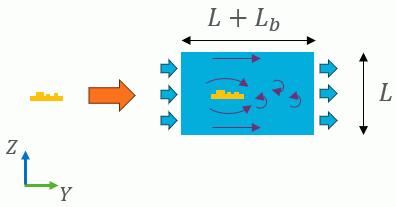
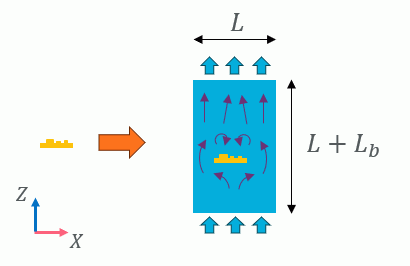
Specifies the flow direction of the external flow.
Automatic creation is schematically illustrated below. L is a scale factor for the fluid domain. Multiplying the model length by the factor gives the length of the fluid domain. Lb is a scale factor for the back, upper, or lower fluid domain. Multiplying the model length by the factor gives the length of the corresponding fluid domain.
|
||||||||||||||||||||||||||
|
External Flow Velocity |
This setting is available if forced convection is specified for the external flow direction. Specify the velocity of the external flow in a specified direction. |
||||||||||||||||||||||||||
|
Scale Factor for Fluid Domain L |
Defines the size of the fluid domain created automatically by a scale factor (magnification ratio). Multiplying the model length by the factor gives the length of the fluid domain.
The model length is the maximum of the lengths in the X, Y, and Z directions of the target model. |
||||||||||||||||||||||||||
|
Scale Factor for Back, Upper, or Lower Domain of Fluid Lb |
If [Natural convection in the +Z direction] is selected for the external flow direction, the external flow domain is extended upward. If [Natural convection in the -Z direction] is selected for the external flow direction, the external flow domain is extended downward. If [Forced convection] is selected for the external flow direction, the external flow domain is extended backward.
The fluid domain is stretched backward, upward, and downward by the model length multiplied by the scale factor for the backward, upward, and downward domains, respectively.
The model length is the maximum of the lengths in the X, Y, and Z directions of the target model.
|