|
Home / How to Set Analysis Condition / List of Analysis Condition Tabs / Translating Machinery Tab
Translational Machinery Tab
Translational machinery conditions for the magnetic transient analysis are set on this tab.
It is in the [Analysis Condition Setting] dialog box. See also [How to Set Analysis Condition].
|
Setting Item |
Notes |
|
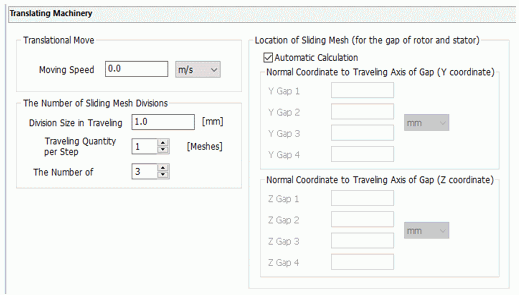
Translational Move |
Moving Speed Sets the moving speed of the mover. Select [Mover] on the [Stator/Rotor/Air] tab for the body attribute to create the mover body. The traveling direction is +X axis on the modeling window. Enter negative value to reverse the direction. If the direction is not what you want, rotate the body to adjust the direction.
|
|
The Number of Sliding Mesh Divisions |
Sets the number of sliding mesh divisions.
Division Size in Traveling Direction Specifies the circumferential mesh division size of the translational machinery. This is a minimum translational moving unit per timestep.
Traveling Quantity per Step Sets the traveling quantity per step the step condition specified on the [Transient analysis tab]. The unit is [mesh]. If the value is 1, the movement is 1 step. The translating machinery travels for a distance set by [Division Size in Traveling Direction] If the value is n, the movement is at the multiple of n.
The Number of Sliding Mesh Layers Specifies the number of sliding mesh layers
|
|
Location of Sliding Mesh |
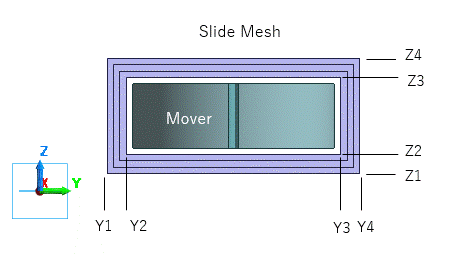
Specifies the location of sliding mesh (the gap between rotor and stator).
Automatic Calculation Calculates the sliding mesh location automatically. Generally this option is selected. Deselect it only when the automatic calculation does not work. Set the parameters manually as follows.
Normal Coordinate to Traveling Axis of Gap (Y coordinate) Specifies the coordinates of the upper and lower sides the gap between mover and stator in the Y direction. Enter the values in the increasing order.
Normal Coordinate to Traveling Axis of Gap (Z coordinate) Specifies the coordinates of the upper and lower sides the gap between mover and stator in the Z direction. Enter the values in the increasing order.
|