


|
Home / How to Set Analysis Condition / List of Analysis Condition Tabs / Resonant Analysis Tab
Resonant Analysis Tab
Analysis conditions for the resonant analysis are set on this tab.
It is in the [Analysis Condition Setting] dialog box. See also [How to Set Analysis Condition].
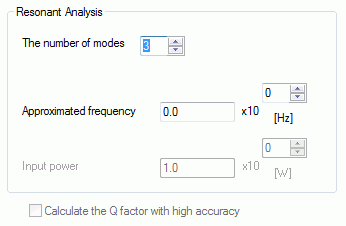
|
Setting Item |
Notes |
|
Resonant analysis |
The number of modes Sets the number of resonant modes to calculate. The value is an integer equal to or greater than 1.
Approximated frequency Used for the resonant mode calculation. Calculates the resonant modes around the specified frequency. The significand is a real number equal to or greater than 0.
Input power Used to calculate the energy stored in the resonator in the electromagnetic-resonant analysis. Stored energy E is shown in the expression below where Q0 is the Q factor, P is the input power, and ω is the angular frequency. E = Q0 x P/ω The significand is a real number equal to or greater than 0.
|
Options
|
Options |
Notes |
|
Calculate the Q factor with high accuracy |
Selectable for the electromagnetic-resonant analysis. If selected, the electromagnetic field will be calculated with the loss taken into account. Suitable for the calculation of the electromagnetic field inside of the electrodes. A reference frequency on the Mesh tab is used in this analysis, and a resonant frequency is needed to be set beforehand.
|