


|
Home / How to Set Analysis Condition / List of Analysis Condition Tabs / Angular Velocity Tab
Angular Velocity Tab
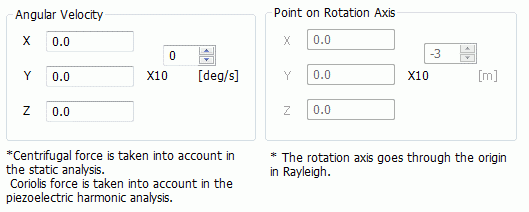
Angular velocity is set on this tab.
It is in the [Analysis Condition Setting] dialog box. See also [How to Set Analysis Condition].
|
Setting Item |
Notes |
|
Angular Velocity |
Sets the vector . The vector direction indicates the axis direction. The vector magnitude indicates the rotation speed. In static analysis, the centrifugal force is taken into account based on the input angular velocity. In the case of harmonic piezoelectric analysis, the Coriolis force is taken into account.
|
|
Point on Rotation Axis |
Can be anywhere in the analysis space. Available for mechanical stress analysis only. |