


|
Home / How to Set Analysis Condition / List of Analysis Condition Tabs / Open Boundary Tab
Open Boundary Tab
Open boundary is set on this tab.
It is in the [Analysis Condition Setting] dialog box. See also [How to Set Analysis Condition].
The open boundary is the boundary beyond which the infinite space exists.
FEM cannot handle the open boundary usually.
Therefore, the special setting is required for it.
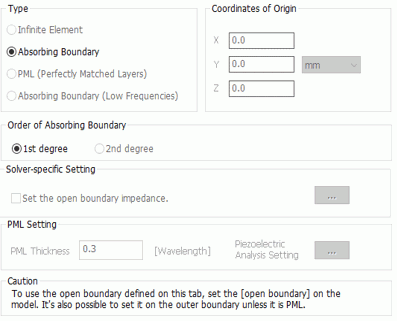
|
Setting Item |
Notes |
|
|
Type |
Infinite element The open boundary is treated as the infinite element.
Absorbing boundary The electromagnetic waves propagating towards the open space are absorbed at the boundary, Its impedance is the square root of (permeability / permittivity). If the relative permittivity and the relative permeability are equal to 1, the impedance is 377 ohms approximately.
PML (Perfectly Matched Layers) The electromagnetic waves are attenuated at the PML set at the outer side of open boundary. PML is automatically created while meshing. The analysis space and PML are to be fully matched. Therefore the reflection will be minimized. The electromagnetic-transient analysis is not supported.
Absorbing boundary (low frequencies) This is for analyzing low frequencies. Available for electromagnetic harmonic analysis only. Effective when the distance between the open boundary and the wave source is short with respect to the wavelength. This open boundary condition must be specified to a sphere. If specified to other than a sphere, an error will occur.
|
|
|
Coordinates of Origin |
Sets the coordinates with the symmetric point of the expected field to calculate properly under the infinite element or the absorbing boundary.
No entry is required if Air Domain Creation is selected. (Automatic setup) Y coordinate is not required for the 2D or axisymmetric space. |
|
|
Order of Absorbing Boundary |
1st order The accuracy is worse than the 2nd order, but there is no restriction on the boundary form.
2nd order The accuracy is better than the 1st order, but there is some restriction on the boundary shape: It needs to be a part of sphere or circle for the 3D or 2D analysis space respectively.
|
|
| Solver-specific Setting |
[Electromagnetic Analysis Setting] Set the open boundary impedance. |
This setting is only applicable for the absorbing boundary in the electromagnetic analysis. Impedance Setting If this setting is not selected, the impedance of plane wave is used for the open boundary condition. This impedance is obtained by the material property which is applied the open boundary condition.
If selected, impedance (z) can be specified for the open boundary condition (see here). Calculation is executed to establish the equation below on the boundary face. Ht =(1/Z) nxEt where n is unit vector normal to the boundary face and going outward from the analysis domain, and Et and Ht are vectors of electric field and magnetic field projected on the boundary face.
|
|
[Acoustic Analysis Setting] Radius of the Open Boundary |
If [2nd order] is selected for the Order of Absorbing Boundary, values can be entered. See the figure for reference. The default value is 0.0. Set a radius and create a sphere in the model. Set the open boundary on the sphere surface. The radius must be set up as to include discontinuity like a sound source completely, and must be included completely in the analysis domain. In the acoustic analysis, 2nd-order absorbing boundary has higher accuracy than the 1st-order absorbing boundary. But it can be set on the sphere only and cannot be used for other analysis models. To overcome this problem, Femtet provides the sphere in the analysis domain for calculating the open boundary. The Inside of the sphere is analyzed by FEM, and the outside by directivity calculation.
See Example 9 of Acoustic Analysis for the details. |
|
|
Thickness of PML Layer |
[Electromagnetic Analysis] Enter the thickness with reference to the wavelength in the free space. If the PML thickness is 1.0, it is equal to the wavelength in the free space.
[Piezoelectric Analysis] Enter the thickness with reference to the wavelength in the free space. If the PML thickness is 1.0, it is equal to the wavelength. The wavelength here is the value entered in "Wavelength".
|
|
| Piezoelectric Analysis Setting (See Figure) |
Coefficient of PML damping |
[Piezoelectric Analysis only] The default value is 1.0. It defines the damping in PML. The equation below is used.
u = u0 exp[-cβx]
u: displacement, u0: displacement on the boundary of PML and analysis domain c: coefficient of damping, β: wavenumber [rad/m] x: distance from the border to a point in PML |
|
Wavelength |
[Piezoelectric Analysis only] The default is 0.3. The PML thickness is calculated from the value entered here. If nil is entered, the PML thickness is determined If 0 is entered, the longer wavelength is used which Femtet presumes is safe for calculation. The PML could be thicker than required. |
|