


|
Home / Show Results / Graphics Setup / Directivity in 3D
Directivity in 3D
- 3D display of directivity
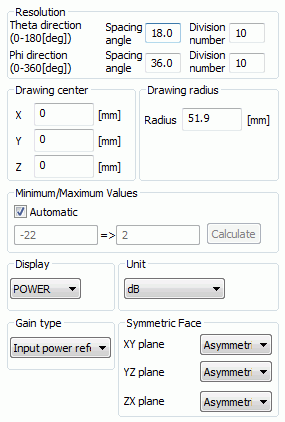
The display setting for "Directivity in 3D" can be modified here.
|
Setting Item |
Notes |
|
Resolution |
Specifies the resolution in θ and φ directions by the spacing angle or by the number of divisions. If a number is entered in one, the number for the other will be calculated and entered automatically. The display will be smoother with the smaller spacing angle or the higher number of divisions. That will, however, make the time to display increase. |
|
Drawing Center |
Sets the coordinates of the drawing center. Coordinates of the gravity center of the model are set by default. |
|
Drawing Radius |
Specifies the drawing radius at the maximum value. It controls the size of the 3D display. |
|
Minimum Value/Maximum Value |
If Automatic is selected, the minimum and maximum values for the color scale will be calculated automatically. This setting remains valid for the display of other data types. For manual setting, deselect Automatic and enter the minimum and maximum values in the boxes. Calculate button calculates the values automatically. |
|
Other Items |
The setting items vary depending on the analysis type. See "Directivity" for the detail. |