


|
Home / Show Results / Characteristics by Charts / Directivity / [Detailed Mode] Calculation of Electromagnetic Waves Directivity
[Detailed Mode] Electromagnetic Waves Directivity
The far-field directivity is calculated and displayed for the model with open boundary, e.g. antenna in electromagnetic harmonic analysis.
It is required that the antenna is fully surrounded by the boundary condition for the accurate calculation.
On the [Shoe Result] tab  , click ▼ at the side of [Show Characteristics Chart]
 .
.
Select [Directivity Graph] on the submenu. The [Directivity Calculation] dialog box will appear.
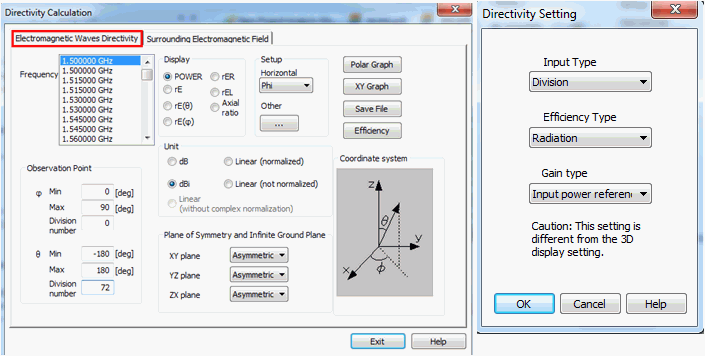
The dialog box includes the [Simple Mode] Electromagnetic Waves Directivity tab, [Detailed Mode] Electromagnetic Waves Directivity tab, and Surrounding Electromagnetic Field tab. The [Detailed Mode] Electromagnetic Waves Directivity tab is explained.
-
To acquire the typical results on three planes, see [[Simple Mode] Electromagnetic Waves Directivity].
|
Item |
Notes |
|||||||||||
|
Graph Type |
Either XY Graph and Polar Graph are available. The polar graph is available only if the angle is selected for the horizontal axis. |
|||||||||||
|
Efficiency |
Calculates the one specified in [Efficiency type].
|
|||||||||||
|
Save File |
Saves the calculation results in a csv file. |
|||||||||||
|
Observation Point |
Specifies by the angle from the origin. See the figure at Coordinate system for the angles definition.
|
|||||||||||
|
|
Antenna's electromagnetic field is calculated by solving the electromagnetic current source induced on the plane S which surrounds the antenna entirely. The induced electromagnetic current source is given by the electromagnetic field generated by the antenna on the plane S. If the observation point for the directivity calculation is far enough from the antenna, the electric field at the observation point is expressed with the integral on the pane S as below. [1]
The directivity is calculated by performing the integration on the open boundary. Ref [1] Finite Element Method for Electromagnetics :John L.Volakis Chapter1 |
|||||||||||
|
Display Type |
The electric field in the far field is as shown above equations. Femtet actually calculates the electric field as indicated below.
Equation (1) is modified to Equation (2).
where
Note that the left-hand side of Equation (2) is the product of the electric field in the far field and the distance.
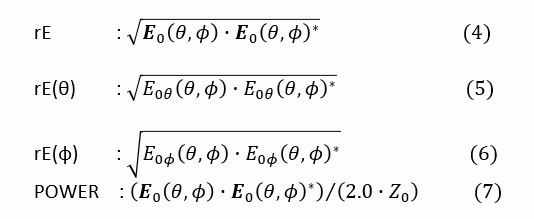
POWER, rE, rE(θ), and rE(Φ) are solved as follows. Where E0θ is a θ-component of E0 and E0Φ is a Φ-component of E0.
For the display on the directivity dialog box, when Power, rE, rE(θ), and rE(Φ) are selected, Equations (7), (4), (5), and (6) are calculated, respectively.
To acquire the radiation pattern for the specific polarization, specify the corresponding rE(θ) or rE(φ) based on the model's orientation and coordinates.
rER, rEL and Axial ratio are used to calculate the circular polarization. rER = (rE(θ) + j rE(φ)) / √2 : Right circular polarization rEL = (rE(θ) - j rE(φ)) / √2 : Left circular polarization Axial ratio = (|rER| + |rEL|) / (|rER| - |rEL|)
|
|||||||||||
|
Unit |
As shown in [Display Type] above, the quantities in equations (4) through (7) are obtained. The value is represented by V. The maximum value of V is represented by Vmax.
dB..........10Log(V/Vmax): for Power 20Log(V/Vmax): for the items other than Power
dBi..........10Log(4π*V/Pin): for Power 10Log(2π*V*V/Z0/Pin): for the items other than Power Pin is the input power. See also [Gain Type] below.
Linear (normalized) ... ... V/Vmax Linear (not normalized) ... ... V Linear (without complex normalization) ... ... E0 : refer to Equation (3) |
|||||||||||
|
Plane of Symmetry and Infinite Ground Plane |
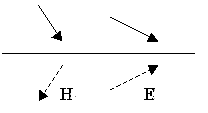
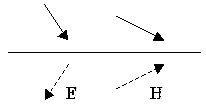
The magnetic wall and the electric wall can be symmetric boundary. The directions of the electric and magnetic fields at the symmetric boundary are shown in Fig.1. Their magnitudes are considered to be equal.on both sides of the boundary. With the results of half, quarter and 1/8 models, the partial radiation patterns are obtained. The full radiation pattern is constructed from them.
The symmetric boundary is selectable from XY plane at Z=0, YZ plane at x=0, or XZ plane at y=0.
Select either magnetic wall or electric wall considering the symmetric electromagnetic fields to calculate the radiation pattern. Note that the calculation time of these partial models will be similar to that of the full model, as the calculation is executed for the area where the meshes are not generated as well.
The infinite ground plane is selected if the model has a large ground plane, e.g. monopole antenna.
See Example 30 of Electromagnetic Analysis
|
|||||||||||
|
[Setting] - [Horizontal axis]
|
Select one from θ, φ, or Frequency. That will be used for the horizontal axis of XY graph or the angle component of the polar graph. When Frequency is selected, the maximum electric field at the observation point be plotted for the frequencies. |
|||||||||||
|
[Setting] - [Other settings] |
Activates the Directivity Setting dialog box. |
|||||||||||
|
Directivity Setting: Input |
Select either Number of Divisions or Interval. The method to specify the observation points is selected. |
|||||||||||
|
Directivity Setting: Efficiency |
Select either Total or Radiation.
The equations are as follows.
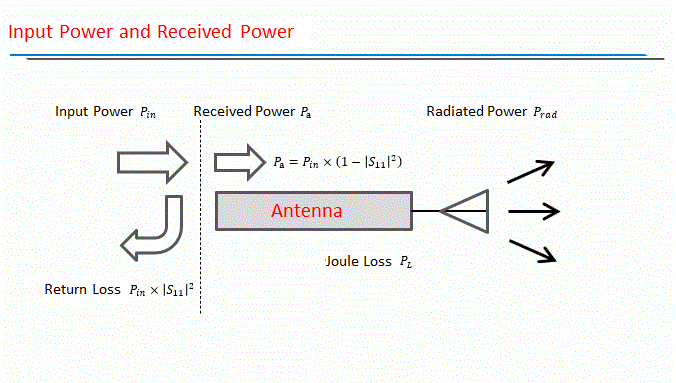
Radiation efficiency: Efficiency = 100 * Radiation power / (Input power - Reflected power) Total efficiency: Efficiency = 100 * Radiation power / Input power
where Radiation power = (Input power - Reflected power - Joule loss)
|
|||||||||||
|
Directivity Setting: Gain type |
Select either Input power referenced or Received power referenced.
Antenna gain is calculated as follows. For G[ dBi]
G(θ,φ) = 10xlog10( P(θ,φ)/Piso)
where P(θ,φ) is the power radiated in the (θ,φ) direction per unit solid angle and Piso is the power that the non-directional antenna radiates per unit solid angle.
If [Input power referenced] is selected: Piso = (Input Power) / 4π (8) If [Received power referenced] is selected: Piso = (Received Power) / 4π (9) Refer here for the input power and received power Select [Received Power Referenced] for absolute gain and select [Input Power Referenced] for actual gain.
1 [W] per port is the default setting for Pin. It is set on the harmonic analysis tab of the analysis condition. If [Input power referenced] is selected, the comparison is made with the non-directional antenna which radiates all the input power. If [Received power referenced] is selected, the reference is set to the non-directional antenna which radiates the input power it actually received excluding the reflection at the port. Equations (8) and (9) are for the input power at one port. If the power is input at multiple ports, Piso is the totaled power of all ports.
|
|||||||||||

 and
and  : Electric field
 : Magnetic field
 : Unit vector directing to the observation point




Radiation Patterns and Settings
The polar coordinate system is suitable to view the radiation patterns. The observation point is specified by φ and θ.
The polarization direction is specified by the unit vector of the polar coordinates. The radiation patterns on XZ and YZ planes containing the dipole antenna are calculated for the polarization with the electric field parallel to the antenna.
Enter the parameters in the directivity calculation dialog box as follows.
At the Observation Point of the directivity setting dialog box, set, for φ, Min: 0[deg], Max: 90[deg], Number of Divisions: 1.
If φ=0 [deg], the radiation pattern on XZ plane is calculated, and if φ=90 [deg], the radiation pattern on YZ plane is calculated.
At the Display Type, select rE(θ) for the polarization direction. It will obtain polarization components having the electric field components that are parallel to the unit vector eθ in the polar coordinate system.
At θ=0, the polarization will have an electric field parallel to the dipole antenna.
Radiation pattern in the shape of number 8 is obtained as in the diagram below.
The settings in the table below will show the typical radiation pattern.
Notes: The diagram below is an example where a frequency of only 5GHz is used to calculate.


Directivity Calculation Radiation Pattern
|
Section |
Polarization |
Observation Point (φ, θ) |
Display Type |
Setting > Horizontal axis |
|
XZ plane, YZ plane |
eθ |
φ(0, 90, 1), θ(-180, 180, 100) |
rE(θ) |
θ |
|
XZ plane, YZ plane |
eφ |
φ(0, 90, 1), θ(-180, 180, 100) |
rE(φ) |
θ |
|
XY plane |
eθ |
φ(-180, 180, 100), θ(90, 90, 0) |
rE(θ) |
φ |
|
XY plane |
eφ |
φ(-180, 180, 100), θ(90, 90, 0) |
rE(φ) |
φ |