


|
ホーム / チュートリアル / 05.マクロの変更(モデル形状の変更)
05.マクロの変更(モデル形状の変更)
マクロに少し手を加え、梁の長さを変更してみます。
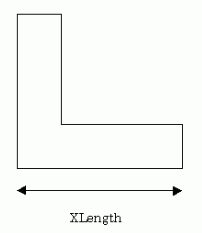
XLengthの長さをExcelシートから取り込むように変更します。
マクロを下記に示します。(変更を加えた部分は赤字)
関数 CommandButton1_Click の内容
|
Private Sub CommandButton1_Click() Dim XLength As Double
'パラメータの設定 XLength = ActiveSheet.Cells(1, 2).Value FemtetMain XLength
End Sub |
ActiveSheet.Cells(1, 2).ValueでセルB1の値を取り込みます。
|

-
複数のシートに渡りマクロを記述する場合は、誤動作を避けるためにActiveSheetの代わりに下記の例のようにシート名を明示します。
例 Worksheets("Sheet1").Cells(1, 2).Value
FemtetMacroモジュールの内容
Option Explicit
Dim Femtet As New CFemtet
Dim Als As CAnalysis
Dim BodyAttr As CBodyAttribute
Dim Bnd As CBoundary
Dim Mtl As CMaterial
Dim Gaudi As CGaudi
Dim Gogh As CGogh
'/////////////////////////null***の説明/////////////////////////
'//下記の四つの変数はCGaudiクラスMulti***を使用する場合に用います。
'//例えばMultiFilletを使用する場合に引数であるVertex(点)は指定せず
'//複数のEdge(線)だけをFilletする場合にnullVertex()を用います。
'//「Gaudi.MultiFillet nullVertex,Edge」とすれば
'//複数のEdgeだけFilletすることができます。
'/////////////////////////////////////////////////////////////
Global nullVertex() As CGaudiVertex
Global nullEdge() As CGaudiEdge
Global nullFace() As CGaudiFace
Global nullBody() As CGaudiBody
'///////////////////////////////////////////////////
'モデリング変数の宣言
Private pi As Double
'///////////////////////////////////////////////////
'////////////////////////////////////////////////////////////
' Main関数
'////////////////////////////////////////////////////////////
Sub FemtetMain(XLength As Double)
Dim ProjectName As String
'------- Femtet自動起動 (不要な場合やExcelで実行しない場合は下行をコメントアウトしてください) -------
Workbooks("FemtetRef.xla").AutoExecuteFemtet
'------- プロジェクトの作成 -------
If Femtet.OpenNewProject() = False Then
Femtet.ShowLastError
End If
'------- データベースの設定 -------
AnalysisSetUp
BodyAttributeSetUp
MaterialSetUp
BoundarySetUp
'------- モデルの作成 -------
Set Gaudi = Femtet.Gaudi
InitVariables
MakeModel XLength
'------- 標準メッシュサイズの設定 -------
'<<<<<<< 自動計算に設定する場合は-1を設定してください >>>>>>>
Gaudi.MeshSize = 2.0
'------- プロジェクトの保存 -------
Dim ProjectFilePath As String
ProjectFilePath = "C:\MacroEx1_ProjectFile\MacroEx1"
'<<<<<<< プロジェクトを保存する場合は以下のコメントを外してください >>>>>>>
'If Femtet.SaveProject(ProjectFilePath & ".femprj", True) = False Then
' Femtet.ShowLastError
'End If
'------- メッシュの生成 -------
'<<<<<<< メッシュを生成する場合は以下のコメントを外してください >>>>>>>
Gaudi.Mesh
'------- 解析の実行 -------
'<<<<<<< 解析を実行する場合は以下のコメントを外してください >>>>>>>
Femtet.Solve
'------- 解析結果の抽出 -------
'<<<<<<< 計算結果を抽出する場合は以下のコメントを外してください >>>>>>>
SamplingResult
End Sub
'////////////////////////////////////////////////////////////
' 解析条件の設定
'////////////////////////////////////////////////////////////
Sub AnalysisSetUp()
'------- 変数にオブジェクトの設定 -------
Set Als = Femtet.Analysis
'------- 解析条件共通(Common) -------
Als.AnalysisType = GALILEO_C
Als.Space = TWO_C
End Sub
'////////////////////////////////////////////////////////////
' Body属性全体の設定
'////////////////////////////////////////////////////////////
Sub BodyAttributeSetUp()
'------- 変数にオブジェクトの設定 -------
Set BodyAttr= Femtet.BodyAttribute
'------- Body属性の設定 -------
BodyAttributeSetUp_hari
End Sub
'////////////////////////////////////////////////////////////
' Body属性の設定 Body属性名:hari
'////////////////////////////////////////////////////////////
Sub BodyAttributeSetUp_hari()
'------- Body属性のIndexを保存する変数 -------
Dim Index As Integer
'------- Body属性の追加 -------
BodyAttr.Add "hari"
'------- Body属性 Indexの設定 -------
Index = BodyAttr.Ask("hari")
'------- 厚み/幅(Length) -------
BodyAttr.Length(Index).Length = (6)
End Sub
'////////////////////////////////////////////////////////////
' Material全体の設定
'////////////////////////////////////////////////////////////
Sub MaterialSetUp()
'------- 変数にオブジェクトの設定 -------
Set Mtl = Femtet.Material
'------- Materialの設定 -------
MaterialSetUp_Brass
End Sub
'////////////////////////////////////////////////////////////
' Materialの設定 Material名:Brass
'////////////////////////////////////////////////////////////
Sub MaterialSetUp_Brass()
'------- MaterialのIndexを保存する変数 -------
Dim Index As Integer
'------- Materialの追加 -------
Mtl.Add "Brass"
'------- Material Indexの設定 -------
Index = Mtl.Ask("Brass")
'------- 弾性定数(Elasticity) -------
Mtl.Elasticity(Index).sY = (1) * 10 ^ (10)
End Sub
'////////////////////////////////////////////////////////////
' Boundary全体の設定・保存
'////////////////////////////////////////////////////////////
Sub BoundarySetUp()
'------- 変数にオブジェクトの設定 -------
Set Bnd = Femtet.Boundary
'------- Boundaryの設定 -------
BoundarySetUp_RESERVED_default
BoundarySetUp_Fix
BoundarySetUp_Force
End Sub
'////////////////////////////////////////////////////////////
' Boundaryの設定 Boundary名:RESERVED_default
'////////////////////////////////////////////////////////////
Sub BoundarySetUp_RESERVED_default()
'------- BoundaryのIndexを保存する変数 -------
Dim Index As Integer
'------- Boundaryの追加 -------
Bnd.Add "RESERVED_default"
'------- Boundary Indexの設定 -------
Index = Bnd.Ask("RESERVED_default")
End Sub
'////////////////////////////////////////////////////////////
' Boundaryの設定 Boundary名:Fix
'////////////////////////////////////////////////////////////
Sub BoundarySetUp_Fix()
'------- BoundaryのIndexを保存する変数 -------
Dim Index As Integer
'------- Boundaryの追加 -------
Bnd.Add "Fix"
'------- Boundary Indexの設定 -------
Index = Bnd.Ask("Fix")
'------- 機械的な境界(Mechanical) -------
Bnd.Mechanical(Index).Condition = DISPLACEMENT_C
End Sub
'////////////////////////////////////////////////////////////
' Boundaryの設定 Boundary名:Force
'////////////////////////////////////////////////////////////
Sub BoundarySetUp_Force()
'------- BoundaryのIndexを保存する変数 -------
Dim Index As Integer
'------- Boundaryの追加 -------
Bnd.Add "Force"
'------- Boundary Indexの設定 -------
Index = Bnd.Ask("Force")
'------- 機械的な境界(Mechanical) -------
Bnd.Mechanical(Index).Condition = FACE_LOAD_C
Bnd.Mechanical(Index).SetT (0#), (0#), (-10)
End Sub
'////////////////////////////////////////////////////////////
' 変数定義関数
'////////////////////////////////////////////////////////////
Sub InitVariables()
pi = 3.1415926535897932
End Sub
'////////////////////////////////////////////////////////////
' モデル作成関数
'////////////////////////////////////////////////////////////
Sub MakeModel(XLength As Double)
'------- Body配列変数の定義 -------
Dim Body() As CGaudiBody
'------- モデルを描画させない設定 -------
Gaudi.RedrawMode = False
'------- SetPlane -------
Dim Plane0 As New CGaudiPlane
Plane0.Location.SetCoord 0#, 0#, 0#
Plane0.MainDirection.SetCoord 0#, -1#, 0#
Plane0.RefDirection.SetCoord 1#, 0#, 0#
Gaudi.SetPlane Plane0
'------- CreateRect -------
ReDim Preserve Body(0) As CGaudiBody
Dim Point0 As New CGaudiPoint
Point0.SetCoord 0, 0, 0
Set Body(0) = Gaudi.CreateRect(Point0, XLength, 6)
'------- CreateRect -------
ReDim Preserve Body(1) As CGaudiBody
Dim Point1 As New CGaudiPoint
Point1.SetCoord 0, 0, 6
Set Body(1) = Gaudi.CreateRect(Point1, 6, 14)
'------- Unite -------
ReDim Preserve Body(2) As CGaudiBody
Dim BodyArray0(0) As CGaudiBody
Dim BodyArray1() As CGaudiBody
Set BodyArray0(0) = Body(1)
Body(0).Unite BodyArray0, BodyArray1, True
Set Body(2) = BodyArray1(0)
'------- SetName -------
Body(2).SetName "hari", "Brass"
'------- AddBoundary -------
Dim Edge0 As CGaudiEdge
Set Edge0 = Body(2).GetEdgeByID(21)
Edge0.AddBoundary "Fix"
'------- AddBoundary -------
Dim Edge1 As CGaudiEdge
Set Edge1 = Body(2).GetEdgeByID(13)
Edge1.AddBoundary "Force"
'------- モデルを再描画します -------
Gaudi.Redraw
End Sub
'////////////////////////////////////////////////////////////
' 計算結果抽出関数
'////////////////////////////////////////////////////////////
Sub SamplingResult()
'------- 変数にオブジェクトの設定 -------
Set Gogh = Femtet.Gogh
'<<<<<<< 計算結果を抽出する場合は以下のコメントを外してください >>>>>>>
Femtet.SavePDT Femtet.ProjectPath & Femtet.ProjectTitle & ".pdt", True 'pdtファイルを上書きするので、必要に応じてファイル名を変更して下さい
Femtet.OpenPDT Femtet.ProjectPath & Femtet.ProjectTitle & ".pdt" 'pdtファイルを開きます
End Sub
このマクロを実行すると、指定したXLengthのモデルで解析が行われます。
下図はその解析結果(変位ベクトル図)を表示したものです。
-
結果の表示は手動で行う必要があります
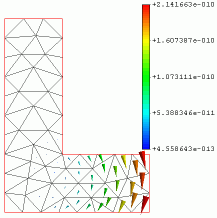
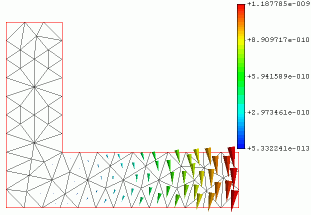
XLength = 15 XLength = 25

