

FAQs


Purchase Procedure
How do I purchase Femtet?
You can purchase Femtet from the Order for Femtet page.
Do you accept an order from individual?
We only accept orders from those belonging to corporation and organization.
What is a valid period of the license?
The license is valid for one year. If you would like to extend the license, please apply for the license at Order for Femtet to renew the license.
If I don’t intend to apply for license extension, do I have to inform you?
No, you do not need to notify us.
I received a notification telling me that my license will expire soon. What should I do to extend the validity?
You can extend the validity by order for the license.
I want to buy the Japanese version of Femtet. Can I buy it?
There is no difference between Japanese and English versions of licenses. After purchasing the license at Order for Femtet, please download the Japanese version installer.
Software Use
Who is permitted to use the Software?
The Software may be used by the following individuals, provided that they use it for the business of the corporation that has entered into the Agreement and under that corporation’s management:
– Officers and employees of the contracting corporation
– Temporary agency workers and contractors engaged in the contracting corporation’s business
– Employees of subsidiaries or group companies who are seconded to the contracting corporation
– Researchers participating in joint research with a university or research institution who are seconded to, or engaged under a service contract with, the contracting corporation
Can the Software be used across different departments or locations?
Yes. There are no restrictions based on department, job function, or work location (such as an office or business site).
Can temporary agency workers and contractors use the Software?
Yes.However, they may use the Software only for the contracting corporation’s business and only if they work under the contracting corporation’s direction and supervision or under a direct service contract with the contracting corporation. Third parties that do not have a direct contractual relationship with the contracting corporation, such as subcontractors or lower-tier subcontractors, may not use the Software.
Can employees of wholly owned subsidiaries or other group companies use the Software?
Yes, but only if they are seconded to the contracting corporation and are performing work for the contracting corporation.They may not use the Software for the subsidiary’s or group company’s own business.
Can a subsidiary access or indirectly use its parent company’s license?
No.Any access to or indirect use of a parent company’s license by a subsidiary is considered use by the subsidiary itself. A separate Agreement is required for the subsidiary to use the Software.
Can the Software be used for joint research with a university or research institution?
Yes, in certain cases. Faculty members, researchers, students, or other personnel of a university or research institution may use the Software only if they are seconded to, or engaged under a service contract with, the contracting corporation and conduct the research under the contracting corporation’s management. The Software may not be used independently by the university or research institution or its personnel.
How is the Software handled in cases of concurrent or dual affiliation?
The Software may be used only for work performed on behalf of the contracting corporation. It may not be used for work performed on behalf of any other entity.
What should I do if I am unsure whether a particular use is permitted?
Please contact us before using the Software if you are unsure whether your intended use is permitted. We will make the final determination as to whether the proposed use is permitted.
Please note:
A license for the Software is granted separately to each corporate entity. In principle, a separate Agreement is required for each corporate entity, including parent companies, subsidiaries, and affiliates.
Specs & Requirements
What is the system requirements for Femtet?
The system requirements are as follows.
Femtet System Requirements
| OS | Windows 11 x64 Edition / Windows 10 x64 Edition |
| CPU | Intel® EM64T (Pentium, Xeon, Core, CeleronD)- and AMD® (Athlon64, Opteron)-based processors. Not operational on Intel Itanium and Itanium2. |
| Memory | Minimum: 4GB, Recommended: 16GB |
| Graphic | Resolution: 1024 x 768 or higher, Color: 16 bits (65000 colors) or more |
| Others | Macros are supported in Excel2000 or higher. |
Can I run Femtet on a PC that is not connected to the internet?
Yes you can. Download Femtet installer on a PC that is connected to the internet, copy the installer on to the PC that is not connected to the internet.
Can I run Femtet on a remote desktop?
Yes you can.
Is parallel computing possible?
Yes. Please note, however, that the cluster analysis which connects multiple computers are not supported.
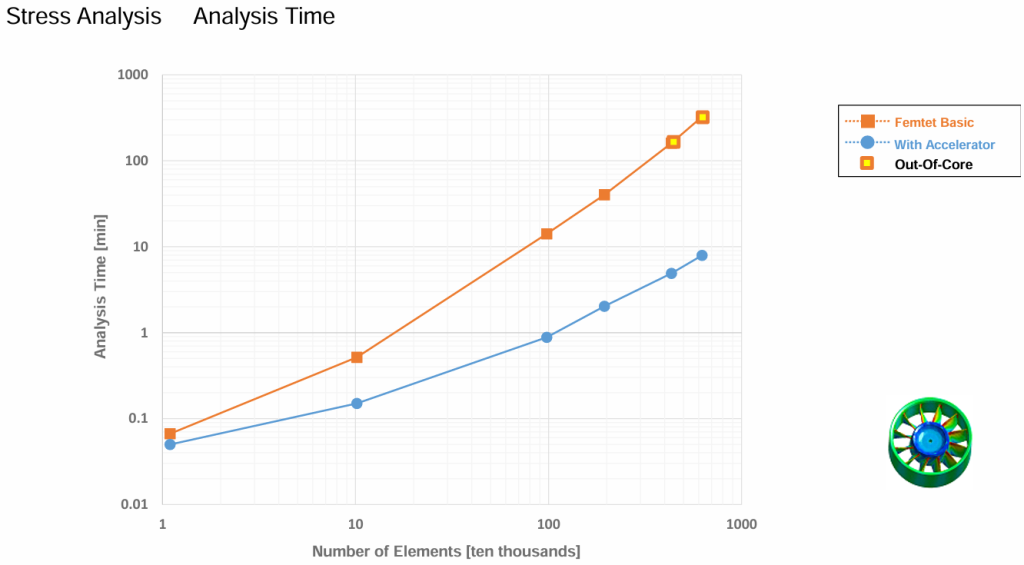
What is the effect of the Accelerator option?
An example of the performance improvement achieved with the Accelerator option is shown in the figure below. For details, please refer to the benchmark documentation available in the Femtet Help.
Can I check who is currently using Femtet?
You can see who is using license on which PC here.
Can I install different versions of Femtet?
Yes. Please refer to this pdf.
License
What is the difference between Trial for Enterprise, the Free Trial for Personal and the licensed version of Femtet?
The Free Trial for Enterprise is intended for employees or members of businesses and organizations who are evaluating Femtet before purchase. It provides 60 days of free access to all features available in the full version, along with technical support throughout the trial period.
The Free Trial for Personal is available to individual users. However, it has feature limitations and does not include technical support.
For more information, please see “Trial Specifications and Limitations.“
I would like to transfer my software license to another PC.
If you wish to transfer your license, please submit your request through the Order Form.
I cannot generate a c2v file for license issuance.
Please try the following steps:
① If another CAD/CAE application is using the USB dongle, unplug the USB dongle temporarily.
② From the Windows Start menu, open:
Control Panel > Administrative Tools > Services,
and check the status of the following services:
- Sentinel LDK License Manager
- Sentinel HASP License Manager
- HASP License Manager
- HILServer
③ If any of these services are in the “Running” state, stop them temporarily.
④ Install the License Update Utility (RUS Tool).
⑤ Open the Sentinel LDK License Manager service by double-clicking it, then click the “Start” or “Restart” button to restart the service.
After completing these steps, you should be able to generate the c2v file using the RUS Tool.
My security system does not allow me to upload a c2v file on your site.
Please contact us through Inquiries. Upon receipt of your inquiry, we will send you a mail. Attach c2v file and send it back to us.
I am using the English version of Femtet. Can I use the Japanese version as well?
There is no difference between licenses for the English and Japanese versions. If you have a valid license, you can use either version of Femtet.
I am using a license server. Femtet no longer starts after upgrading to a new version.
This may be caused by a version mismatch between Femtet installed on the client PC and the license management software (RUS Tool) installed on the license server.
Please update the RUS Tool on the license server to the latest version and see if the issue is resolved.
If the problem persists, please contact Technical Support.
I want to manage the optional settings PC by PC.
You can specify whether to use each optional license by going to the File button in the upper-left corner of the Femtet window > General Settings > Optional Licenses tab.
Brochure Request & Free Trial
-
Download materials that give you a quick overview of basic features, how to use Femtet, Cases, and more.

-
Apply for Seminars Here

-
Apply Here for a Free Trial

