


|
Home / Simulation Accuracy Setting (Mesh/Element) / Meshing Setup / Mesher Version
Mesher Version
There are two mesher versions built in Femtet.
They work with different algorithm.
- Mesher G1: conventional mesher
- Mesher G2: enhanced mesher available since version 2017.0
Default setting is Mesher G2.
To enable Mesher G1,
go to [Model] tab  ,
,
click [Analysis Condition]  . The [Analysis Condition Setting] dialog box will show up.
Click [Mesh] tab.
Click [Meshing Control] > [Setting].
Select [Use Mesher G1]
See [Mesher G1 Setting] for the details.
Features of Mesher G2
Faster meshing in the large-scale model
Compared to Mesher G1, it takes much less time to generate the meshes in a large-scale model which has many bodies.
Especially, if the number of bodies is more than 1000, the meshing time will be less than 1/6 of Mesher G1.
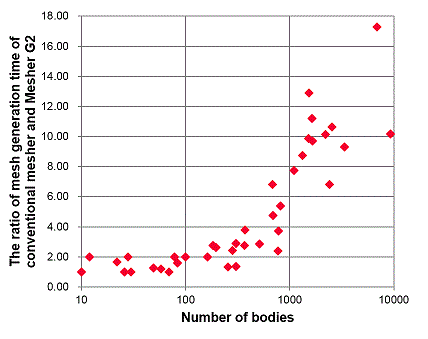
Variety of meshable forms
- Self Contact
The following forms are meshable by Mesher G2 but not by G1.
|
[A self-contacting sheet body] |
|
[A self-contacting solid body] |
|
|
|
|
|
The sheet body has a point contact with itself. |
|
The solid body has an edge contact with itself |


- Intersection of Bodies
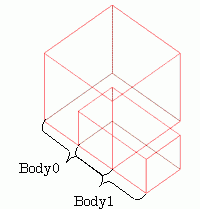
The intersecting bodies can be meshed by Mesher G2 but not by G1.
|
|
|
A model with intersecting bodies |
Features of Mesher G1
Basically, Mesher G2 is recommended except for the following cases where only Mesher G1 is capable of executing:
- periodic boundary pairing of more than one type as well as combining adaptive mesh and periodic boundary condition.
(See Periodic Boundary Condition for the detail.)
-
Mesher G1 is not selectable in the following analyses.
- Magnetic-transient analysis [Luvens]
- Fluid analysis [Bernoulli]