


|
Home / Analysis Flow / How to Use the Nastran Data
How to Use the Nastran Data
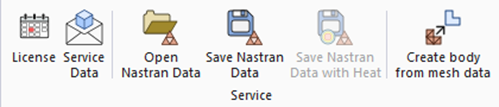
There are four operations possible with Nastran file.
-
Open Nastran-format mesh file
Open the Nastran-format mesh file and generate the meshes
-
Save Nastran-format meshes
Model, attribute setting, and meshes created by Femtet are saved in the Nastran format
-
Save Nastran-format heat distribution
Model, attribute setting, meshes, and heat distribution created by Femtet are saved in the Nastran format.
-
Create model data from Nastran-format mesh data
Femtet-format model data is created from the Nastran-format mesh.
The details are explained in the table below.
|
Item |
Notes |
|
Open Nastran-format file |
GeneralRead the Nastran-format data and create meshes. (File extensions are .bdf, .nas, and .dat) Supported analysis conditions
Supported solvers
* Depending on the analysis condition and boundary condition, there may be a case where the solvers above are not applicable. Supported elements
1st-order and 2nd-order elements are available for the above. DetailsSee [Analysis with Meshes in the Nastran Format] for more information.
|
|
Save Nastran-format meshes |
GeneralThe mesh data is saved in the Nastran file (.nas). The data can be utilized by other analysis software. DetailsSee [Save Meshes in the Nastran Format] for more information. ProcedureOn the [Tool] tab,
The following options are available.
Normally, ID numbers for the bodies such as PSOLID and PSHELL are set automatically. Any numbers can be specified as well.
XZ plane is used for 2D analysis in Femtet. The coordinates of nodes are transformed to the XY plane. * Available for the 2D analysis only.
The data of nodes and elements of stator and rotor are output to the separate files. The numbers for nodes and elements are assigned starting from 1 respectively. [_Stator] and [_Rotor] will be attached to the end of the specified file names. *This function is available for the magnetic transient analysis only.
The deformed meshes resulting from stress analysis or piezoelectric analysis can be saved as well. The message [Do you want to apply the displacement result to each node?] will appear. Select "Yes". Multiple number of modes and resulting deformations can be saved.
|
|
Save Nastran Heat Distribution |
GeneralSaves the mesh and heat information in a Nastran-format file (.bdf). The data can be utilized by other analysis software. DetailsThe mesh data contains the following.
The dimensional unit is [m]. You might need to redefine the material properties when it is used by other analysis software. ProcedureGo to [Tool] tab
|
|
Create model data from mesh data |
GeneralBy using the Nastran-format mesh file (.bdf, .nas, and .dat), Femtet-format model data can be created for analysis. The analysis settings can be applied to the created model. DetailsFor details, please refer to [Q14. I Want to Create a Model from Mesh Data]. |
|
Read Nastran-format result (.op2) |
GeneralRead the Nastran-format result file (op2) to show in Femtet. How to readGo to and click the [File] tab
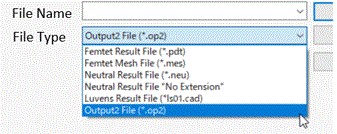
Select Output File(*.op2) as a file type and select the file to show.
DetailsSee [Read Nastran-Format Result (.op2)] for the details.
|


 on the drop-down list.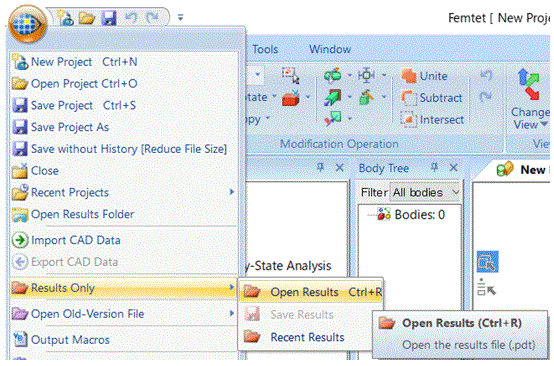
- Nastran is a registered trademark of NASA.