|
Home / How to Set Body Attribute, Material Property and Boundary Condition / Material Property Tabs / Elasticity Tab
Elasticity Tab
The material's elasticity is set on this tab.
It is in the [Edit Material Property] dialog box. See [How to Set Body Attribute/Material Property].
(Note) The elasto-plastic analysis is available in an optional package.
|
Setting Items |
Notes |
|
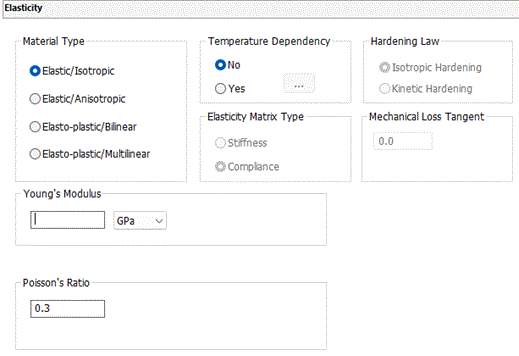
Material Type |
Elastic/Isotropic, Elastic/Anisotropic, Elasto-plastic/Bilinear, and Elasto-plastic/Multilinear are selectable.
For the details of elasto-plastic materials, see the technical notes: Stress Analysis of Elasto-plastic Materials and Elasto-plastic Multilinear Materials
|
|
Elastic/Isotropic |
Without temperature dependency
Sets Young's modulus and Poisson's ratio.
The significand of Young's modulus is a real number greater than 0. The significand of Poisson's ratio is a real number in the range of 0 to 0.5. |
|
With temperature dependency
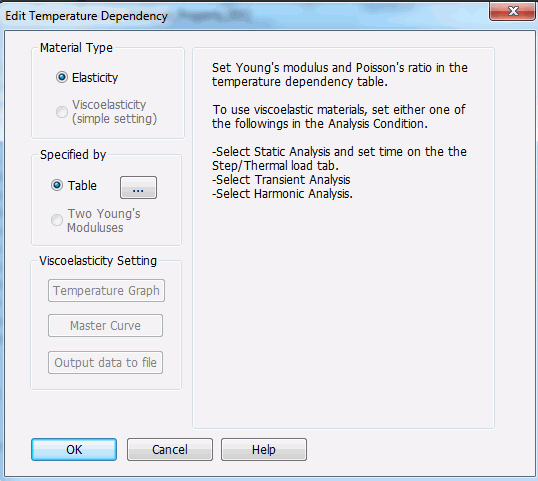
Elasticity or viscoelasticity can be selected for the material type. Though viscoelastic materials are usually set on the [Viscoelasticity tab], simple setting is done here instead, by using only temperature dependency data. See [Viscoelasticity (Simple setting)] for more details. (Note) The viscoelastic analysis is available in an optional package.
Material Type: [Elastic]
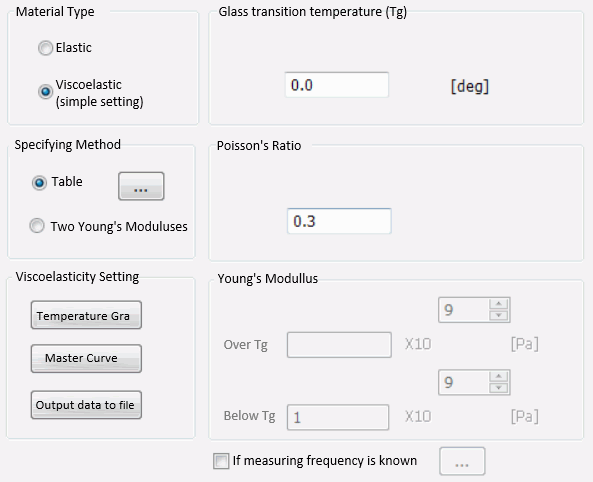
Material Type: [Viscoelasticity (Simple setting)]
The following dialog box will show up to select either[Table] or [Two Young's moduli] to set temperature dependency.
Setting by [Table]
Glass transition temperature and Poisson's ratio are defined as well.
Setting by [Two Young's moduli]
Glass transition temperature (Tg), Poisson's ratio, Young's modulus at higher than Tg, and Young's modulus at lower than Tg are defined. If the time dependency of the Young's modulus is measured with dynamic method and the frequency is known, select [If measuring frequency is known] and click (If it is not selected, the measuring frequency is assumed to be 1Hz.)
If [Temperature Graph] in Viscoelasticity Setting is selected, a graph will appear showing the storage and loss moduli at 1Hz represented by the viscoelastic characteristics (Prony series and shift function) which are automatically estimated with the input data.
If [Master Curve] in Viscoelasticity Setting is selected, a graph will appear showing the frequency and relaxation curves at the glass transition temperature (Tg) represented by the viscoelastic characteristics (Prony series and shift function) which are automatically estimated with the input data.
If [Master Curve] in Viscoelasticity Setting is selected, the viscoelastic characteristics (Prony series and shift function) which are automatically estimated can be saved in file.
The significand of Young's modulus is a real number greater than 0. The significand of Poisson's ratio is a real number in the range of 0 to 0.5.
|
|
|
Elastic/Anisotropic |
Without temperature dependency
Defines the elasticity matrix. Select either Stiffness [Pa] or Compliance [1/Pa].
The significand is a real number equal to or greater than 0. However, 0 is not allowed for the diagonal component (i, i ) where i=xx,yy,zz,xy,yz,zx. See the technical note for the details of elastic matrix, stress, and strain.
|
|
With temperature dependency
Notes: The significand of Young's modulus is a real number greater than 0. The significand of Poisson's ratio is a real number in the range of 0 to 0.5. |
|
|
Elasto-plastic/Bilinear |
Without temperature dependency
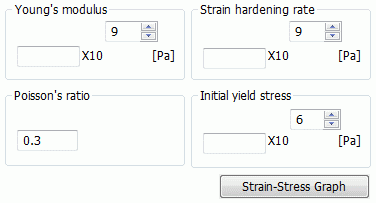
Sets Young's modulus, Poisson's ratio, the initial yield stress and the strain hardening rate.
Press the Stress-Strain Graph button. The graph will appear. To set the initial yield stress and the strain hardening rate, use the true stress and the true strain.
The significand of Young's modulus is a real number greater than 0. The significand of Poisson's ratio is a real number in the range of 0 to 0.5. The strain hardening rate is greater than 0 and less than Young's modulus. The initial yield stress is greater than 0.
|
|
With temperature dependency
Press the Stress-Strain Graph button. The graph for each temperature will appear.
Notes: The significand of Young's modulus is a real number greater than 0. The significand of Poisson's ratio is a real number in the range of 0 to 0.5. The strain hardening rate is greater than 0 and less than Young's modulus. The initial yield stress must be greater than 0.
|
|
|
Elasto-plastic/Multilinear |
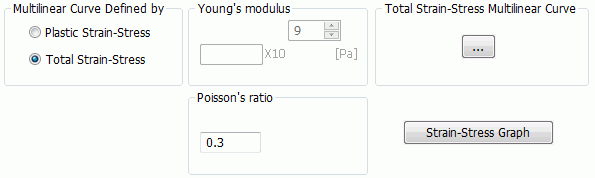
Without temperature dependency
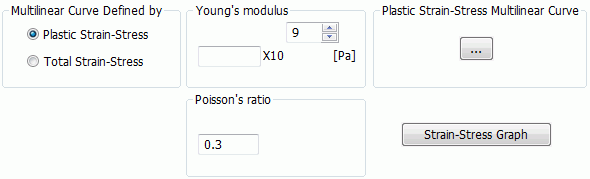
Selectable from [Plastic Strain-Stress] or [Total Strain-Stress] in [Multilinear Curve Defined by]
If [Plastic Strain-Stress] is selected, define Young's modulus and Poisson's ratio. Click
Notes: The significand of Young's modulus is a real number greater than 0. The significand of Poisson's ratio is a real number in the range of 0 to 0.5. The true stress and the plastic strain are used for the setting.
If [Total Strain-Stress] is selected, define Poisson's ratio. Click
Notes: The significand of Poisson's ratio is a real number in the range of 0 to 0.5. Use the true stress and the true strain for the total strain-stress multilinear table.
Press the Stress-Strain Graph button. The graph will appear.
See Elasto-plastic Multilinear Materials for the detail. |
|
With temperature dependency
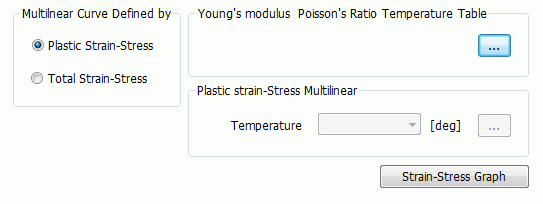
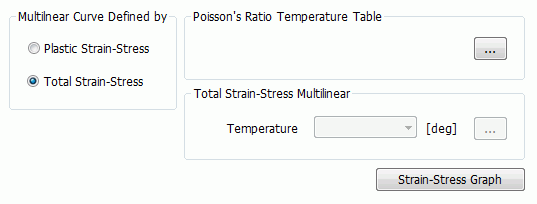
Selectable from [Plastic Strain-Stress] or [Total Strain-Stress] in [Multilinear Curve Defined by]
If [Plastic Strain-Stress] is selected, click Once defined, the Plastic Strain-Stress Multilinear Table will be definable for each temperature entered in the [Temperature-Young's modulus Poison's ratio] Table Click
Notes: Thee true stress and the plastic strain are used for the setting.
If [Total Strain-Stress] is selected, click Once defined, the TotalT Strain-Stress Multilinear Table will be definable for each temperature entered in the [Temperature-Young's modulus Poison's ratio] Table Click
Notes: The true stress and the true strain are used for the setting.
Press the Stress-Strain Graph button. The graph for each temperature will appear.
See Elasto-plastic Multilinear Materials for the detail. |
|
|
Temperature Dependency |
Selectable only when Thermal load option or Constant temperature option is selected. |
|
Hardening Law |
Selectable from the isotropic hardening or the kinetic hardening for the elasto-plastic/bilinear or multilinear materials.
See the technical note, Isotropic Hardening and Kinetic Hardening for the detail.
|
|
Mechanical Loss Tangent |
Takes the mechanical damping into account if non-zero value is entered.
There are several parameters to specify the damping. For each parameter, enter the following value in 1/Qm.
1) Loss factor η (Mechanical loss tangent, tanδ): Enter the value of η or tanδ. 2) Q: Enter the inverse of Q. 3) Damping ratio ζ: Enter the value of ζ multiplied by 2. 4) Coefficients of Rayleigh damping α and β: Enter the value of α/ωi + βωi (ωi is resonant frequency.)
See Mechanical Damping for various coefficients of damping.
This parameter is taken into account for the resonant and harmonic analyses only.
|
 is to be clicked to show the following time dependency table for edit.