|
Home / How to Set Body Attribute, Material Property and Boundary Condition / Material Property Tabs / Permeability Tab
Permeability Tab
The material's relative permeability is set on this tab.
It is in the [Edit Material Property] dialog box. See [How to Set Body Attribute/Material Property].
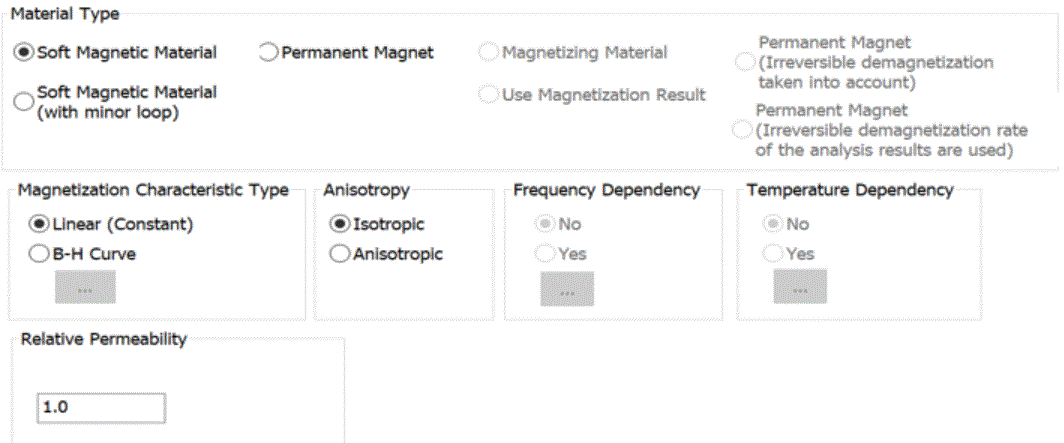
The isotropic/anisotropic and linear/nonlinear materials are set up on this tab.
The anisotropic material will have the anisotropy set on the Directivity tab.
|
Setting Items |
Notes |
|
|
Material Type |
Available only for the static and transient analysis of the magnetic solver. ([Use the tensor permeability] is only option applicable to the electromagnetic analysis.)
Soft Magnetic Material Analyzes the magnetic materials in general other than magnet.
Soft Magnetic Material (with minor loop) Simulates the superimposed DC characteristics. The BH curve of the major loop is set on this tab. The BH curve of the minor loop is set on the Permeability (with minor loop) tab. Available only for magnetostatic analysis.
Permanent Magnet Analyzes magnet.
Tensor Permeability Sets the analysis using the tensor permeability. Available only for the electromagnetic analysis.
Magnetizing Material Sets the target for magnetization. Available only for the magnetic-transient analysis.
Use Magnetization Result In the analysis where the magnetizing material mentioned above is used, the magnet is specified and its results are used. Available only for the magnetic-transient analysis.
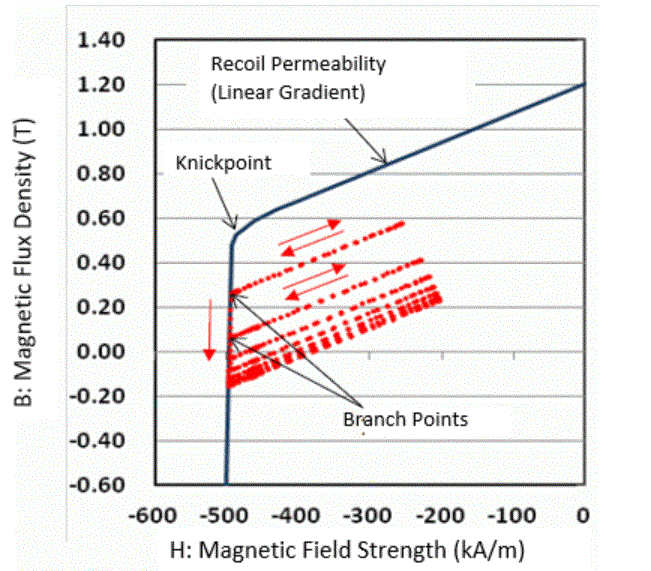
Permanent Magnet (Irreversible demagnetization taken into account) Available to take the irreversible demagnetization into account, which is caused when the working point goes beyond the knickpoint. The transient analysis continues until the steady-state is reached. It analyzes the extent of the demagnetization and how the magnet’s performance is degraded. The distribution of the demagnetization rate is output. This is available for the magnetic transient analysis only.
Permanent Magnet (Demagnetization rate of the irreversible demagnetization result is used) Available to apply the analysis results of the irreversible demagnetization (demagnetization ratio distribution) mentioned above to the original magnet before demagnetization. Other analysis than the demagnetization is possible. For instance, thermal-demagnetization analysis can be performed, where the demagnetization at high temperature is analyzed by [Permanent Magnet (Irreversible demagnetization taken into Account], and the calculation results of demagnetization rate are used for the magnet characteristics at ambient temperature. Available only for the magnetic transient analysis.
|
|
 |
||
|
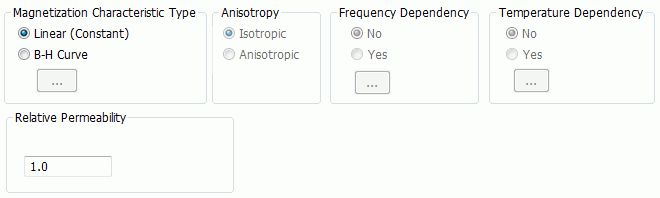
Magnetization Characteristic Type |
Available for the magnetic analysis.
Linear (Constant)
B-H Curve Defines the relative permeability. Click Fill in the table with the magnetic field and the magnetic flux density. Enter the initial magnetization characteristics of the B-H curve (the first quadrant). Click the Graph button to see the graph of entered data.
|
|
|
Anisotropy |
Sets either Isotropic or Anisotropic. |
|
|
Frequency Dependency |
Available only for electromagnetic-harmonic analysis. Select either Yes or No. If Yes is selected, by clicking Enter the frequencies, the corresponding relative permeabilities, and magnetic loss tangents (tanδ).
|
|
|
Temperature Dependency |
Selectable for the magnetic harmonic - thermal coupled analysis. Select either Yes or No. If Yes is selected and the [Temperature-Relative Permeability] Table will appear. Fill in the table.
|
|
|
Relative Permeability |
It can be entered only when Linear (Constant) is selected for the magnetization characteristic type and Isotropic is selected for Anisotropy. The significand is a real number greater than 0. |
|
|
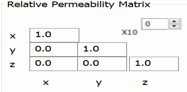
Relative Permeability Matrix |
Available only if Linear (Constant) is selected for the magnetization characteristic type and Isotropic is selected for Anisotropy.
The significand is a real number equal to or greater than 0. It is not allowed to enter 0 in (x, x), (y, y), and (z, z). Direction of the anisotropic material depends on the setting on the [Direction] tab of body attribute. With the default setting on the Direction tab, (x, y, z) in the above figure matches with (X, Y, Z) of the modeling window. |
|
|
Magnetic Loss tangent |
Available for the electromagnetic analysis only. However, the electromagnetic-transient analysis is not supported.
Magnetic loss tangent (tanδ) represents the ratio of the real part to the imaginary part of the complex permeability. Complex permeability μ is represented as below where μr is the relative permeability, μ0 is the permeability in the vacuum, and j is the unit for imaginary number.
μ = μr × μ0 × ( 1 - j tanδ)
|
|
|
The BH curve of the major loop is set on this tab. The BH curve of the minor loop is set on the Permeability (with minor loop) tab.
See [Superimposed DC Characteristic Analysis] for more information.
|
||
 |
||
|
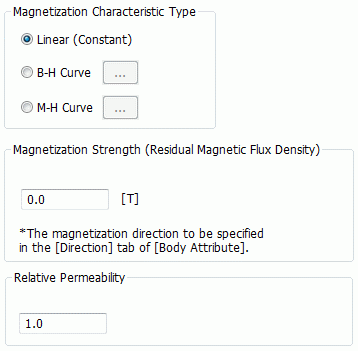
Magnetization Characteristic Type |
Linear (Constant)
B-H Curve Defines the magnetization strength. Click Fill in the table with the magnetic field and the magnetic flux density. Demagnetization Curve: Enter the second quadrant of the B-H curve (the third quadrant may be included in some cases)
Defines the magnetization strength. Click Fill in the table with the magnetic field and the magnetization. Demagnetization Curve: Enter the second quadrant of the M-H curve (the third quadrant may be included in some cases)
Click the [Graph] button to see the graph of entered data.
|
|
|
Magnetization Strength (Residual Magnetic Flux Density) |
Available only if Linear (Constant) is selected for the magnetization characteristic type. Sets the magnetization strength of magnet. Normally, residual magnetic flux density (magnetic flux density when the magnetic field is 0) is entered.
|
|
|
Relative Permeability |
Available only if Linear (Constant) is selected for the magnetization characteristic type. Enter the relative permeability (recoil relative permeability) of magnet.
|
|
|
Enter the [Properties of Ferrite] in addition to the inputs mentioned in [Permanent Magnet] above.
Used only when the ferrite is involved in the electromagnetic-harmonic analysis. The tensor permeability is calculated from the magnetostatic field specified on the Static Magnetic Field tab, the magnetization strength, and ⊿H and g coefficient specified here. (Tensor Permeability of Ferrite) (Tensor Permeability of Ferrite)
|
||
 |
||
|
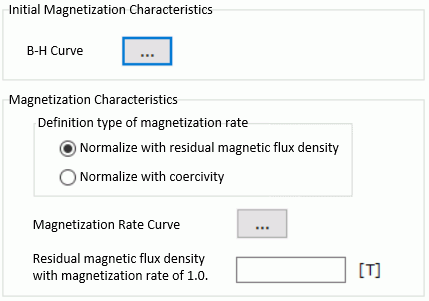
Initial Magnetization Characteristics |
Click Fill in the table with the magnetic field and the magnetic flux density.
By clicking the Graph button, the graph for the nonlinearity based on the entered data will show up. At least two data for [Magnetic field] and [Magnetic flux density] respectively are required to draw a graph. |
|
|
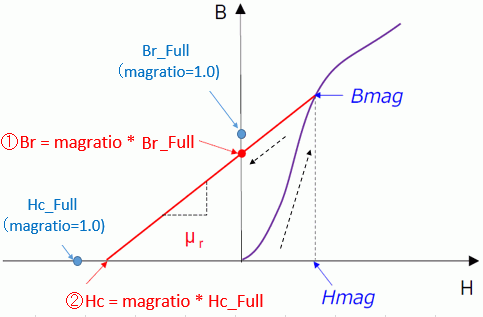
Magnetization Characteristics |
Purple line: Initial magnetization curve Red line: Return curve Hmag: Magnetization field Bmag: Magnetization flux density Br: Residual magnetic flux density Br_Full: Residual magnetic flux density at the perfect magnetization (magnetization ratio: 1.0) Hc: Coercive force Hcr_Full: Coercive force at the perfect magnetization (magnetization ratio: 1.0) magratio: Magnetization ratio μr: Recoil relative permeability
As magnetization characteristic, the return curve after the magnetization field is applied (red line shown above) is defined by the magnetization ratio curve. In the magnetization analysis, the magnetization strength is determined as follows.
Input parameters are as follows.
Definition type of magnetization ratio The magnetization ratio curve is defined as the magnetization characteristic. Magnetization ratio is normalized by one of the following.
Magnetization Ratio Curve Enter the magnetization field (Hmag) and the magnetization ratio (magratio), and the recoil relative permeability (μr) in the table.
Residual magnetic flux density with magnetization ratio of 1.0 / Coercivity with magnetization ratio of 1.0 Enter the residual magnetic flux density and coercivity at the time of full magnetization.
|
|
 |
||
|
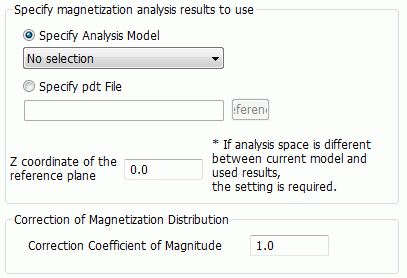
Specify the magnetization analysis results to use |
Specify analysis model The result of the analysis model in the same project is used. The analysis model is selected from the same project. Specify pdt File Specifies the results file directly. Press Browse button to specify the pdt file. Z coordinate of the reference plane It is specified to use the 3D analysis results for the 2D analysis. It specifies which plane of the 3D analysis is used.
|
|
|
Correction of Magnetization Distribution |
The magnitude of the magnetization can be corrected. No correction is applied at 1.0. |
|
|
Permanent Magnet (Irreversible demagnetization taken into account) |
 |
|
|
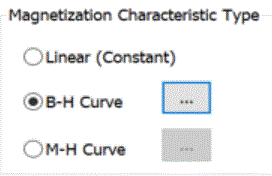
Magnetization Characteristic Type |
As in the case of [Permanent magnet], “Linear (Constant)” is not selectable.
B-H Curve Defines the magnetization strength. Click Fill in the table with the magnetic field and the magnetic flux density. Demagnetization Curve: Enter the second quadrant of the B-H curve (the third quadrant may be included in some cases)
Defines the magnetization strength. Click Fill in the table with the magnetic field and the magnetization. Demagnetization Curve: Enter the second quadrant of the M-H curve (the third quadrant may be included in some cases)
Click the [Graph] button to see the graph of entered data.
The red points in the graph above show the trajectory of the working point (H, B) at a certain point inside the magnet. |
|
|
Permanent Magnet (Irreversible demagnetization rate of the analysis results are used) |
 |
|
|
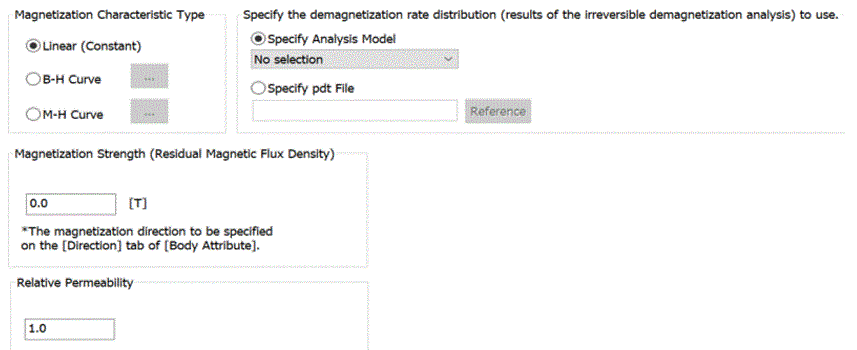
Magnetization Characteristic Type |
Linear (Constant) B-H Curve Defines the magnetization strength. Click Fill in the table with the magnetic field and the magnetic flux density. Demagnetization Curve: Enter the second quadrant of the B-H curve (the third quadrant may be included in some cases)
Defines the magnetization strength. Click Fill in the table with the magnetic field and the magnetization. Demagnetization Curve: Enter the second quadrant of the M-H curve (the third quadrant may be included in some cases)
Click the [Graph] button to see the graph of entered data. |
|
|
Magnetization Strength (Residual Magnetic Flux Density) |
Available only if Linear (Constant) is selected for the magnetization characteristic type. Sets the magnetization strength of magnet. Normally, residual magnetic flux density (magnetic flux density when the magnetic field is 0) is entered.
|
|
|
Relative Permeability |
Available only if Linear (Constant) is selected for the magnetization characteristic type. Enter the relative permeability (recoil relative permeability) of magnet.
|
|
|
Specify the demagnetization rate distribution (results of the irreversible demagnetization analysis) to use. |
Of the specified results, only demagnetization rate distribution is used for the magnet characteristics of the original magnet before magnetization. The magnetization is multiplied by (1-γ), where γ is demagnetization rate in the original magnet before demagnetization.
Specify Analysis Model Uses the result of the analysis model in the same project. The analysis model is selected from the same project.
Specify pdt File Specifies the results file directly. Press Browse button to specify the pdt file.
|
|
 to open the