


|
Home / How to Set Analysis Condition / List of Analysis Condition Tabs / Piezoelectric-Acoustic Tab
Piezoelectric-Acoustic Tab
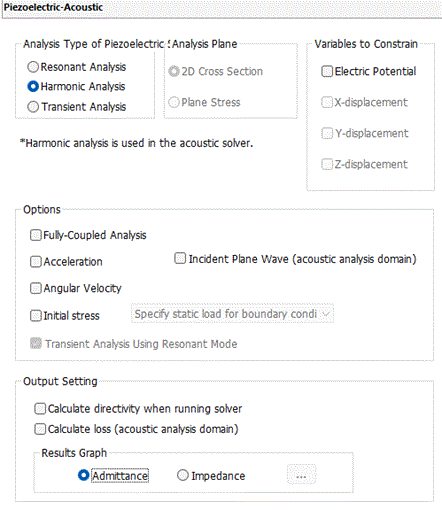
Analysis conditions for the piezoelectric-acoustic coupled analysis are set on this tab. The solvers are Rayleigh and Mach.
It is in the [Analysis Condition Setting] dialog box. See also [How to Set Analysis Condition].
|
Setting Item |
Notes |
|
Piezoelectric Analysis Type |
Harmonic Analysis Solves the response to sinusoidal load, AC voltage, and AC current. Harmonic analysis is adopted in the acoustic solver as well.
Resonant Analysis Solves the mechanical resonance and the electric resonance. For the acoustic solver, harmonic analysis is driven by the resonant frequency of the piezoelectric solver.
Transient Analysis Solves physical state that changes over time both in the piezoelectric analysis and acoustic analysis. Transient mode only applicable in the piezoelectric-acoustic coupled analysis is [transient analysis using resonant mode]. Therefore, [transient analysis using resonant mode] is selected by default. This analysis is not supported in the axisymmetric analysis.
|
|
Analysis Plane |
To perform the 2D analysis, select either one below.
2D Cross Section Applicable to the vibrators relatively thicker than the plate dimension. It corresponds to the plane strain of the stress analysis.
Plane Stress |
|
Variables to Constrain |
The piezo-vibration has four freedoms: the X/Y/Z/ displacement and the electric potential. Constrain the freedom which is known to be 0 from the beginning. The calculation time will be shortened, as the unnecessary calculation can be omitted.
Constrain the Y-direction displacement in the 2D analysis, as there is no displacement in Y direction. In the case of SH waves, however, leave the Y direction free as some modes have the vibration in the depth direction.
The displacement cannot be constrained in the 3D analysis.
Constrain the electric potential for the non-piezo, pure elastic body, as there is no electric potential involved.
|
Options
|
Options |
Notes |
|
Fully-coupled Analysis |
Takes the resistance from acoustic domain into account for the piezoelectric vibration. Note that the computational complexity increases in the fully-coupled analysis. |
|
Acceleration |
See Piezoelectric Analysis Tab for the details. |
|
Angular Velocity |
See Piezoelectric Analysis Tab for the details. |
|
Analysis with Initial Stress Taken into Account |
See Piezoelectric Analysis Tab for the details.
|
|
Transient Analysis Using Resonant Mode |
Preselected in the piezoelectric-acoustic coupled analysis. Also, see Piezoelectric Analysis Tab for the details.
|
|
Incident Plane Wave (acoustic analysis domain) |
Available only for the harmonic analysis.
|
Output Setting
|
Setting Item |
Notes |
|
Calculate directivity when running solver
|
See Acoustic Analysis Tab for the details.
|
|
Calculate loss (Acoustic Analysis Domain) |
See Acoustic Analysis Tab for the details.
|
|
Results Graph |
See Piezoelectric Analysis Tab for the details.
|
The Relating Tabs
The relating tabs are [Open Boundary] tab, [Harmonic Analysis] tab, [Resonant Analysis] tab, [Acceleration] tab, [Results Import] tab, and.[High-Level Setting] tab.
How to Modify Analysis Conditions
To modify the analysis conditions, go to [Model] tab

and click [Analysis Condition]  . The dialog box will appear.