


|
Home / How to Set Body Attribute, Material Property and Boundary Condition / Inlet/Outlet Pair Boundary
Inlet/Outlet Pair Boundary
To have an effective connection between the inlet and outlet boundaries, pairing and must be set.
The paring is set as below.
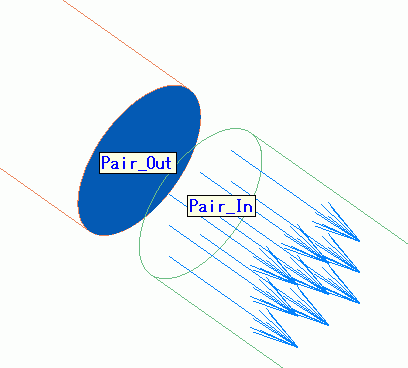
It is assumed that the inlet boundary condition (Pair_In) and the outlet boundary condition (Pair_Out) are set to the different topologies.
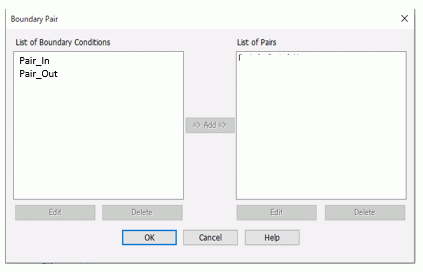
How to Set the Inlet/Outlet Boundary Pair (from Menu)
|
|
|
|

 .
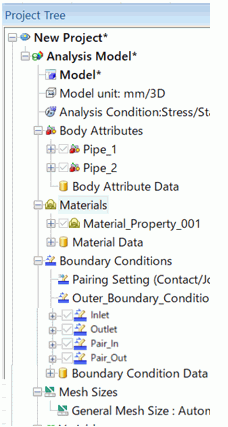
.
How to Change the Inlet/Outlet Boundry Pair (from Project Tree)
|
|
|
|
The Boundary Pair Dialog Box Setup
|
Setting Item |
Notes |
|
List of Boundary Conditions |
From the boundary conditions registered in the database, the list of those for the boundary pair will appear. Double click one. The [Edit Boundary Condition] dialog box will show up. To remove it from the list, press the [Delete] button. |
|
List of Pairs |
The registered pairs will be listed here. Double click one. The [Edit Boundary Pair] dialog box will show up and you can edit the data. (Inlet condition can be edited in the case of inlet/outlet pair.) To remove it from the list, press the [Delete] button. |
|
Add |
Selects the boundary conditions to pair up in the list. By pressing the Add button, the Edit Boundary Pair dialog will show up. The OK button completes the pairing. |
|
Delete |
Deletes the boundary conditions from each list. |
|
Edit |
Sets the inlet of the inlet/outlet pair. Editing is not required if already set. For the details, see Thermal tab (Fluid Thermal tab). |