|
Home / How to Set Body Attribute, Material Property and Boundary Condition / Boundary Condition Tabs / Fluid Tab (Fluid Thermal tab)
Fluid Tab (Fluid Thermal tab)
Boundary conditions relating to the fluid are set on this tab. In the case of fluid-thermal coupled analysis, the fluid thermal tab is displayed.
It is in the [Edit Boundary Condition] dialog box. See [How to Set Boundary Condition].

For the general explanations of the boundary condition setting, refer to [Boundary Condition of Fluid Analysis] of Technical Note.
|
Setting Item |
Notes |
||||||||||||||||||||||||||||||
|
Solid Wall |
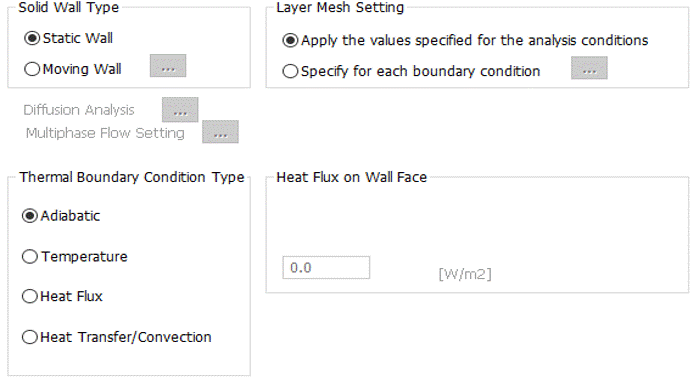
Sets to the wall face where there are no inflow or outflow of the fluid.
Solid Wall: Flow velocity is zero on the wall face.
Slip Wall: Flow velocity in the normal direction to the wall face is zero.
The difference between the solid wall and the slip wall is explained in [Boundary Condition of Fluid Analysis] of Technical Note.
Solid wall type is selectable. The moving wall specifies the boundary that moves at a constant velocity or rotates at a constant angular velocity. Click
Layer mesh of the wall surface can be set for each boundary condition.
Select [Specify for each boundary condition] and click
For the boundary condition in the diffusion analysis, the diffusion value must be set to the wall face. Click
For the free surface analysis, the contact angle on the solid surface must be set. Click
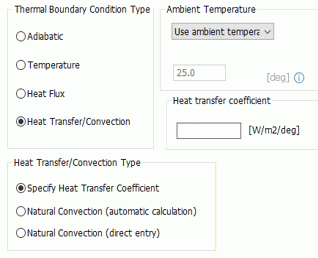
For the fluid-thermal analysis, thermal boundary condition must be set to the wall face.
|
||||||||||||||||||||||||||||||
| Inlet |
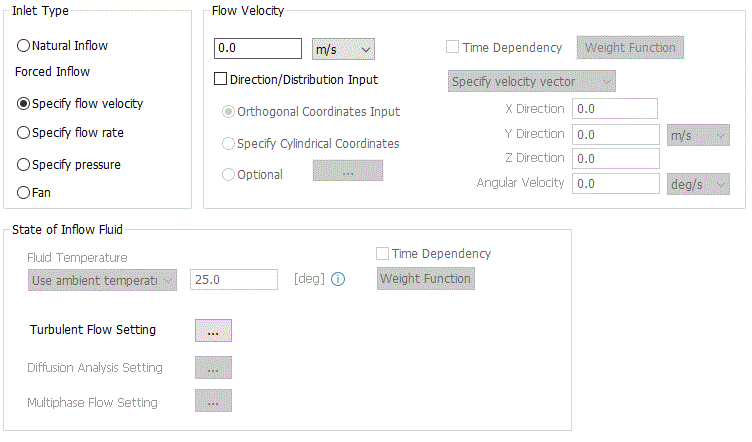
Applied to the face where the fluid flows in.
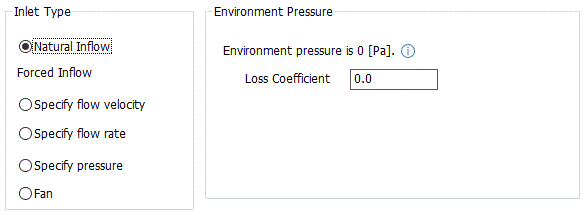
Natural Inflow Takes the inflow from the environment into account. Femtet executes calculation assuming that the pressure of the environment is 0 [Pa]. The flow velocity of the inflow and the static pressure are calculated so that the total pressure becomes 0 [Pa] on the boundary condition. See Loss Coefficient at Inlet and Outlet for Natural Flow for more details.
Forced Inflow > Specify flow velocity Specifies the flow velocity in the normal direction to the face. If [Direction/Distribution Input] is set, [Specify direction vector] and [Specify velocity vector] are selectable in addition to velocity.
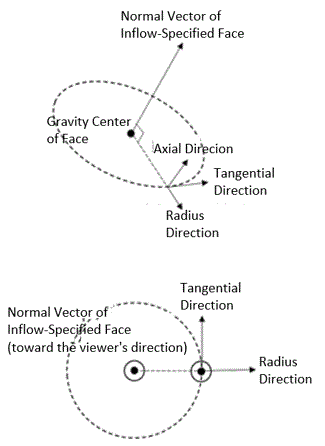
[Specify direction vector] sets the inflow direction for the specified flow velocity on the orthogonal coordinates or cylindrical coordinates. In this setting, unit vector is not required for the input. Normalization will be executed automatically. [Specify velocity vector] sets the inflow velocity vector directly on the orthogonal coordinates or cylindrical coordinates. In this setting, if cylindrical coordinates are selected, angular velocity with gravity center of the specified face can be specified. See [How to Set Distributed Boundary Condition and Body Attribute] for the detail.
*If the direction vector and the velocity vector are in the outflow direction in relation to the normal vector of the inlet, where the inner product with normal vector is negative, the error message [Failed to create the boundary condition data for the fluid analysis] will show up.
*The orthogonal coordinates specify vector by X, Y, Z directions in the global coordinates. The cylindrical coordinates specify vector by radius direction, tangential direction, and axial direction with gravity center
*In the 2D axisymmetric analysis, setting of direction vector and velocity vector by the cylindrical coordinates is not allowed.
* You may set the time dependency with the weight function for transient analysis. Select Time Dependency and click Weight Function. [Time-Weight] table will appear.
Forced Inflow > Specify flow rate Specifies the volumetric flow rate in the normal direction to the face. If [Direction/Distribution Input] is set, [Specify direction vector] is selectable in addition to the volumetric flow rate.
[Specify direction vector] sets the inflow direction for the specified volumetric flow rate on the orthogonal coordinates or cylindrical coordinates. In this setting, unit vector is not required for the input. Normalization will be executed automatically.
*If the direction vector and the velocity vector are in the outflow direction in relation to the normal vector of the inlet, where the inner product with normal vector is negative, the error message [Failed to create the boundary condition data for the fluid analysis] will show up.
*In the 2D axisymmetric analysis, setting of direction vector and velocity vector by the cylindrical coordinates is not allowed.
* You may set the time dependency with the weight function for transient analysis. Select Time Dependency and click Weight Function. [Time-Weight] table will appear.
Forced Inflow > Specify pressure Specifies the pressure difference with the environment. The flow velocity of the inflow and the static pressure are calculated to specify the pressure by the total pressure. If Use static pressure is selected, the inflow velocity is calculated to specify the pressure by the static pressure. If the static pressure is used, the calculation may become unstable in some cases.
* You may set the time dependency with the weight function for transient analysis. Select Time Dependency and click Weight Function. [Time-Weight] table will appear.
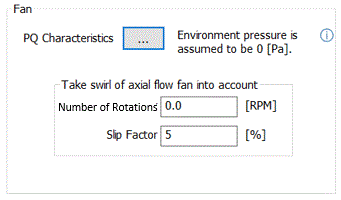
Forced Inflow > Fan Sets the relationship of the volumetric flow rate and the differential pressure (P-Q characteristics) in the table.
The volumetric flow rate and the differential pressure are entered in the table. When setting, the first data must have the volumetric flow rate of 0[m3/s], and the last data must have the differential pressure of 0[Pa].
The analysis is executed with the volumetric flow rate where the rising pressure and the pressure loss in the analysis domain become almost equal. To take the swirl in the downstream of the axial flow fan into account, teh number of rotations and the slip factor are required to set.
See Boundary Condition of Fluid Analysis of Technical Note for more details.
Fluid Temperature Sets the fluid temperature for the incoming fluid in the fluid-thermal analysis.
Turbulent Flow Setting Sets the turbulent flow energy and the energy dissipation rate if turbulent flow is selected in the analysis condition.
Diffusion Analysis Setting Sets the diffusion value for the incoming fluid if the diffusion analysis is selected in the analysis condition.
Multi-Phase Flow Setting Sets the phase for the incoming fluid if the free surface analysis is selected in the analysis condition.
|
||||||||||||||||||||||||||||||
|
Outlet |
Applied to the face where the fluid flows out.
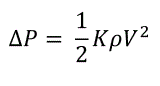
Natural Outflow Takes the outflow to the environment into account. Femtet executes calculation assuming that the pressure of the environment is 0 [Pa]. The outflow velocity is calculated so that the static pressure becomes 0 [Pa] on the boundary condition. If the loss coefficient (loss coefficient K) is set, the pressure loss at the outlet is taken into account, which is given by the following equation where ρ is fluid density and V is flow velocity. See Loss Coefficient at Inlet and Outlet for Natural Flow for more details.
Forced Outflow > Specify flow velocity Specifies the flow velocity in the normal direction to the face.
* You may set the time dependency with the weight function for transient analysis. Select Time Dependency and click Weight Function. [Time-Weight] table will appear.
Forced Outflow > Specify flow rate Specifies the volumetric flow rate normal direction to the face.
* You may set the time dependency with the weight function for transient analysis. Select Time Dependency and click Weight Function. [Time-Weight] table will appear.
Forced Outflow > Specify pressure Specifies the pressure difference with the environment by the negative static pressure. The outflow velocity is calculated so that the static pressure reaches the specified pressure on the boundary condition.
* You may set the time dependency with the weight function for transient analysis. Select Time Dependency and click Weight Function. [Time-Weight] table will appear.
Forced Outflow Fan Sets the relationship of the volumetric flow rate and the differential pressure (P-Q characteristics) in the table.
The volumetric flow rate and the differential pressure are entered in the table. When setting, the first data must have the volumetric flow rate of 0 [m3/s], and the last data must have the differential pressure of 0 [Pa].
The analysis is executed with the volumetric flow rate where the rising pressure and the pressure loss in the analysis domain become almost equal.
See Boundary Condition of Fluid Analysis of Technical Note for more details.
|
||||||||||||||||||||||||||||||
|
Inlet/Outlet |
Applies to the face where it is not known if the fluid flows in or flows out.
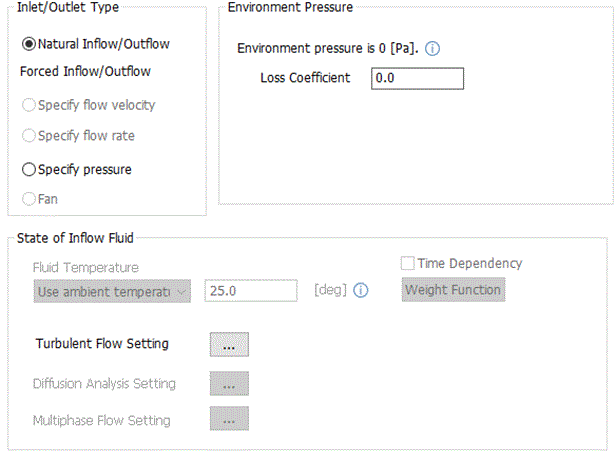
Natural Inflow/Outflow No items to set. Femtet executes calculation assuming that the pressure of the environment is 0 [Pa]. At the inflow, the flow velocity of the inflow and the static pressure are calculated so that the total pressure becomes 0 [Pa] on the boundary condition. At the outflow, the fluid velocity of the outflow is calculated so that the static pressure becomes 0 [Pa] on the boundary condition.
Fluid Temperature Sets the fluid temperature for the incoming fluid in the fluid-thermal analysis. For details, see the explanations of the inflow above.
Turbulent Flow Setting Sets the turbulent flow energy and the energy dissipation rate if turbulent flow is selected in the analysis condition.
Diffusion Analysis Setting Sets the value of diffusion for the incoming fluid if diffusion analysis is selected in the analysis condition.
|
||||||||||||||||||||||||||||||
|
Inlet/Outlet Pairing |
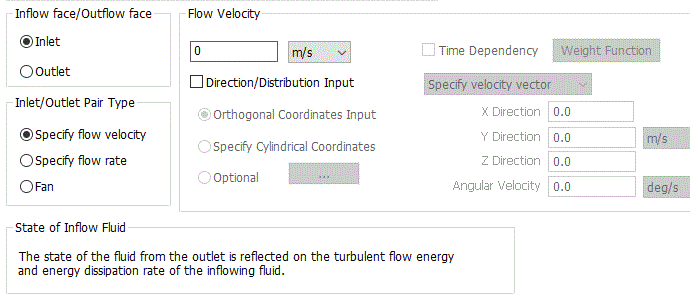
Connects the inlet and the outlet of the distant faces. The boundary temperature and the boundary turbulent flow rate are given so as to have the same outflow rate and inflow rate. Pairing of inlet and outlet is required. See [Inlet/Outlet Pair Boundary] for the details.
Inflow Face/Outflow Face
Specifies the face either for inflow or outflow.
Inlet/Outlet Pair Type Selectable when the inlet face is set.
Specify Flow Velocity Specifies the flow velocity in the normal direction to the face. If [Direction/Distribution Input] is set, [Specify direction vector] and [Specify velocity vector] are selectable in addition to velocity.
[Specify direction vector] sets the inflow direction for the specified flow velocity on the orthogonal coordinates or cylindrical coordinates. In this setting, unit vector is not required for the input. Normalization will be executed automatically. [Specify velocity vector] sets the inflow velocity vector directly on the orthogonal coordinates or cylindrical coordinates. In this setting, if cylindrical coordinates are selected, angular velocity with gravity center of the specified face can be specified. See [How to Set Distributed Boundary Condition and Body Attribute] for the detail.
*If the direction vector and the velocity vector are in the outflow direction in relation to the normal vector of the inlet, where the inner product with normal vector is negative, the error message [Failed to create the boundary condition data for the fluid analysis] will show up.
*The orthogonal coordinates specify vector by X, Y, Z directions in the global coordinates. The cylindrical coordinates specify vector by radius direction, tangential direction, and axial direction with gravity center
*In the 2D axisymmetric analysis, setting of direction vector and velocity vector by the cylindrical coordinates is not allowed.
* You may set the time dependency with the weight function for transient analysis. Select Time Dependency and click Weight Function. [Time-Weight] table will appear.
Specify flow rate Specifies the volumetric flow rate normal direction to the face. If [Direction/Distribution Input] is set, [Specify direction vector] is selectable in addition to the volumetric flow rate.
[Specify direction vector] sets the inflow direction for the specified volumetric flow rate on the orthogonal coordinates or cylindrical coordinates. In this setting, unit vector is not required for the input. Normalization will be executed automatically.
*If the direction vector and the velocity vector are in the outflow direction in relation to the normal vector of the inlet, where the inner product with normal vector is negative, the error message [Failed to create the boundary condition data for the fluid analysis] will show up.
*In the 2D axisymmetric analysis, setting of direction vector and velocity vector by the cylindrical coordinates is not allowed.
* You may set the time dependency with the weight function for transient analysis. Select Time Dependency and click Weight Function. [Time-Weight] table will appear.
Fan Sets the relationship of the volumetric flow rate and the differential pressure (P-Q characteristics) in the table.
|
||||||||||||||||||||||||||||||
|
No Setting/Measuring Terminal |
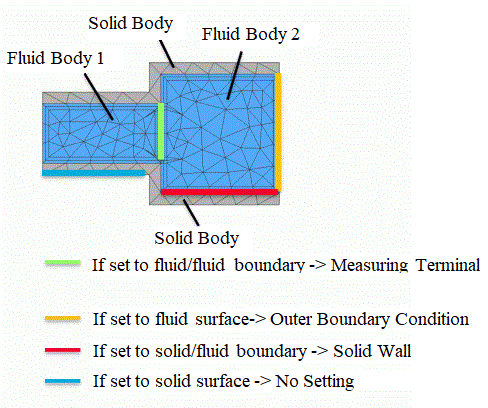
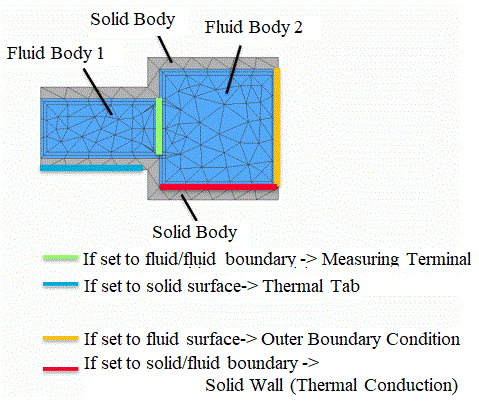
If this is set to the fluid/fluid boundary, volumetric flow rate, pressure, and other physical values can be calculated and checked in the table. If it is set to other boundaries, their behavior is the same as without boundary conditions. Detailed are shown below.
|
||||||||||||||||||||||||||||||
|
Automatically determine the outer boundary condition |
Displayable only when editing the outer boundary condition.
If selected, the outer boundary condition types are automatically determined based on the setting of internal or external flow and the boundary conditions of the model.
|
||||||||||||||||||||||||||||||
 The [
The [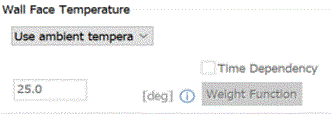
 , if clicked, opens