


|
Home / Technical Notes / Electromagnetic analysis / Boundary Condition / How to Set Ports in Electromagnetic Analysis
How to Set Ports in Electromagnetic Analysis
The setting of the port boundary conditions in the 3D electromagnetic analysis is explained with examples.
[Port]
Ports are the entry (input) or exit (output) points of electromagnetic waves. In the 3D electromagnetic harmonic analysis, the waveguide analysis is performed
on the faces where the I/O port boundary condition is set. The propagation modes are acquired. The electromagnetic waves of the acquired modes are applied to the 3D model,
and the distribution of electromagnetic fields is calculated. The port structure must be a transmission line such as microstrip line, waveguide, and parallel plates so that the electromagnetic waves can propagate.
[External Port and Internal Port]
The port formed inside the model is called internal port, and the port not inside the model is called external port.
3D harmonic analysis is executed assuming that the external port is connected with the transmission line in the analysis. The electromagnetic waves, which are applied to the transmission line, are analyzed as the propagation mode.
The propagation modes applied to the external port depends on the port structure and the boundary condition set to the port.
For example, if the port structure is microstripline or parallel plates, TEM mode is the propagation mode.
If the structure is waveguide, TE or TM mode is the propagation mode.
The internal port is for the electromagnetic waves (TEM mode) having uniform electromagnetic field which is given forcefully.
The internal port is a boundary condition which is connected with transmission line. Its structure must be that of parallel plates.
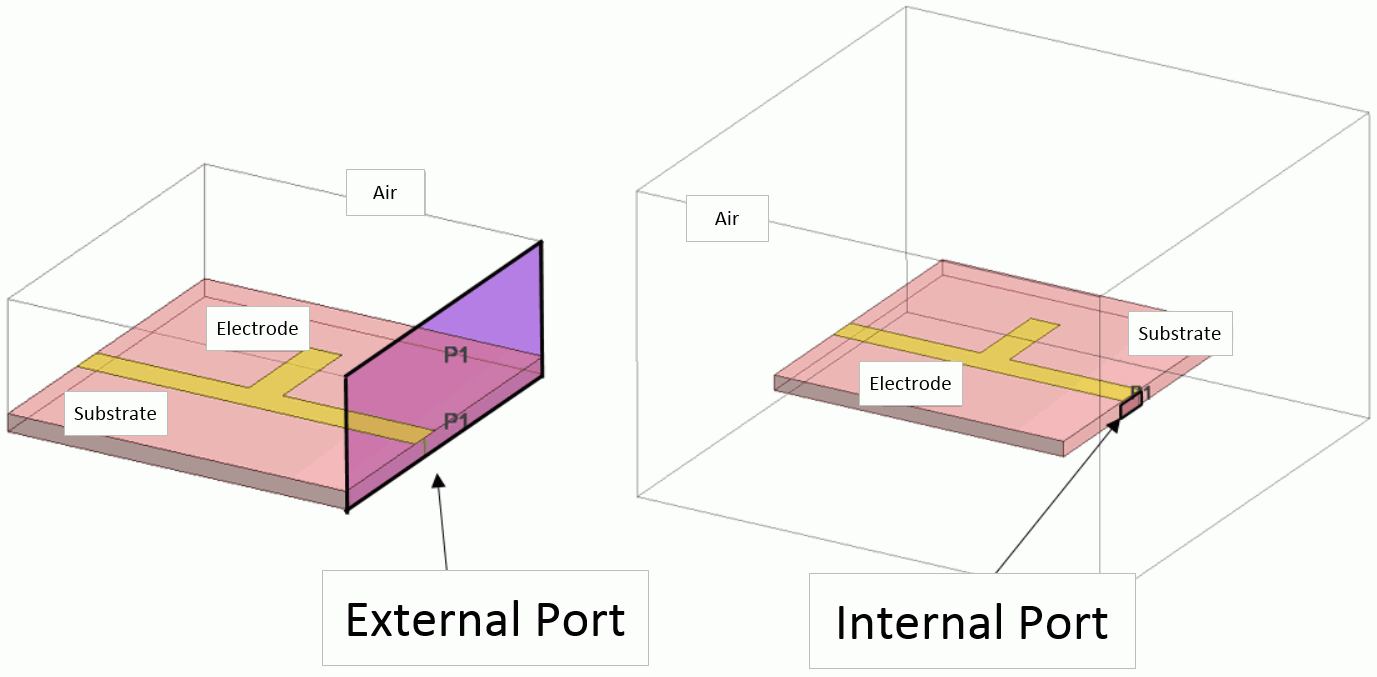
The models in Fig. 1 below consist of the substrate and the electrode. The external port and internal port are set.
The ports are set to the area surrounded by the black lines. In the left model, the external port is set to the side of the whole model including the air.
In the right model, the substrate and the electrode are surrounded by the air.
The port is an internal port and set to the side of the substrate.
 |
|
Fig. 1: External and Internal Port Setting |
When executing analysis, the port is automatically judged if it is external or internal.
In the case of the external port, the propagation modes are determined by the port structure and material, and used as an incident mode.
In the case of the internal port, the incident mode is such electromagnetic waves that produce a uniform electric field in the conductors connected to the port.
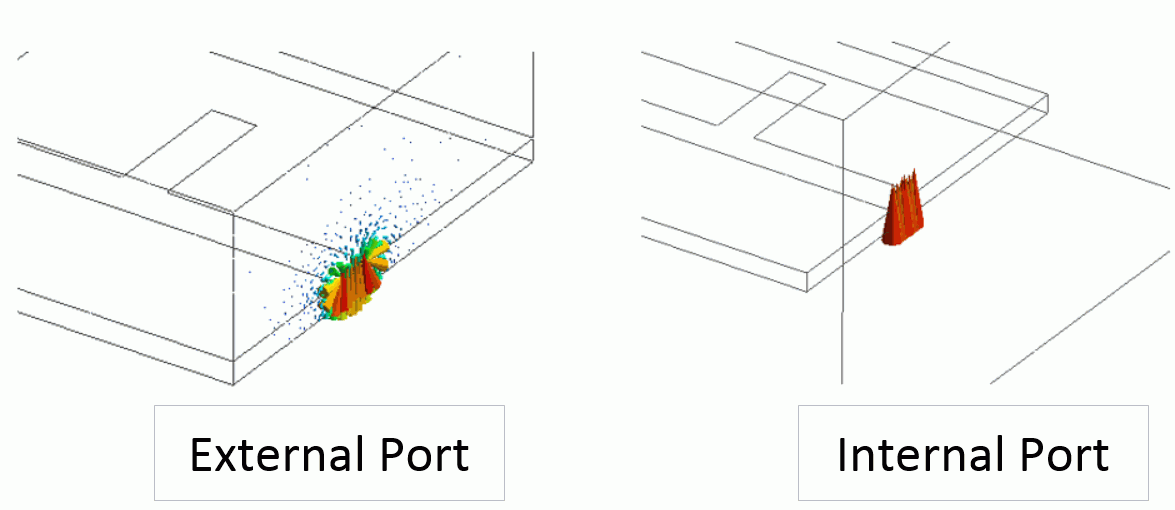
Fig. 2 below shows the difference of the electric fields of the modes between external and internal ports.
 |
|
Fig. 2: Electric Field Distribution of External and Internal Ports |
For the external port, the electromagnetic waves are obtained as the propagation mode, whose electric fields are distributed around the ground and electrodes.
The external port is a boundary condition where the electromagnetic waves having such distribution enter the transmission line. The transmission line is considered to be connected with the external port.
Refer to Example 8 of Electromagnetic Analysis for details.
For the internal port, on the other hand, the electromagnetic waves having the uniform electric field between the signal line and the ground are obtained as the propagation mode.
The internal port is a boundary condition which is used for the case where the incident electric field or magnetic field is locally intensified.
Therefore, if the internal port is set to the cross section of the waveguide, which has TE/TM mode as the propagation mode, accurate analysis cannot be performed because TE/TM mode has electric field or magnetic field distributions.
See Common Mistakes in Port Settings in the Electromagnetic Analysis for details.
[How to Set the Port]
The port boundary condition can be set on the planes that are connected with each other. The curved face cannot be applied the boundary condition.
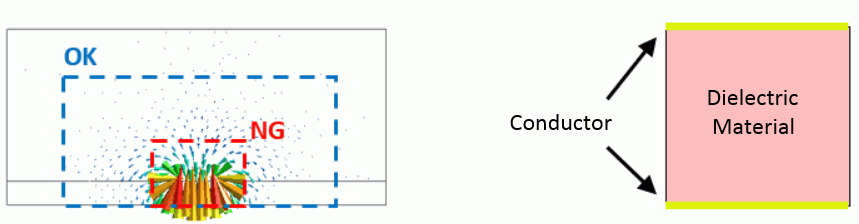
Fig. 3 shows the planes where the external port and internal port can be set. The external port and internal port are shown on the left and the right respectively.
The plane for the external port must be large enough to surround the incident electromagnetic waves so as to obtain the propagation modes correctly.
In the case of left model of Fig. 3, the area indicated by the dotted blue lines sufficiently encircles the electric field, and can be applied the external port.
In the area surrounded by the red dotted lines, the accurate propagation modes cannot be obtained because the the electric field distribution cannot be analyzed accurately.
The plane for the internal port must be between different conductors, or boundary conditions such as electric wall, impedance boundary, or multilayer electrodes so that the propagation modes have the uniform electric field between the electrodes.
The right model of Fig. 3 shows the dielectric material placed between the conductors. The right model of Fig. 3 shows the dielectric material placed between the conductors. This structure is the same as that of the parallel plates. Generally, the internal port must have this structure.
Generally, the internal ports must have the same structure as the parallel plates.
 |
|
Fig. 3: Planes for External Port (left) and Internal Port (right) |
For the port boundary condition, port name can be assigned to each port. The port numbers are assigned to the ports according to the sorted names.
The numbers are for those of the components of S-parameters obtained by the analysis.
For the port setting, the following items are also set.
- Reference impedance
-
Integral path
Reference impedance is for the electromagnetic waves entering the port.
If the acquired characteristic impedance and the reference impedance are not the same, reflection will occur at the port.
The integral path is required to acquire the characteristic impedance (Zpv).. The characteristic impedance (Zpv) is acquired from the voltage difference between the electrodes which run along the integral path.
To acquire the characteristic impedance accurately, the integral path must be set properly
on the area where the electric field is concentrated.
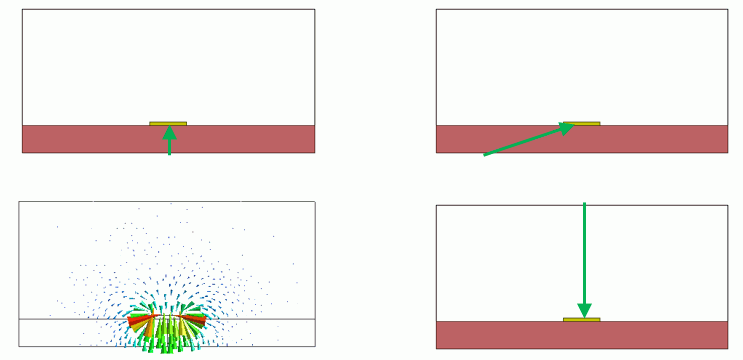
Fig. 4 shows the example of the integral path setting. The model has an electrode (yellow) placed on a substrate (brown).
The port has a structure of a microstripline. A green arrow represents the integral path. The propagation mode at this port has the electric field distribution as shown in the bottom left of Fig. 4.
The integral path must be set on the location where the electric field is concentrated as shown in the top left of Fig. 4.
If the integral path is set on the location where the electric field is not dense as in the top right or bottom right of Fig. 4,
the characteristic impedance (Zpv) cannot be obtained accurately. The accuracy of the harmonic analysis results becomes worse.
If the electric field is concentrated, it is not necessary to make the integral path direction perpendicular to the ground or the signal line.
The electric potential is almost constant on the electrode. If the electric field is concentrated on the electrode, startpoint and endpoint of the integral path can be anywhere on such electrode.
The direction of the integral path is used as that of the electric field.
Therefore, when setting multiple ports in a model, the direction of the integral paths must be consistent. (Direction: from ground to signal line or from signal line to ground).
 |
|
Figure 4: Integral Path Setting at the Port: Proper Setting (left) and Improper Setting (right) |
If the integral path is not set, the characteristic impedance (Zpi) obtained from the current flowing into the port is used as the characteristic impedance at the port.
If the electric field is concentrated locally at the port as in such of a microstrip line of the external port, the accurate characteristic impedance is Zpv.
If the electric field is distributed as in such a case of coaxial cable, Zpi is the accurate characteristic impedance.
For the examples of common mistakes in the port setting, see here.
[Port Setting]
Examples of the external port and the internal port are as below.
Please also refer to the Examples of Electromagnetic Analysis where other types of ports are explained.
-
External Port Setting 1: Microstrip Lines
An analysis model is shown in Fig. 5. It consists of 4 layers: the upper air layer, the upper substrate, the lower substrate, and the lower air layer.
The conductors are indicated by yellow color. The ground plane is inserted between the substrates.
Microstrip lines are formed on the top surface of the upper substrate and on the bottom surface of the lower substrate.
The via hole in the center connects the top and bottom microstrip lines.
Port 1 and Port 2 are set on the planes indicated by purple color. The right figure in Fig. 5 is the enlarged portion of the left figure.
The ports are made of microstrip line. Their structure is a transmission line. The propagation mode is the quasi TEM mode.
The green arrow indicates the integral path. With the propagation mode at the port, the electric field concentrates between the ground electrode and the signal lines.
The integral path should be set in the concentrated area.
In this model, the directions of the integral paths are unified from the ground to the signal line.
What should be noted in setting the ports for this model is that the ports should not go beyond the conductor sandwiched by the substrates.
In other words, the port cannot be set on the entire side surface of the model.
The side surface of the model is divided by the ground conductor. If the port goes beyond the conductor, the error will occur.
The divided areas have their own propagation modes independently from each other.
Depending on which propagation mode is selected, the analysis results become unstable.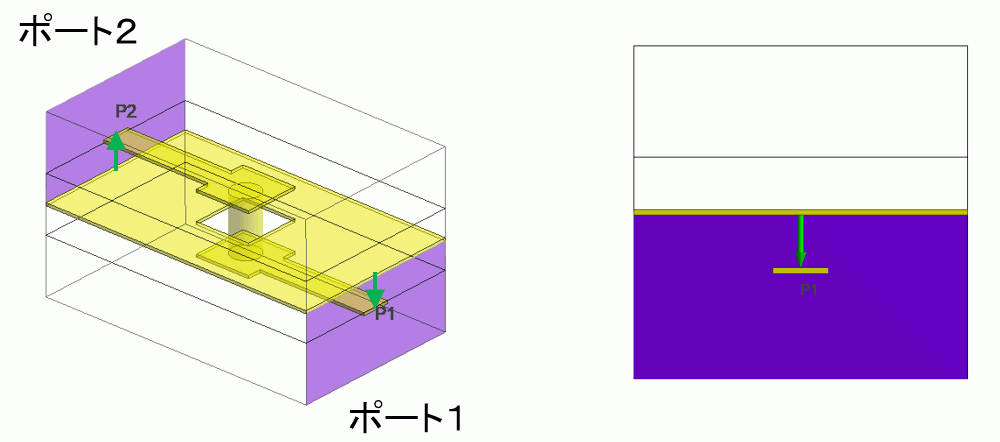
Figure 5: External Port Setting (Microstrip lines): Analysis Model (left) and Magnified Area of Port 1 (right)
-
External Port Setting 2: Coplanar Lines
An analysis model is shown in Fig. 6.
The analysis model consists of dielectric substrate (red), signal line electrode (center electrode on the board, yellow), and ground electrodes (both ends on the board, yellow).
The air is over the top of the substrate. A port can be set on the side surface of the model indicated by the black line.
The right figure in Figure 6 is a magnified portion of the port plane. The structure of the ports is that of the parallel-plate transmission line made of the signal-line electrodes and the ground.
The green arrow indicates the integral path. Its direction is from the signal line to the ground at the bottom of the substrate.
The electric wall is set around the port by default. The electrodes on both sides of the signal line are connected around the port.
Therefore, the electrodes on both sides of the signal line are considered the ground.
The port is expected to have a propagation mode in which the electric field concentrates between the signal-line electrode and the ground at the bottom of the substrate, or between the signal-line electrode and the ground electrodes at both end of the signal line.
See Example 9 of Electromagnetic Analysis for further information.
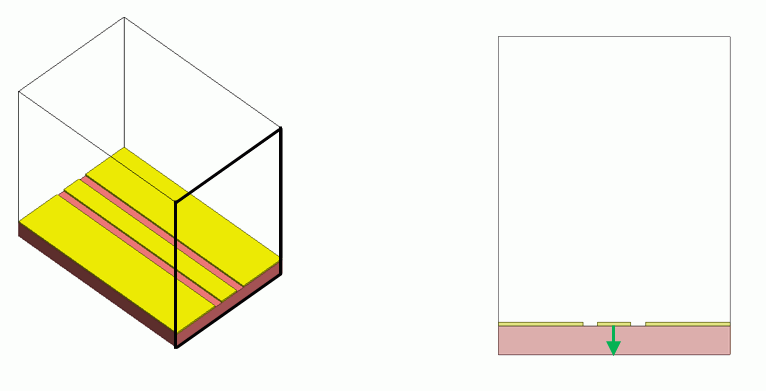
Figure 6: External Port Setting (Coplanar Lines): Analysis Model (left) and Magnified Area of Port (right)
-
External Port Setting 3: Differential Lines
An analysis model is shown in Fig. 7.
The analysis model has two signal lines consisted of the electrodes (yellow) on the dielectric substrate (red). The air is over the top of the substrate.
A port can be set on the plane of the model indicated by the black line. The right figure in Figure 7 is a magnified portion of the signal lines on the port plane.
In the case of the balanced lines, there exist two propagation modes that feed the electricity to two signal lines.
The common mode corresponds to the sum of the two propagation modes.
The differential mode corresponds to the difference between the two propagation modes. It creates the electric field between the signal lines.
The green arrows indicate the integral paths for the common mode and differential mode.
In the case of common mode, as the electricity is supplied to the two signal lines, one of them must be selected to connect to the ground at the bottom of the substrate.
In the case of differential mode, the electric field concentrates between the two signal lines. The integral path must be set so as to connect the two signal lines.
If multiple propagation modes exist at the port, the setting of the integral path is determined by the propagation mode selected for harmonic analysis.
For further details, see Example 21 of Electromagnetic Analysis for the waveguide analysis of differential lines, and Example 22 of Electromagnetic Analysis for the harmonic analysis.
If there is only one integral path as in the above figure, the port setting must be modified
depending on the analysis mode (common mode or differential mode). If Propagation mode transformation function is selected, multiple integral paths can be set.
By selecting this function, analysis of both common mode and differential mode is possible with one port.
See Example 23 of Electromagnetic Analysis for further information of propagation mode transformation.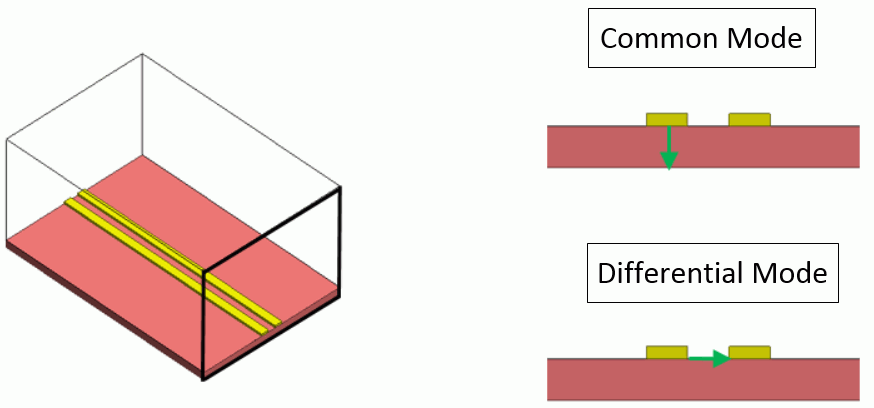
Figure 7: External Port Setting (Differential Lines): Analysis Model (left) and Magnified Area of Port (right)
-
External Port Setting 4: Connectors
An analysis model is shown in Fig. 8.
The model has two signal lines consisted of the conductors (brown) on a dielectric substrate (red). The signal lines are connected to the connectors (yellow).
The connectors represent the connecting part to the transmission lines (coaxial cables) which are considered to be in the outside of the model. The right figure in Figure 8 is a magnified portion of the connector.
It consists of an inner conductor and an outer conductor, and a dielectric sandwiched by them. The cross section of the connector can be regarded as parallel plates for transmission line.
So the port can be set to the cross section of the connector. The inner conductor (brown) is represented by a solid body.
The outer conductor is represented by the electric wall boundary condition.
The green arrow indicates the integral path. Its direction is from the signal line (inner conductor) to the ground (outer conductor).
The propagation mode at this port is TEM mode. The electromagnetic field is expected to be distributed almost uniformly between the outer and inner conductors.
The position of the integral path does not affect the accuracy of characteristic impedance (Zpv) very much. It is important to connect the ground and the signal lines.
See Example 19 of Electromagnetic Analysis for the details.
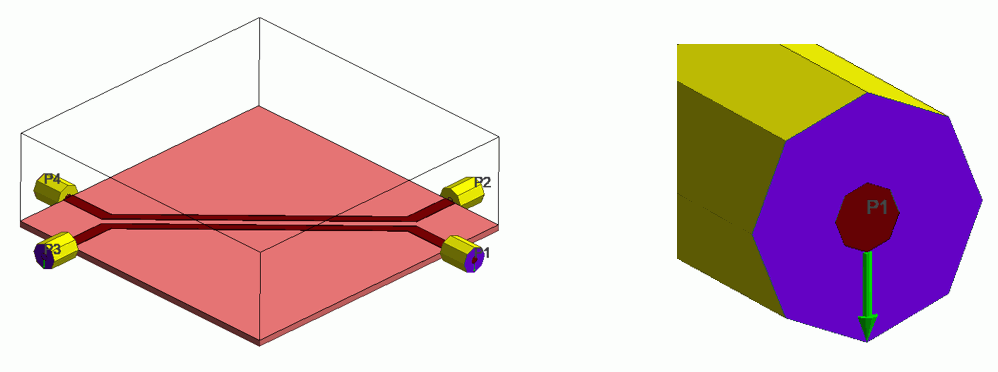
Figure 8: External Port Setting (Connectors): Analysis Model (left) and Magnified Area of Port (right)
-
Internal Port Setting 1: Microstrip Lines
An analysis model has a surface-mount component such as capacitor on a substrate as in Figures 9a and 9b. The characteristics of the component are combined by the circuit simulator.
In order to combine the characteristics of the component, the inlet and outlet for the electromagnetic waves to the component are
replaced by the ports, and the electromagnetic analysis must be applied to the domain other than the component.
The port is internal port as it must be set inside the model. The model consists of a dielectric substrate (red color), electrode for a signal line (yellow color), and the air above the substrate.
and the air above the substrate.
The lower part of the substrate is a reference ground for the whole model. Two setting examples are shown below.
[Example a]
In the the right figure of Figure 9a, the internal ports are represented by sheet bodies. The ports are connected to the bottom of the substrate. The surface-mount component is placed on the ports.
The structure of the ports is that of the parallel-plate transmission line made of the signal line electrodes and the ground.
The two ports in Fig. 9a are for the same surface-mount component. These ports must have the same ground.
In this example, the bottom of the substrate is the ground for the two ports.
The green arrows represent the integral paths. The direction at the ports is unified from the ground to the signal lines.
In the case of the internal port, there might be a case where it is difficult to identify the reference ground electrode. A close attention must be paid to the direction of the integral path.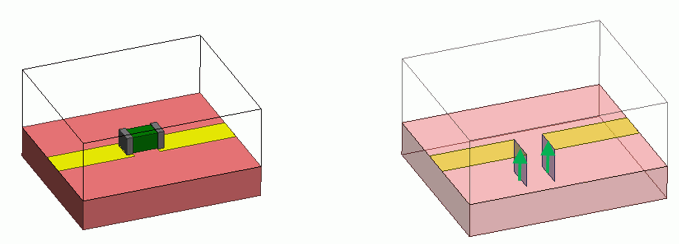
Figure 9a: Internal Port Setting (Microstrip lines): Analysis Model (left) and Port Setting (right)
[Example b]
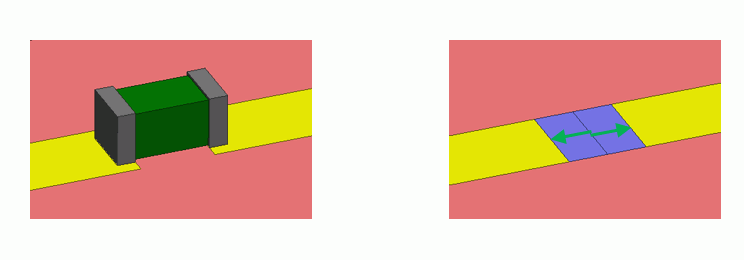
In some cases, it may not be possible to set up the internal port to connect the electrode and the ground. Fig. 9b shows such case.
Right side of Fig. 9b shows two internal ports (purple color).
(Purple color). Two sheet bodies are created so as to connect the signal line.
The port boundary condition is set to each of them. Like this model, if the two port plane contact each other,
the contacting edges are given electric wall boundary condition automatically.
The electric wall boundary condition is regarded as a quasi ground at each port plane. The two port planes can share the quasi ground.
In this way, the ports can be set up which share the ground even in the case where the ground of the whole model and the signal line cannot be connected.
The green arrows indicate the integral path of each port.
The port faces are placed between the electric wall and the electrodes. The structure is the same as that of the parallel plates.
 |
|
Figure 9b: Internal Port Setting (Microstrip lines): Analysis Model (left) and Port Setting (right) |
S-parameters obtained by the harmonic analysis are used in the circuit editor
to combine the characteristics of the surface mount devices.
It must be noted that the setup of the internal ports in Fig. 9b does not always give the right results.
The ground in Figure 9b is defined by the electric wall boundary condition set to the interfacing edge of the ports.
Generally, this ground is different from that of the whole model.
Therefore, if a surface mount device has complicated structure which cannot be represented by a lumped constant,
the setups of Figures 9a and 9b may give different results.
The ground in Figure 9a is that of the whole model. The setup of the ports is always right regardless of the characteristics of the device.
The setup in Figure 9b is applicable only to such device which can be represented by the lumped constant.
-
Internal Port Setting 2: Coplanar Lines
Fig. 10 shows the coplanar lines where the signal line is not extended to the outside of the model.
The model consists of a dielectric substrate (red color), a signal line (yellow color in the center), the ground electrodes (yellow at both ends), and the air above the substrate.
Here, it is assumed that the model is configured to have the ground electrodes as the only ground. The lower part of the substrate is not considered to be a reference ground for the whole model.
For this model, the internal port must be set to feed the electricity to the signal line.
As the ground electrodes are the only ground in this model, the internal port cannot be set between the signal line and the lower part of the substrate.
The internal port must be set between the ground electrodes and the signal line.
To set the internal port, the model needs to be modified because the ground electrode is divided into two.
Two figures on the right side of Fig. 10 show the modification examples.
The upper example shows the connected ground electrodes by extending them around the edge of the substrate.
The lower example shows the connected ground electrodes by extending them upward into the ambient air.
Like these modification examples, the internal port can be set to the ground electrode
which is a reference for the whole model. This makes it possible to feed the electricity and create the electric fields between the ground and the signal line.
It must be noted that the modification applied to the model could affect the analysis results.
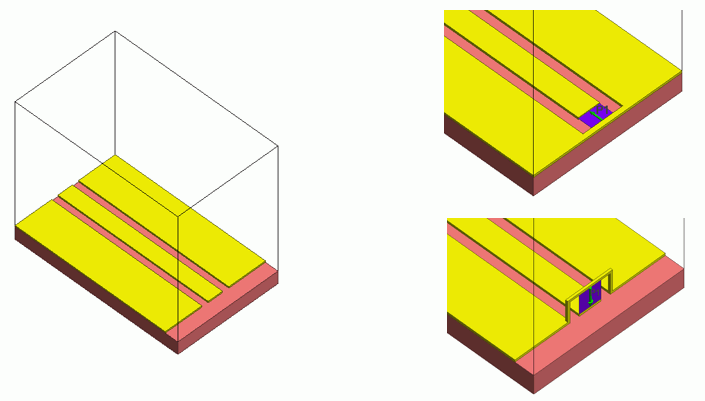
Figure 10: External Port Setting (Coplanar Lines): Analysis Model (left) and Port Setting (right)
-
Internal Port Setting 3: Coil and Excitation Line
An analysis model is shown in Fig. 11. The coil is made of conductor and surrounded by the air. In this model,
the electromagnetic waves enter the port and generate the electric field. As a result, an electric potential difference occurs in the conductor.
The conductor is electrically excited by the flowing current and releases the electromagnetic waves.
The conductor's excitation by the electrical feeding from the internal port is used for the analysis of antenna as well. The radiation of the electromagnetic waves into the air by the current can be analyzed.
The right figure is an magnified portion of the internal port encircled by the red dotted lines.
The port is a sheet body and placed inside the conductor of the coil. It means that the port has the structure of parallel plates which is a precondition for the internal port.
The dielectric in this model is the air surrounding the coil.
The green arrow represents an integral path and direction of the electric field. An electric potential difference occurs in the direction opposite of the arrow direction.
Example 28 of Electromagnetic Analysis analyzes a coil having the same port.
Example 7 of Electromagnetic Analysis too analyzes an antenna havening the same internal port.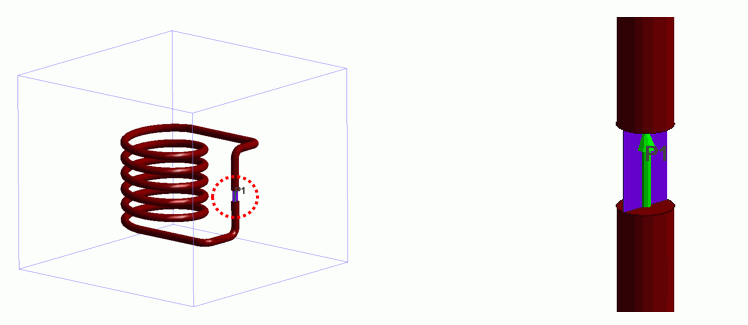
Fig. 11: Internal Port Setting (Coil and Excitation Line): Analysis Model (left) and Port Setting (right)