


|
Home / Executing Simulation / Execution with existing meshes
Run Solver with Existing Meshes
The analysis is executed with the existing meshes saved in a results file (.pdt).
-
Additional analysis can be performed with the deformed meshes.
See [Analysis with Deformed Meshes] for details.
-
The values of the body attributes, the material properties and the boundary conditions can be changed for the analysis.
-
The simulation is faster as the meshing process is omitted.
-
It is possible to run the solver without the model.
-
The proper calculation is not possible if [the modifications requiring the mesh regeneration] are applied.
-
Please be aware that the skin meshes remain the same. Therefore, it would be required to regenerate the skin meshes, if the factors affecting the skin depth, such as the frequency, the conductivity etc, are modified.
How to Proceed
-
On the [Model] tab, go to

and click ▼ at the bottom of [Run Mesher/Solver] .
.
Select [Run Solver with Existing Meshes] on the submenu.
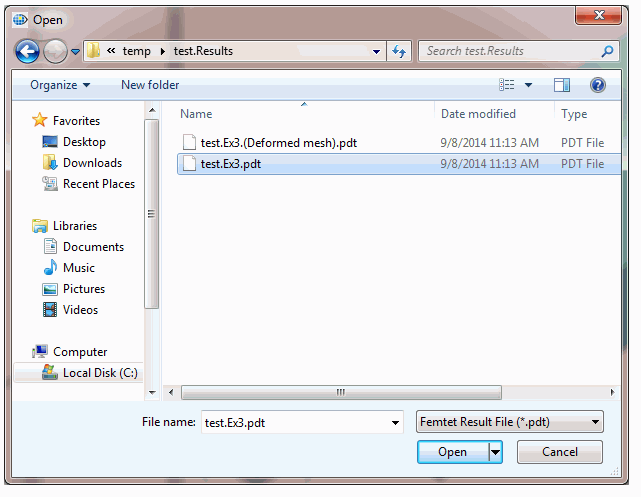
The dialog box to select a results file will appear.
-
Select the file to use.
Press the [Open (O)] button. The analysis will start immediately.
-
The analysis results are saved in a (.pdt) file in the folder named [Project Name.Results], which is at the same location as the project file.
-
After the analysis, if you want to keep the previous results, save the previous analysis model first and then save the new results.
-
Notes on Boundary Conditions
Mesh data includes the position information of the boundary conditions. Meshing determines the position of the boundary conditions.
When importing and analyzing, boundary conditions such as force or electric wall can be basically modified.
Some modified boundary conditions might not be applied. The modified periodic or discontinuous boundary conditions will not be applied.
Because they rely on mesh information that does not reflect the modified boundary conditions.