


|
Home / User Interface / General settings / Database
Database
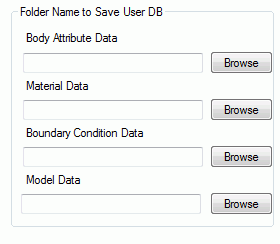
A location to save the user's database file is specified.
-
How to share the database among users
A file "UserV2.***" is created in the specified folder. ("User.***" is a file created by Femtet version 2020.0 or earlier.)
The file is shared by copying it to individual computers.
-
The database created by Femtet version 2021.0 or later cannot be used in the earlier versions.
|
Items |
Notes |
|
Body Attribute Data |
Specifies the folder to save the body attribute data. Click the [Browse] button to launch the dialog box. |
|
Material Data |
Specifies the folder to save the material data. Click the [Browse] button to launch the dialog box. |
|
Boundary Condition Data |
Specifies the folder to save the boundary condition data. Click the [Browse] button to launch the dialog box. |
|
Model Data |
Specifies the folder to save the Model DB. Click the [Browse] button to launch the dialog box. |