


|
Home / How to Set Analysis Condition / Electromagnetic Analysis [Hertz] / Hertz Option / Touchstone File Setting
Touchstone File Setting
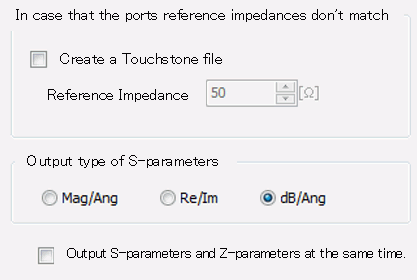
Output conditions for touchstone files are set in this dialog box.
This setting is valid only in 3D electromagnetic harmonic analysis.
|
Setting Item |
Notes |
|
Create a Touchstone file |
Deselected by default, Touchstone file will be created if Zpv or Zpi is acquired. If reference impedances are different among multiple ports, the Touchstone file that is prior to Renormalize will be created.
If selected, Touchstone file will be created regardless of the acquisition of Zpv or Zpi.
(Note) Zpv is the characteristic impedance of the port obtained from the voltage. To obtain Zpv, the integral path is required to be properly set to the port.
|
|
Reference Impedance |
Sets the reference impedance of the Touchstone file if [Create a Touchstone file] is selected. The entered value does not affect the calculation. |
|
Output type of S-parameters |
Selectable from Mag/Ang, Re/Im, or dB/Ang. Mag stands for Magnitude, Ang for Angle, Re for Real, and Im for Imaginary. |
|
Output S-parameters and Z-parameters at the same time. |
If S-parameters can be output, text file of Z-parameters is output as well. (Project name.Results\Analysis model name.z*p) |