


|
Home / Technical Notes / Fluid Analysis/Fluid-Thermal Analysis / If Fluid Analysis/Fluid-Thermal Analysis Does Not Converge
If Fluid Analysis/Fluid-Thermal Analysis Does Not Converge
1. Iterative Calculation in the Fluid Analysis
In the fluid analysis, in order to obtain the state which satisfies multiple equations at the same time,
calculations are repeated to reach the desired state.
In the laminar flow analysis, the flow velocity and the pressure are calculated in one iteration.
In the turbulent flow analysis, the flow velocity, the pressure, K, and ε are calculated in one iteration.
An additional process for calculating temperature is included in the bidirectional coupled analysis (if the buoyancy is taken into account and the viscosity is temperature dependent) of the thermal-fluid solver.
An additional process for calculating diffusion value is included in the bidirectional coupled analysis (if the weight of diffusing materials is taken into account) in the diffusion analysis.
The analysis sequence of the turbulent flow and the fluid-thermal bidirectional coupled analysis is shown below.
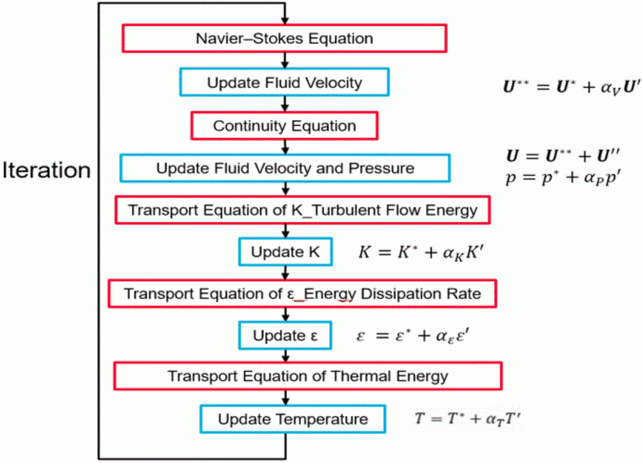
U: flow velocity
p: pressure
K: turbulent flow energy
ε: energy dissipation rate
T: temperature
U*, U**, p*, K*, ε*, and T*: provisional values
U', U'' ,p' ,K' ,ε', and T': increment
αV, αP,αK, αε, and αT: relaxation factor
After calculating each equation, update the flow velocity, pressure, etc.
The relaxation factor is applied to update each value. The factor is a real number of 1 or smaller, by which the convergence of calculation will be affected.
The residual is calculated as an indicator of how well the equation is satisfied.
The change in the residual at each iteration is shown in the dialog box of the progress. Please refer to Viewing Convergence and Intermediate Results for details.
It is judged that the desired state is reached once all the residuals become smaller than the value for convergence judgment. The calculation ends.
The calculation is regarded to have converged.
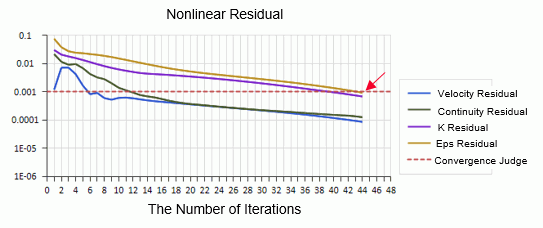
The maximum number of iterations and value for convergence judgment can be set in [Convergence Judgment Setting] of the [Detailed Settings of Fluid Analysis] dialog box.
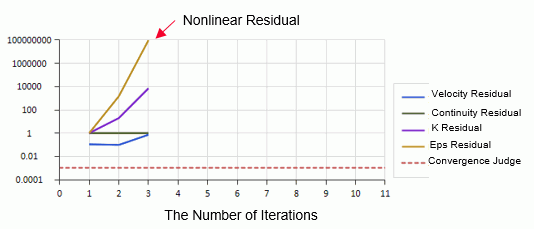
There may be two cases where the calculation does not converge.
The residual becomes larger as the calculation is repeated (Diversion)
For some reason, the calculation is not getting close to the convergence at all.
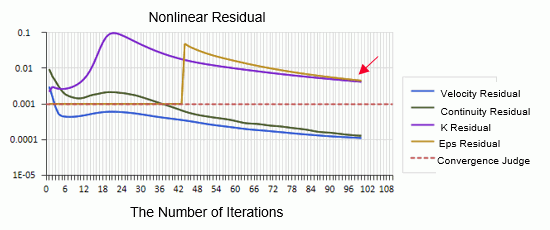
The residual does not become smaller than the value for convergence judgment within the specified number of iterations (Non-convergence)
The accuracy is not high.
If the residual comes closer to the value for the convergence judgment, it can be said that the calculation is close to the convergence.
2. Relaxation Factor
To prevent divergence, the relaxation factor for each physical quantity is set to a value smaller than 1 by default.
Steady-state Analysis
Flow velocity: 0.7
Pressure: 0.3
K: 0.7
ε: 0.7
Temperature: 0.9
Diffusion: 0.9
In many cases, a calculation does not diverge with the default values. If it diverges, it may be necessary to set the smaller values.
If the calculation does not reach the value for convergence judgment though it is coming closer to it, the convergence may be reached quicker by changing the judgment value larger.
The relaxation factor can be set in Detailed Settings of Fluid Analysis on the Fluid Analysis tab and the Fluid-Thermal Analysis tab.
Each relaxation factor is associated with the item shown below.
Flow velocity -> Flow velocity residual
Pressure -> Continuous residual, inflow rate/outflow rate
K -> K residual
Ε -> ε residual
Temperature -> Temperature residual
Diffusion -> Diffusion residual
The following shows examples of changing relaxation factors.
Case: Divergence between inflow rate and outflow rate increases with time
By reducing the relaxation factor of pressure, the divergence may be controlled.
Calculate while decrementing by 0.1, for instance, from 0.3 to 0.2 and to 0.1, until the divergence is suppressed.
If the calculation diverges even with the relaxation factor of 0.1 or less, it may indicate problems with the model or meshes. You should check the meshes.
In many cases, if the relaxation factor is reduced, the calculation may not converge as the continuous residual does not decrease easily.
Repeated calculation with a restart function may help calculation converge with an increased relaxation factor at every calculation.
Case: Flow velocity and continuity converge while K and ε do not.
By increasing the relaxation factors of K and ε, the convergence can be promoted.
It is recommended to increase the factor gradually (0.1 at a time for example) because too large value may make the calculation diverge.
Case: Residual fluctuates
The fluctuation can be controlled by reducing the relaxation factor, which may achieve convergence.
It may cause the calculation to diverge that the updates of pressure and flow velocity are not balanced properly. In this case,
By setting the ratio of pressure to flow velocity to 0.2/0.8 or 0.5/0.5, the total of which is 1, the calculation may converge.
Case: Calculation in the natural convection analysis (buoyancy taken into account) diverges.
By reducing the relaxation factor of temperature, the calculation may converge. It is recommended to reduce the relaxation factor by 0.1 at each step.
Case: Calculation in the natural convection analysis (buoyancy taken into account) does not converge.
If temperature does not come to a certain value over time and vary gradually, the relaxation factor of temperature may be too small.
As the factor approaches 1, for example from 0.9 to 0.99 and to 0.999, the calculation is likely to converge.
Transient Analysis
Flow velocity: 0.7
Pressure: 0.7
K: 0.8
ε: 0.8
Temperature: 0.99
Diffusion: 0.99
In many cases, a calculation does not diverge with the default values. If it diverges, it may be necessary to set the smaller values.
By selecting [For the transient analysis, use the same pressure calculation method as the steady-state analysis], it is possible to avoid calculation divergence.
In the transient analysis, the calculation will proceed to the next timestep even if it does not converge.
Thus, the calculation does not stop due to non-convergence. However, if the calculation proceeds with a large residual, the accuracy of the results may be low.
A smaller timestep or larger number of iterations in the transient analysis can increase the accuracy of calculation.
3. Check of Meshes
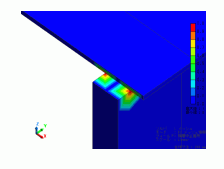
The results display of meshes allows for checking the creation status of layer meshes.
It helps you examine the cause of non-convergence.
The following aspects are mainly checked: mesh quality, number of nodes of the element, height correction factor, distance between facing surfaces, and layer blocking area.
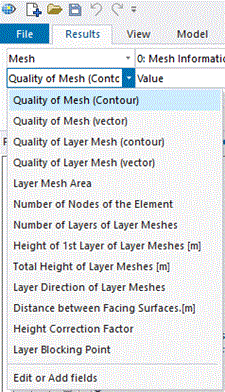
・ Quality of Mesh
The area with higher values (>100) may cause divergence or non-convergence.
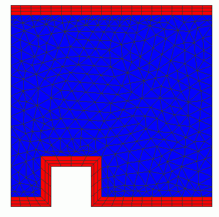
・ Layer Mesh Area
This allows you to check where layer meshes are created.
If the layer meshes are too thin, identify the cause by examining the height correction factor.
・ Number of Layers of Layer Meshes
Display the number of layers of layer meshes. It can be confirmed if the number of layers matches with the specified number.
・Height of 1st Layer of Layer Meshes/Total Height of Layer Mesh
Display the height of 1st layer of layer meshes and the total height of layer meshes.
Displayed values may be different from specified values due to automatic height correction.
If the difference is large, the model may have a problem in a portion with a significantly lower height correction factor.
・ Layer Direction of Layer Meshes
A layer direction of layer meshes at each node can be observed in vectors.
・Height Correction Factor
This will help you check where height is corrected to a lower level while layer meshes are created.
The portion with a significantly low correction factor, or the minimum correction factor, may have a problem with the model.
* To facilitate the identification of the minimum portion with the maximum/minimum display function, values are also assigned to inner nodes.
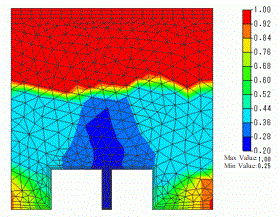
・ Distance between Facing Surfaces
Display the distance to the facing wall.
If the distance is significantly small, there may exist an unintended gap.
* To facilitate the identification of the minimum portion with the maximum/minimum display function, values are also assigned to inner nodes.
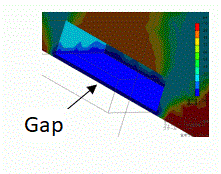
・ Layer Blocking Area
Display the area where layer meshing has failed. The area may prevent calculation convergence.
Please refer to [Notes for Creating Layer Meshes] for more information.
4. Display of Intermediate Results
The intermediate results during the iteration can be output if the calculation was diverged or did not converge.
If the calculation is suspended by Viewing Convergence and Intermediate Results, the same display is possible.
The intermediate results are not shown if the analysis is completed normally. If, however, [Output intermediate results in iteration as well] is selected in Detailed Settings of Fluid Analysis of the Fluid Analysis tab and the Fluid-Thermal Analysis tab,
the intermediate results are also displayed when the analysis is successfully finished.
Note that they will not be displayed if the [Delete intermediate results] or [Terminate with results treated as converged] button is clicked in the [Calculation Finished] dialog box.
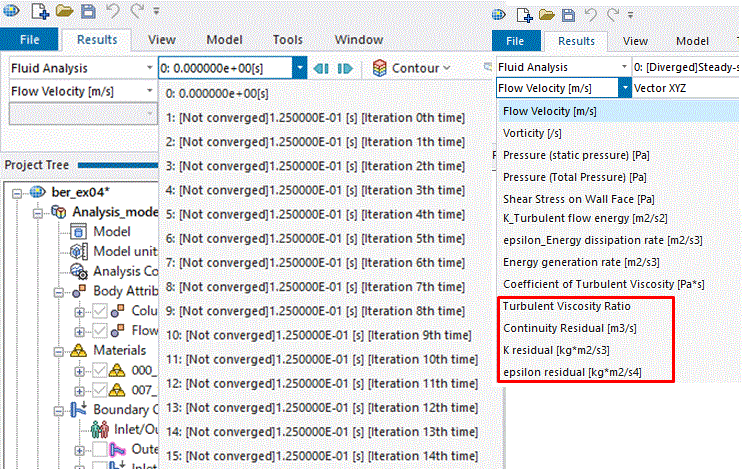
・ The result at each iteration can be viewed.
・ The residual distributions of the flow velocity, continuity, K, and ε can be viewed
The following can be examined.
It may be possible to determine the location of the cause of divergence and how many iterations were made before it occurred.
If the flow velocity fluctuates as the iteration continues, the calculation may not be solved by the steady-state analysis. The transient analysis may be suitable for the calculation in such a case.
If the fluctuation is seen around particular node only and does not affect the overall results, it can be judged that the calculation converged.
[Convergence Domain] close to 100% in the in-progress display is such a case.
5. Measures for Divergence
・ Change model / Modify mesh size
If the cause of divergence can be identified in [3. Check of Meshes] or [4. Display of Intermediate Results], the problem may be solved by changing the problematic portion of the model or reducing the mesh size.
・ Reduce relaxation factor (refer to [2. Relaxation Factor].)
・ Set a finer timestep in the transient analysis.
In the transient analysis, setting a finer timestep can help calculations converge.
When [Manual] is selected for the timestep and [Higher Accuracy] is further selected, in case of non-convergence, recalculations with a finer timestep will be conducted. Calculations can lead to convergence.
When [Automatic] is selected for the timestep, the timestep is adjusted based on Courant number,
and calculations with an appropriate timestep can lead to convergence. For the referred Courant number for adjustment, 1 or less for the free space analysis and 10 to 100 for other analyses are recommended.
・ Select [For the transient analysis, use the same pressure calculation method as the steady-state analysis] (for the transient analysis)
In the transient analysis, calculation method is different from the steady-state analysis in order to reduce the iterations.
It may cause divergence in some cases.
By using the same method as the steady-state analysis, convergence may be avoided and the calculation may converge although the iterations will increase.
If this option is selected, the relaxation factors of flow velocity and pressure in the steady-state analysis are used.
・ Restart
In the steady-state analysis, you can restart from any intermediate result of your choice.
Restarting with smaller relaxation factors from the result that is obtained before the divergence may converge calculation.
Setting for the restart is as follows.
1. Select [Use another analysis result (Results Import)] on the Fluid Analysis tab and the Fluid-Thermal Analysis tab.
2. In the specify results, select [Specify Analysis Model] and select the current analysis model name.
3. In the specify mode, select [Manual] and select the result mode you want to restart.
6. Solutions for Non-convergence
・ Change model / Modify mesh size
If the residual is not small, or not less than 0.1, or the residual largely fluctuates and is over 0.1, there may exist a problem with a model or meshes.
If the cause of non-convergence can be identified in [3. Check of Meshes] or [4. Display of Intermediate Results], the problem may be solved by changing the problematic portion of the model or reducing the mesh size.
・ Restart
If the calculation ended without convergence, the warning message below will show up.
If the residual shows a trend of reduction, restart may allow calculations to converge.
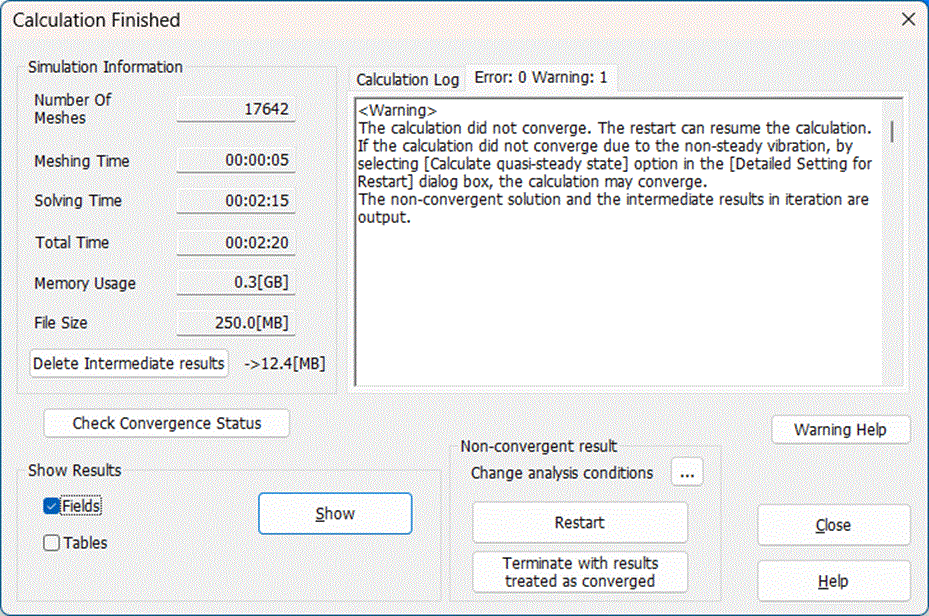
Analysis can be restarted by clicking the [Restart] button in the [Calculation Finished] dialog box.
Clicking the [Change analysis condition] button allows you to continue the analysis by modifying the relaxation factor or the value for the convergence judgment.
* [Use the last analysis result] will be selected on the Fluid Analysis tab and the Fluid-Thermal Analysis tab,
The analysis can be restarted by the method below as well.
With [Use the last analysis result] selected on the Fluid Analysis tab and the Fluid-Thermal Analysis tab, click [Run Mesher/Solver] and read the previous results to continue the analysis.
It is also possible to continue the analysis by modifying the relaxation factor or the value for convergence judgment.
In the steady-state analysis, you can restart from any intermediate result of your choice.
Setting for the restart is as follows.
1. Select [Use another analysis result (Results Import)] on the Fluid Analysis tab and the Fluid-Thermal Analysis tab.
2. In the specify results, select [Specify Analysis Model] and select the current analysis model name.
3. In the specify mode, select [Manual] and select the result mode you want to restart.
・ Adjust relaxation factor
Case: Calculation in the natural convection analysis (buoyancy taken into account) does not converge.
If temperature does not come to a certain value over time and vary gradually, the relaxation factor of temperature may be too small.
As the factor approaches 1, for example from 0.9 to 0.99 and to 0.999, the calculation is likely to converge.
Case: Calculations in the diffusion analysis with weight taken into account do not converge.
If diffusion value does not come to a certain value over time and vary gradually, the relaxation factor of diffusion may be too small.
As the factor approaches 1, for example from 0.9 to 0.99 and to 0.999, the calculation is likely to converge.
Case: Turbulent flow rate does not converge.
By increasing the relaxation factors of K and ε, for example, from 0.7 to 0.8, the calculation may converge.
・ Display the result by clicking [Terminate with results treated as converged] after the analysis has finished.
In some cases, the result may have enough accuracy even though the calculation did not converge.
The results will be displayed assuming the calculation has converged.
・ Select [Calculate quasi-steady state] if the problem cannot be solved in the steady-state analysis.
A problem which fluctuates periodically and cannot be solved by the steady-state analysis can converge if [Calculate quasi-steady state] is selected.
An instantaneous state of the vibration is output.
To restart an analysis, select [Calculate quasi-steady state] in [Detailed Setting for Restart] in the Fluid Analysis tab.
If the calculation does not converge, select [Calculate quasi-steady state in the case of non-convergence] in Detailed Setting of Fluid Analysis before the subsequent quasi-steady state calculation.
・ Switch the analysis type to transient, if the steady-state analysis cannot solve a problem
If a problem cannot be solved by the steady-state analysis because of periodic fluctuations, the transient analysis may solve the problem.
[Example 5: Transient Analysis of Flow around Cylinder]
・ Select [Convergence Judgment by Monitored Value]
If [Convergence Judgment by Monitored Value] is selected in Detailed Setting of Fluid Analysis,
the calculation will be judged to converge by a small variation of monitored values even though the residual does not converge.
If [Automatic Monitoring Setting] is selected in the detailed setting,
in the fluid analysis, the pressures (total pressure) and volumetric flow rates of all boundary conditions are registered for monitoring.
In the fluid thermal analysis, the maximum temperatures of all body attributes are also registered for monitoring.
To register monitored values separately, they can be set on the [Monitoring Tab].
There is a risk of not obtaining proper results if fewer iterations than normally required are performed.
・Switch the advection scheme to the 1st-order upwind differencing scheme
In the fluid analysis, it is known that the calculation result of the advection term is close to the analysis result of the material having high viscosity because of the numerical viscosity.
In the flow velocity calculation, the velocity difference hardly occurs with the material having high viscosity. In the temperature calculation, the temperature difference hardly occurs with the material having high thermal conductivity.
The default setting (2nd-order upwind differencing scheme) reduces the numerical viscosity at each iteration. It may reduce the likelihood of convergence.
By switching to the 1st-order upwind differencing scheme, the number of iterations may be reduced.
The numerical viscosity can be minimized by reducing the mesh size. When using the 1st-order upwind differencing scheme, the accuracy can be secured by reducing the mesh size.
The advection scheme can be modified in Detailed Settings of Fluid Analysis of the Fluid Analysis tab and Fluid-Thermal Analysis tab.
7. Solutions for Non-convergence in Thermal Analysis while Fluid Analysis Converged
・Switch the advection scheme to the 1st-order upwind differencing scheme
In the fluid analysis, it is known that the calculation result of the advection term is close to the analysis result of the material having high viscosity because of the numerical viscosity.
In the temperature calculation, the temperature difference hardly occurs with the material having high thermal conductivity.
The default setting (2nd-order upwind differencing scheme) reduces the numerical viscosity at each iteration. It may reduce the likelihood of convergence.
By switching to the 1st-order upwind differencing scheme, the number of iterations may be reduced.
The numerical viscosity can be minimized by reducing the mesh size. When using the 1st-order upwind differencing scheme, the accuracy can be secured by reducing the mesh size.
The advection scheme can be modified in Detailed Settings of Fluid Analysis of the Fluid Analysis tab and Fluid-Thermal Analysis tab.
・ Reduce the value for convergence judgment and restart
Low accuracy of the results of fluid analysis may be the cause.
By reducing the value for the convergence judgment so as to improve the accuracy, the calculation may converge.
The value for convergence judgment can be modified in Detailed Settings of Fluid Analysis of the Fluid Analysis tab and Fluid-Thermal Analysis tab.