


|
Home / Technical Notes / Fluid Analysis/Fluid-Thermal Analysis / Free Surface Analysis (VOF Method)
Free Surface Analysis (VOF Method)
The free surface analysis (VOF method) , which is an option in the fluid solver (Bernoulli), is explained.
The VOF method is used to analyze multiphase flows and track the movement of free surfaces or boundaries between different phases.
1. VOF Method
1.1 Features
·Fixed meshes are used for analysis (mesh boundary not equal to phase boundary).
·The occupancy rate for each phase is represented as a volume fraction.
·The flow is calculated with the averaged material properties that are weighed with volume fractions.
·The boundary is defined as where there is a change in volume fraction.
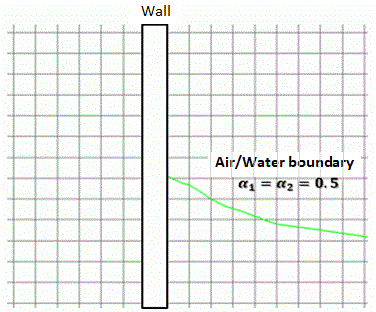
When phase 1 is air and phase 2 is water, the volume fraction of phase 2 will be as follows.
The transition domain is the boundary domain between air and water.
This means the boundary has a width of the transition domain, while the isosurface where both α1 and α2 are 0.5 is also regarded as the boundary.
|
Air phase: α1 = 1.0 Water phase: α2 = 0.0 |
|---|---|
|
Air phase: 0.0 < α1 < 1.0 Water phase: 0.0 < α2 < 1.0 |
|
Air phase: α1 = 0.0 Water phase: α2 = 1.0 |

1.2 Examples
[Example 14: Dam Break Analysis]
[Example 15: Droplet Formation Analysis]
[Example 16: Capillary Action Analysis]
[Example 17: Solder Wicking Analysis]
1.3 Solved Equation
See Differential Equations in Fluid Analysis/Fluid-Thermal Analysis for more information.
2. External Force Taken into Account in VOF Method
Weight
The VOF method treats the mixture of phases having different densities, where gravity generates a downward force that causes the higher-density phase to descend.
The fluid will be moved by the weight, which is calculated based on the average density weighed with the volume fractions.
To take into account the weight for analysis, select [Take into account weight].
Surface Tension
On the free surface which is a boundary between different phases, surface tension according to the curvature of the surface is generated.
In the contact area with a solid surface, the surface tension is corrected based on the contact angle.
The contact angle indicates the hydrophilicity or hydrophobicity to the solid wall.
In the case that phase 2 is water, a smaller contact angle, higher hydrophilicity, and a larger contact angle, higher hydrophobicity.
|
Contact Angle < 90° Hydrophilicity |
Contact Angle > 90° Hydrophobicity |
|---|---|
|
|
|


To take into account the surface tension for analysis, select [Take into account surface tension].
Set a coefficient of surface tension and a contact angle for each combination of phases.
A contact angle is set to the default value in the analysis condition.
In Body attribute > Solid tab > Multiphase flow setting, set a contact angle for each solid body. -> [Multiphase Flow Setting [Solid Wall Face]]
The mixture of hydrophilic and hydrophobic solids is applicable for the analysis.
The contact angle can be set to the specific boundary. -> [Multiphase Flow Setting [Wall Face]]
While the boundary moving, the contact angle is not constant but varies depending on its moving direction and moving speed. The term dynamic contact angle is used for it.
The entered contact angle is a static contact angle, that is, a contact angle under a steady state. Before the steady state, the transient contact angle might differ from the entered one.
See Differential Equations in Fluid Analysis/Fluid-Thermal Analysis for more information about the calculation.
2. Cautions When Performing VOF Method
3.1. Application Range of VOF Method
The method can be used to analyze the phenomena where there is a distinct boundary between fluids, such as gas and liquid, and those do not mix.
Only the transient analysis is used to calculate the movement of this boundary.
To obtain the steady state, the transient analysis takes a long time before the steady state will be reached.
3.2 Timestep
If the boundary traverses multiple meshes within a single timestep, the accuracy of the boundary representation will decrease significantly. To avoid it, a very small timestep is necessary.
When the moving speed of the boundary is constant, smaller meshes require a smaller timestep. The VOF method requires much more computation time than the conventional fluid analysis.
If the initial state is unstable, the calculation can diverge shortly after the analysis starts. To avoid the problem, a smaller timestep is necessary.
Courant number can be used as a reference for timestep.
It indicates how many meshes a boundary traverses in a single timestep.
If Courant number exceeds 1, the accuracy extremely degrades.
Courant number is defined as follows.

C: Courant Number, U: Flow Velocity [m/s], Δt: Timestep [s], d: Mesh Size [m]
The timestep that achieves Courant number of 1 or less is required, if possible.
The distribution of Courant number can be checked on the analysis result fields.
The maximum Courant number in the analysis domain and the recommended timestep calculated from the maximum Courant number can be checked.
3.3 Steady State Calculation
To calculate the steady state, the transient analysis needs a huge amount of timesteps.
If the steady state can not be achieved under the predetermined timestep setting, the calculation can be continued by Restart.
In the calculation where a contact angle is taken into account, a steady state might not be reached due to the vibration of the boundary.
In this case, about 10 times larger viscosity can suppress the vibration.
In the steady state calculation, the state where surface tension and weight are balanced is calculated.
A change in viscosity will not affect the results of the steady-state calculation.
The viscosity can be adjusted at the restart. By changing it to about 10 times larger viscosity at the stage near to the steady state, the steady state can be calculated faster.
See [Example 16: Capillary Action Analysis] for more information.
3.4 Mesh
Small meshes with regularity are generally desirable to reproduce the boundary shape precisely.
For 2D analysis and 3D analysis, rectangular free mesh/sweep mesh and hexahedral free mesh/sweep mesh are recommended, respectively.
In 3D analysis, the use of hexahedral free mesh may cause poor quality of mesh and non-convergence of calculation,
it is recommended that the shape is designed such that it can be meshed by sweep mesh.
When hexahedral free mesh/sweep mesh is used, the ratio at which sweep meshes have been generated will be displayed on the output window as shown below.
Cutting the body such that the ratio becomes 100% can improve the success rate in the calculation of VOF method.
See [Sweep Mesh and Free Face] for more information on sweep mesh.

As meshes with regularity are desirable, [Do not create layer mesh] is recommended to select.
A flow with a large Reynolds number, which requires layer meshes for analysis, is difficult to use for VOF method.
3.5 Recommended Settings for Femtet
From the cautions above, the settings below are recommended.
After setting VOF, the settings below are automatically performed.
2D Analysis/Axisymmetric Analysis
Mesh Setting: Rectangular Free Mesh/Sweep Mesh
Control Volume Type: Cell-centered Base
Layer Mesh: Do not Create Layer Mesh
3D Analysis
Mesh Setting: Hexahedral Free Mesh/Sweep Mesh
Control Volume Type: Cell-centered Base
Layer Mesh: Do not Create Layer Mesh
4. How to Set
4.1 Analysis Condition
In Analysis condition > Fluid Analysis tab > [Multiphase Flow Setting], performs phase setting and option setting.
To perform Restart, in Analysis Condition > Fluid Analysis tab > Initial Value/Restart, select [Use the last analysis results] or [Use another analysis result].
4.2 Boundary Condition
In Analysis Condition > Fluid tab > [Multiphase Flow Setting [Inflow]], sets an inflow phase.
In Analysis Condition > Fluid tab > [Multiphase Flow Setting [Wall Face]], sets the contact angle of the wall face.
4.3 Body Attribute
In Body Attribute > Solid tab > [Multiphase Flow Setting [Solid Wall Face]], set the contact angle of the solid wall face.
4.3 How to Set Initial State
The initial state is determined based on the material properties assigned to the bodies.
It depends on how the phase 2 or phase 3 body is arranged relative to the phase 1 body.
(1) The phase 2 or phase 3 body does not overlap with the phase 1 body.
The analysis is performed using the specified phases as initial states.
(2) The phase 2 or phase 3 body partially overlap with the phase 1 body.
The phase 2 or phase 3 body is transferred to the phase 1 body in the form of a volume fraction and analyzed.
Only the overlapping parts are for the free surface analysis.
The first phase domain is the analysis domain. A body must be present, which is assigned the material property registered as the first phase.
As bodies that are assigned the material properties of the second and third phases are transferred in the form of a volume fraction, the boundary conditions set for those bodies are not applicable.
Therefore, apply boundary conditions to the bodies that are assigned the material property of the first phase.
The transferred volume fractions are checked at [Initial Volume Fraction of Phase 2] and [Initial Volume Fraction of Phase 3] fields for [Mesh] of Solver on the [Result] tab.
|
|
Configuration |
Transferred State in Analysis Domain |
|---|---|---|
|
|
|
|
|
|
|
|
|


If the mesh size is larger, there may be a decrease in analysis accuracy due to differences in solving shape during the meshing and transferring process.
The accuracy of the transfer can be checked on the output window.

The transferred domain rate is a rate of the area (volume) of B to the area (volume) of A in the table below.
If the second or third phase body is overlapped and included, the ratio should be 100%. However, if the region defined as the first phase that is transferred has a large mesh size, the ratio will be off from 100%.
To achieve a ratio closer to 100%, the mesh size of the domain defined as the first phase that is transferred must be smaller.
|
Domain Defined as Phase 2 (A) |
Domain after Transferred (B) |
|---|---|
|
|
|

5. How to Display Results
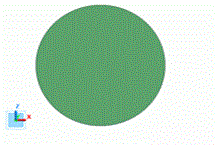
·Volume fraction for each phase can be displayed in fields.
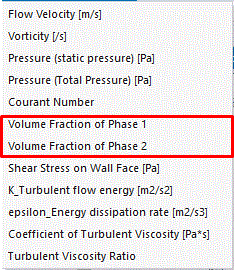
·To view a boundary, use isoline contours (in 2D analysis or for the cross section in 3D analysis), or isosurface contours (in 3D analysis) for display.


·The transition of volume and mass of each phase can be checked in the results table.
(In the 2D analysis, the volume that is calculated with the thickness in the depth direction is presented)
·The transition of the maximum Courant number and recommended timestep can be checked in the results table.

·The position coordinates of the boundary are extracted.
To obtain the position (coordinates) for the volume fraction of 0.5, use the following macro.
"VOF_CaptureBoundary_Macro.xlsm"
See [Example 16: Capillary Action Analysis] for the details.
6. How to Cope with Warnings or Errors
<Warning>
(1) The volume or area of the transferred domain as an initial value is small compared with that of the specified fluid phase domain as phase 2 (90% or less).
In the state of [overlapped and with Protrusion] of 4.3, displayed.
Check for the proper transferred state.
<Error>
(1) E2292: In the free surface analysis (VOF method), the volume fraction is not initialized properly. (transferred domain rate: 5% or less)
In the state of [overlapped and with Protrusion] of 4.3, too small a transferred area will cause an error.
Modifies the shapes of overlapped bodies.
(2) E2293: In the free surface analysis (VOF method), the volume fraction is not initialized properly. (transferred domain rate: 120% or more)
If the mesh size is too large, the transfer ratio may get away from 100%.
Smaller mesh sizes can solve the problem.
(3) The specified material of the fluid phase is not registered in the free surface analysis (VOF method). In the free surface analysis setting, the material of the phase must be added.
Check the phase setting in Analysis Setting > Fluid Analysis tab > [Multiphase Flow Setting].