Home / Tutorial / 04. Macro Execution
04. Macro Execution
Run the macro.
-
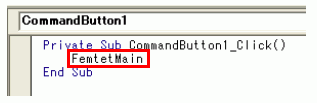
To call the FemtetMain method, add a definition to the CommandButton1_Click method created in 02. Command Button Creation by Excel.
|
|
-
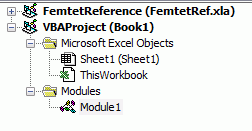
Double click [FemtetMacro] to open.
|
|
-
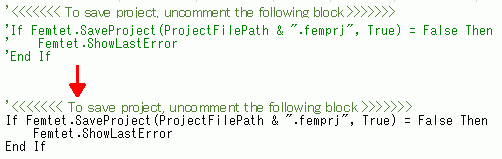
If you want to save the project, uncomment the block for the project saving in the FemtetMain procedure (subroutine).
|
|
-
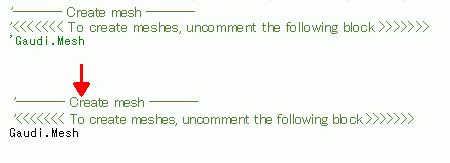
If you want to perform meshing, uncomment the line for the meshing in the FemtetMain procedure (subroutine).
|
|
-
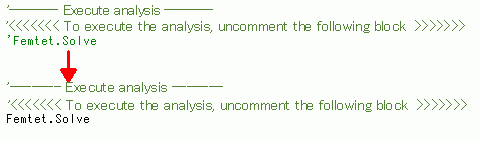
If you want to perform analysis, uncomment the line for the analysis execution.
|
|
-
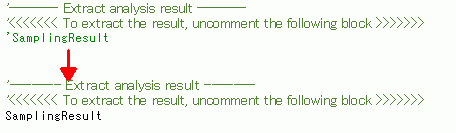
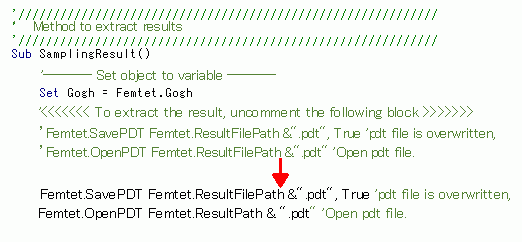
If you want to save the results of analysis, uncomment the line for extracting analysis results.
Also, uncomment the block for the method to extract results which is written further down.
|
|
-
Save the Excel worksheet.
|
|
-
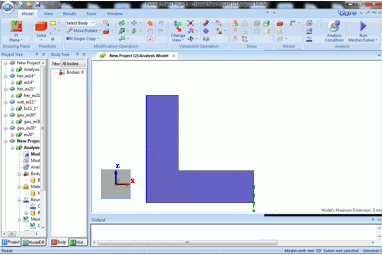
By pushing the command button in Excel worksheet, macro runs to create the cantilever model in Femtet.
If you uncomment meshing or analysis, the operations will be automatically executed.
-
If it does not work correctly, it might be necessary to check if the setup is done properly.
See this for the detail.
|
|
 Prev Next


