


|
Home / Tutorial / 05. Macro Change (Model's Shape)
05. Macro Change (Model's Shape)
Modify the length of the cantilever.
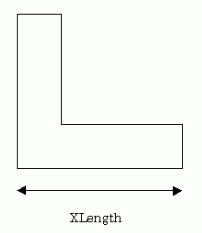
Modify the macro to get the XLength form Excel sheet.
Modified macro is shown as below (modified portion is shown in red).
CommandButton1_Click Method
|
Private Sub CommandButton1_Click() Dim XLength As Double
'Set parameters. XLength = ActiveSheet.Cells(1, 2).Value FemtetMain XLength
End Sub |
Get the value in the cell B1 with ActiveSheet.Cells(1, 2).Value
|
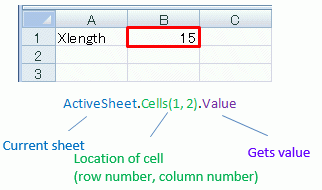
-
If you write macro over the multiple worksheets, specify the worksheet name in place of ActiveSheet to avoid malfunction.
Example : Worksheets("Sheet1").Cells(1, 2).Value
FemtetMacro Module
Option Explicit
Dim Femtet As New CFemtet
Dim Als As CAnalysis
Dim BodyAttr As CBodyAttribute
Dim Bnd As CBoundary
Dim Mtl As CMaterial
Dim Gaudi As CGaudi
Dim Gogh As CGogh
'/////////////////////////explanation of null***/////////////////////////
'//The following 4 variables are used in the Multi*** methods of the CGaudi class .
'//For example, if you want to execute MultiFillet without specifying vertex as parameter
'//to fillet multiple edges only, use nullVertex().
'//If the setting is [Gaudi.MultiFillet nullVertex,Edge],
'//you can fillet multiple edges only.
'/////////////////////////////////////////////////////////////
Global nullVertex() As CGaudiVertex
Global nullEdge() As CGaudiEdge
Global nullFace() As CGaudiFace
Global nullBody() As CGaudiBody
'///////////////////////////////////////////////////
'Declare modeling
Private pi As Double
'///////////////////////////////////////////////////
'////////////////////////////////////////////////////////////
' Main method
'////////////////////////////////////////////////////////////
Sub FemtetMain(XLength As Double)
Dim ProjectName As String
'------- Autostart Femtet (Comment out the following line unless Excel is used.) -------
Workbooks("FemtetRef.xla").AutoExecuteFemtet
'------- Create project -------
If Femtet.OpenNewProject() = False Then
Femtet.ShowLastError
End If
'------- Set database -------
AnalysisSetUp
BodyAttributeSetUp
MaterialSetUp
BoundarySetUp
'------- Create model -------
Set Gaudi = Femtet.Gaudi
InitVariables
MakeModel XLength
'------- Set general mesh size -------
'<<<<<<< Set to -1 for automatic calculation >>>>>>>
Gaudi.MeshSize = 2.0
'------- Save project -------
Dim ProjectFilePath As String
ProjectFilePath = "C:\MacroEx1_ProjectFile\MacroEx1"
'<<<<<<< To save project, uncomment the following block >>>>>>>
'If Femtet.SaveProject(ProjectFilePath & ".femprj", True) = False Then
' Femtet.ShowLastError
'End If
'------- Create mesh -------
'<<<<<<< To create meshes, uncomment the following block >>>>>>>
Gaudi.Mesh
'------- Execute analysis -------
'<<<<<<< To execute the analysis, uncomment the following block >>>>>>>
Femtet.Solve
'------- Extract analysis result -------
'<<<<<<< To extract the result, uncomment the following block >>>>>>>
SamplingResult
End Sub
'////////////////////////////////////////////////////////////
' Set analysis condition
'////////////////////////////////////////////////////////////
Sub AnalysisSetUp()
'------- Set object to variable -------
Set Als = Femtet.Analysis
'------- Common setting of analysis condition -------
Als.AnalysisType = GALILEO_C
Als.Space = TWO_C
End Sub
'////////////////////////////////////////////////////////////
' Set all body attributes
'////////////////////////////////////////////////////////////
Sub BodyAttributeSetUp()
'------- Set object to variable -------
Set BodyAttr= Femtet.BodyAttribute
'------- Set body attribute -------
BodyAttributeSetUp_hari
End Sub
'////////////////////////////////////////////////////////////
' Setting body attribute. Body attribute name: hari
'////////////////////////////////////////////////////////////
Sub BodyAttributeSetUp_hari()
'------- Variable to save body attribute index -------
Dim Index As Integer
'------- Add body attribute -------
BodyAttr.Add "hari"
'------- Set body attribute index -------
Index = BodyAttr.Ask("hari")
'------- Thickness/Width (Length) -------
BodyAttr.Length(Index).Length = (6)
End Sub
'////////////////////////////////////////////////////////////
' Set all materials
'////////////////////////////////////////////////////////////
Sub MaterialSetUp ( )
'------- Set object to variable -------
Set Mtl = Femtet.Material
'------- Set material -------
MaterialSetUp_Brass
End Sub
'////////////////////////////////////////////////////////////
' Set material. Material name : Brass
'////////////////////////////////////////////////////////////
Sub MaterialSetUp_Brass ( )
'------- Variable to save material index -------
Dim Index As Integer
'------- Add material -------
Mtl.Add "Brass"
'------- Set material index -------
Index = Mtl.Ask ("Brass")
'------- Elasticity -------
Mtl.Elasticity(Index).sY = (1) * 10 ^ (10)
End Sub
'////////////////////////////////////////////////////////////
' Set and save all boundaries
'////////////////////////////////////////////////////////////
Sub BoundarySetUp()
'------- Set object to variable -------
Set Bnd = Femtet.Boundary
'------- Set boundary -------
BoundarySetUp_RESERVED_default
BoundarySetUp_Fix
BoundarySetUp_Force
End Sub
'////////////////////////////////////////////////////////////
' Set boundary. Boundary name : RESERVED_default
'////////////////////////////////////////////////////////////
Sub BoundarySetUp_RESERVED_default()
'------- Variable to save material index -------
Dim Index As Integer
'------- Add boundary -------
Bnd.Add "RESERVED_default"
'------- Set boundary index -------
Index = Bnd.Ask("RESERVED_default")
End Sub
'////////////////////////////////////////////////////////////
' Set boundary. Boundary name : Fix
'////////////////////////////////////////////////////////////
Sub BoundarySetUp_Fix()
'------- Variable to save boundary index -------
Dim Index As Integer
'------- Add boundary -------
Bnd.Add "Fix"
'------- Set boundary index -------
Index = Bnd.Ask("Fix")
'------- Mechanical boundary -------
Bnd.Mechanical(Index).Condition = DISPLACEMENT_C
End Sub
'////////////////////////////////////////////////////////////
' Set boundary. Boundary name : Force
'////////////////////////////////////////////////////////////
Sub BoundarySetUp_Force()
'------- Variable to save boundary index -------
Dim Index As Integer
'------- Add boundary -------
Bnd.Add "Force"
'------- Set boundary index -------
Index = Bnd.Ask("Force")
'------- Mechanical boundary -------
Bnd.Mechanical(Index).Condition = FACE_LOAD_C
Bnd.Mechanical(Index).SetT (0#), (0#), (-10)
End Sub
'////////////////////////////////////////////////////////////
' Method to define variables
'////////////////////////////////////////////////////////////
Sub InitVariables()
pi = 3.1415926535897932
End Sub
'////////////////////////////////////////////////////////////
' Method to create model
'////////////////////////////////////////////////////////////
Sub MakeModel(XLength As Double)
'------- Definition of body array variables -------
Dim Body() As CGaudiBody
'------- Set not to show model on screen -------
Gaudi.RedrawMode = False
'------- SetPlane -------
Dim Plane0 As New CGaudiPlane
Plane0.Location.SetCoord 0#, 0#, 0#
Plane0.MainDirection.SetCoord 0#, -1#, 0#
Plane0.RefDirection.SetCoord 1#, 0#, 0#
Gaudi.SetPlane Plane0
'------- CreateRect -------
ReDim Preserve Body(0) As CGaudiBody
Dim Point0 As New CGaudiPoint
Point0.SetCoord 0, 0, 0
Set Body(0) = Gaudi.CreateRect(Point0, XLength, 6)
'------- CreateRect -------
ReDim Preserve Body(1) As CGaudiBody
Dim Point1 As New CGaudiPoint
Point1.SetCoord 0, 0, 6
Set Body(1) = Gaudi.CreateRect(Point1, 6, 14)
'------- Unite -------
ReDim Preserve Body(2) As CGaudiBody
Dim BodyArray0(0) As CGaudiBody
Dim BodyArray1() As CGaudiBody
Set BodyArray0(0) = Body(1)
Body(0).Unite BodyArray0, BodyArray1, True
Set Body(2) = BodyArray1(0)
'------- SetName -------
Body(2).SetName "hari", "Brass"
'------- AddBoundary -------
Dim Edge0 As CGaudiEdge
Set Edge0 = Body(2).GetEdgeByID(21)
Edge0.AddBoundary "Fix"
'------- AddBoundary -------
Dim Edge1 As CGaudiEdge
Set Edge1 = Body(2).GetEdgeByID(13)
Edge1.AddBoundary "Force"
'-----------Redraw the model-----------
Gaudi.Redraw
End Sub
'////////////////////////////////////////////////////////////
' Method to extract results
'////////////////////////////////////////////////////////////
Sub SamplingResult()
'------- Set object to variable -------
Set Gogh = Femtet.Gogh
'<<<<<<< To extract the result, uncomment the following block >>>>>>>
Femtet.SavePDT Femtet.ProjectPath & Femtet.ProjectTitle & ".pdt", True 'As pdt file will be overwritten, rename it if necessary.
Femtet.OpenPDT Femtet.ProjectPath & Femtet.ProjectTitle & ".pdt" 'Open pdt file.
End Sub
With this macro, model with the specified XLength is analyzed.
Below is the figure of results (displacement vector diagram).
-
You need to set up the result display manually.
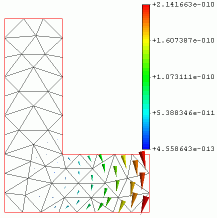
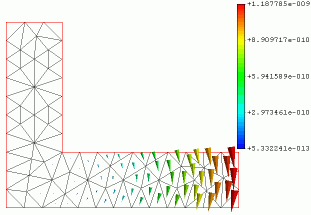
XLength = 15 XLength = 25

