


|
Home / Tutorial / 06. Macro Change (Condition Change and Results))
06. Macro Change (Condition Change and Results))
Lastly, we perform the condition change with batch process.
Change the length of the cantilever and calculate the maximum displacement in each condition.
Modified portion of the macro is shown in red as below.
Change of CommandButton1_Click Method
Private Sub CommandButton1_Click()
Dim i As Integer
Dim XLength As Double
'Display the explanation of result value in the cell.
ActiveSheet.Cells(1, 1).Value = " XLength"
ActiveSheet.Cells(2, 1).Value = "Maximum displacement [m]"
'For Loop to be executed.
'The number of loop cycles is i=1 up to 3.
'You can change loop cycles by changing this value.
For i = 1 To 3
'Initial value of XLength is 10. Incremental value per loop is 5.
'You can change the initial value and incremental value by changing these numbers.
XLength = 10 + 5 * i
FemtetMain XLength, i
Next i
End Sub
Change of FemtetMain Procedure
'/////////////////// Main method /////////////////////
Sub FemtetMain(XLength As Double, i As Integer)
(skip)
'------- Extract analysis result -------
'<<<<<<< To extract the result, uncomment the following block >>>>>>>
SamplingResult i
'////////// Calculate maximum displacement in Z direction ///////////
CalcMaxDisp XLength, i
End Sub
'////////////////////////////////////////////////////////////
' Method to extract results
'////////////////////////////////////////////////////////////
Sub SamplingResult(i As Integer)
'------- Set object to variable -------
Set Gogh = Femtet.Gogh
'<<<<<<< To extract the result, uncomment the following block >>>>>>>
Femtet.SavePDT Femtet.ResultFilePath & "_"& i & ".pdt", True 'As pdt file is overwritten, rename it if necessary.
'Femtet.OpenPDT Femtet.ResultFilePath &".pdt" 'Open pdt file.
End Sub
Addition of Calculation Procedure for Maximum Displacement
Sub CalcMaxDisp(XLength As Double, i As Integer)
Dim Gogh As CGogh
Dim nNode As Long
Dim nElm As Long
Dim j, k As Integer
Dim dMaxDisp, dTmp As Double
Dim ElmIndex As Long
Dim result () As CComplex
'Setting
Set Gogh = Femtet.Gogh
'+++++++ Open the result file +++++++
If (Femtet.OpenPDT (Femtet.ResultFilePath & "_" & i & ".pdt”) = False) Then
MsgBox "Failed to read the result file"
End
End If
'+++++++ Initialization and setting +++++++
nNode = Gogh.Data.nMeshNode
dMaxDisp = 0#
Gogh.Galileo.Vector = GALILEO_DISPLACEMENT_C
'+++++++ Loop maximum displacement calculation in Z direction +++++++
For j = 0 To nNode - 1 'For Loop with the number of nodes
nElm = Gogh.Data.MeshNodeArray(j).nParentMeshElement
For k = 0 To nElm - 1 'For Loop with the number of parent elements
ElmIndex = Gogh.Data.MeshNodeArray(j).ParentMeshElementArray(k).Index
Gogh.Galileo.GetVectorAtNode j, ElmIndex, result
dTmp = Abs(result (2).Real) '”2” means Z direction.
If dTmp > dMaxDisp Then dMaxDisp = dTmp
Next k
Next j
'+++++++ Display results +++++++
MsgBox dMaxDisp, vbInformation, "Maximum displacement [m]"
With ActiveSheet
.Cells(1, i + 1).Value = XLength
.Cells(2, i + 1).Value = dMaxDisp
End With
End Sub
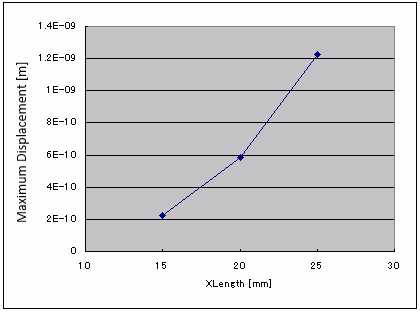
Execute looping by the number specified in the CommandButton1_Click and the result will be output to Excel.

-
Depending on the version of Femtet, the results might be slightly different.
-
The maximum displacement of the color scale and that of the macro calculation differ.
This is because Femtet calculates the displacement at the gravity center of element while the macro calculates it at the node of element.
The graph of the result is shown as below.
This is the end of the tutorial.

