


|
Home / How to Set Analysis Condition / List of Analysis Condition Tabs / Electric-Thermal Tab
Electric-Thermal Analysis Tab
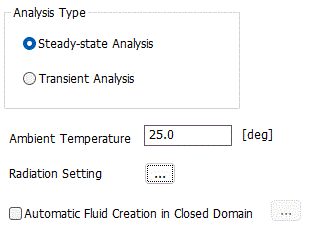
Analysis conditions for the electric-thermal analysis are set on this tab. The solver is Coulomb and Watt.
It is in the [Analysis Condition Setting] dialog box. See also [How to Set Analysis Condition].
|
Setting Item |
Notes |
|
Analysis Type |
Steady-state analysis There is no time dependency.
Transient analysis Transient states are analyzed.
|
Options
|
Options |
Notes |
|
Ambient Temperature |
Sets the ambient temperature.
Used for various temperature settings.
・Ambient temperature and ambient radiation temperature on the [Thermal] tab.
・Unless specified individually, the ambient temperature set here is used as the ambient radiation temperature.
|
|
Radiation Setting |
Enables the settings relating to the radiation.
・Outer boundary condition setting ・Default value of emissivity ・Emissivity of each body attribute ・Emissivity of each boundary condition
Click
|
|
Automatic Fluid Creation in Closed Domain |
if selected, a model of fluid can be automatically created in the closed domain surrounded by solids. Click the button |
 to show [
The Relating Tabs
The relating tabs are [Transient Analysis], [High-Level Setting], [Monitoring].
How to Modify Analysis Conditions
To modify the analysis conditions, go to [Model] tab

and click [Analysis Condition]  .
.