


|
Home / How to Set Analysis Condition / List of Analysis Condition Tabs / Electromagnetic-Thermal Tab
Electromagnetic-Thermal Tab
Analysis conditions for the electromagnetic-thermal coupled analysis are set on this tab. The solvers are Hertz and Watt.
It is in the [Analysis Condition Setting] dialog box. See also [How to Set Analysis Condition].
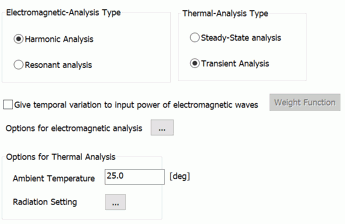
-
The analysis space for electromagnetic-thermal analysis is fixed to 3D.
|
Setting Item |
Notes |
|
Analysis Types (for electromagnetic analysis) |
Harmonic Analysis Solves the response to sinusoidal load, voltage (AC) and current (AC).
Resonant Analysis Solves the mechanical resonance and the electric resonance.
|
|
Analysis Types (for thermal analysis) |
Steady-state Analysis There is no time dependency.
Transient Analysis Transient states are analyzed. *When coupling with the electromagnetic harmonic analysis, applicable only at a single frequency of a discrete sweep.
|
Options
|
Options |
Notes |
|
Options Setup |
Click this button
|
|
Ambient Temperature |
Sets the ambient temperature. Used for various temperature settings. ・Ambient temperature and ambient radiation temperature on the [Thermal] tab in the boundary condition. ・Unless specified individually, the ambient temperature set here is used as the ambient radiation temperature. |
|
Radiation Setting |
Enables the settings relating to the radiation. ・Outer boundary condition setting ・Default value of emissivity ・Emissivity of each body attribute ・Emissivity of each boundary condition Click |
|
Give Temporal Variation to Input Power of Electromagnetic Waves |
Available if both electromagnetic-harmonic analysis and thermal transient analysis are selected. The weight that changes over time is given to the heat quantity caused by the electromagnetic waves. It gives the same effect that input power is changed over time.
For setup, tick the option of [Give temporal variation], click [Weight Function], and enter the temporal variation of weight in the [Time-Weight] table.
|
 . The
. TheThe Relating Tabs
The relating tabs are [Open Boundary], [Harmonic Analysis], [Resonant Analysis], [Transient Analysis], [High-Level Setting], and [Monitoring].
How to Modify Analysis Conditions
To modify the analysis conditions, go to [Model] tab

and click [Analysis Condition]  . The dialog box will appear.