Femtet Help/Manual
 

Home / Tutorial / Simple Fluid-Thermal Coupled Analysis (Pascal/Watt) / 06.Set the Boundary Conditions

00

01

02

03

04

05

06

07

08

09

06.Set the Boundary Conditions

Set the boundary conditions.
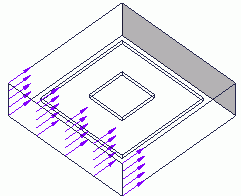
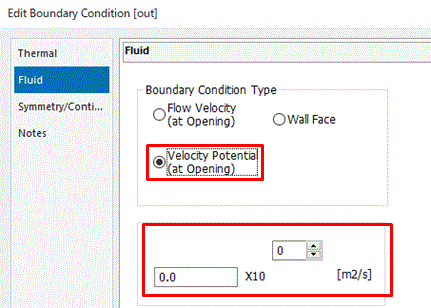
The flow velocity is given at the input opening and the velocity potential is given at the output opening.


  • The details are explained at [Fluid] tab of the boundary condition.


You need to set boundary conditions on some parts of model's body (topology).
It varies depending on the analysis.

The boundary conditions are distinguished by name. It is not allowed to assign the same name to the different boundary conditions
 

Procedure

  1. On the [Model] tab, go to
    ,
    and select [Select Face] on the drop-down list at .
     

  2. How to Switch the Object to Select
     

  3. Concept of Body and Topology


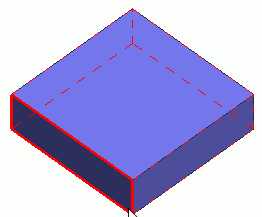
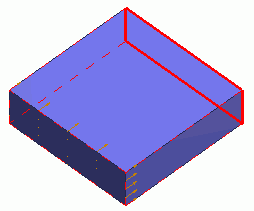
  1. On the air domain box, highlight and click to select the face perpendicular to the -Y axis.


Click

Highlight


Selected

  1. On the [Attribute] context tab, go to ,

    and click [Boundary Condition] .


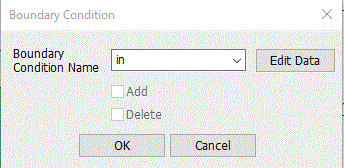
  1. In the [Boundary Condition] dialog box, enter

    Boundary Condition Name: in

    and click .
     

  2. Any name is acceptable.
     

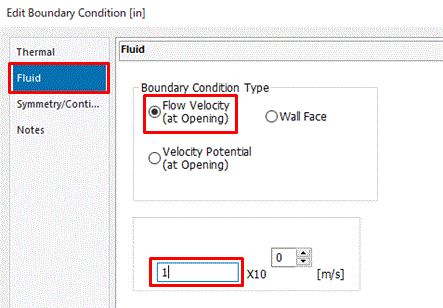
  1. In the [Edit Boundary Condition] dialog box,

    go to the [Fluid] tab

    select Flow Velocity at Boundary Condition Type

    and enter 1[m/s].

    Click .
     

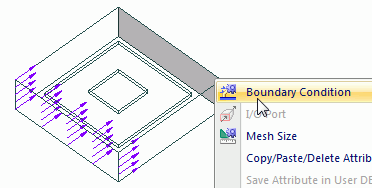
  1. Highlight and click to select the face perpendicular to the +Y axis.


Click

Highlight


Selected

  1. On the right-click menu, click [Boundary Condition].


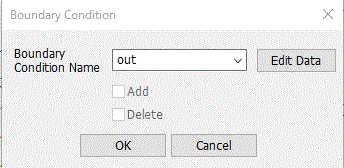
  1. In the [Boundary Condition] dialog box, enter

    Boundary Condition Name: out

    and click .
     

  2. Any name is acceptable.
     

  1. In the [Edit Boundary Condition] dialog box,

    go to the [Fluid] tab

    select Boundary Condition Type: Velocity potential

    enter 0 [m^2/s]


    and click .
     

    • The details are explained at [Fluid] tab of the boundary condition.


The boundary conditions have been set.


Prev Next