|
Home / How to Set Analysis Condition / List of Analysis Condition Tabs / High-Level Setting Tab
High-Level Setting Tab
Various high-level analysis conditions are set on this tab.
It is in the [Analysis Condition Setting] dialog box. See also [How to Set Analysis Condition].
|
Setting Item |
Notes |
||||||||||||||||||||||||||||||||||||||||||||||||||||
|
Nonlinear Analysis
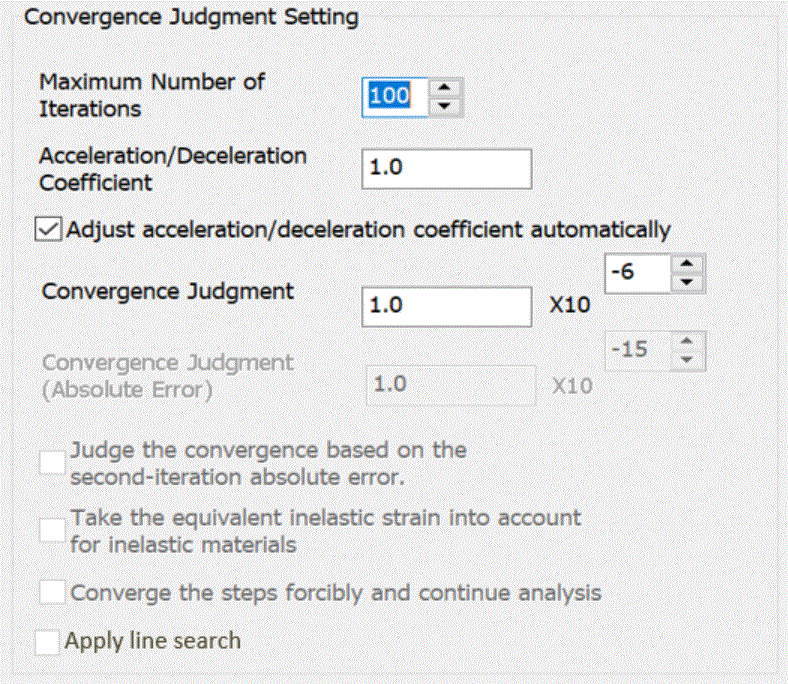
Convergence Judgment Setting |
Iterative calculations are repeated until the convergence is achieved in nonlinear analysis.
The calculation will stop when the iterations reach the [Maximum number of iterations].
If the nonlinear slope is too steep, the iterative calculations might not converge. Select "Adjust acceleration/deceleration factor automatically"
[Maximum number of iterations] is an integer greater than 0.
[Apply line search] is available only for the magnetic transient analysis. The line search determines the relaxation factor used in the Newton-Raphson method so that the residual of the matrix equation is close to the minimum. This function is to accelerate the convergence in the nonlinear magnetic analysis. In some cases, the calculation speed may be several times faster, but not always. So the default setting is OFF. Try Newton-Raphson method if the convergence is poor.
If the calculation doesn't converge in nonlinear analysis, try the following:
|
||||||||||||||||||||||||||||||||||||||||||||||||||||
|
Nonlinear Analysis
|
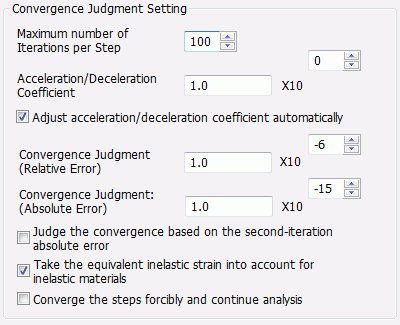
To realize the nonlinearity, the displacement or the load is divided into some small steps and
The convergence is judged by [absolute error] (= the sum of squared displacement of all nodes) and
The significand of [Convergence Judgment (Relative Error)] is a real number greater than 0.
If "Judge the convergence based on the second-iteration absolute error" is selected,
If "Take the equivalent inelastic strain into account for inelastic materials" is selected,
The calculation will stop as soon as the iterations reach the entered maximum number. [Maximum number of iterations per step] is an integer greater than 0.
If the calculation doesn't converge,
[Acceleration/deceleration] factor is a real number greater than 0.
If [Converge the steps forcibly and continue analysis] is selected, the result closest to convergence in the iterations before calculation stopped will be used as an optimum solution to continue analysis. Although the calculation accuracy will be lower, this is useful in the cases the calculation doesn't converge or takes long time to converge See [Example 56: Buckling Analysis of Bimetal Switch]
|
||||||||||||||||||||||||||||||||||||||||||||||||||||
|
Nonlinear analysis
Convergence Judgment Setting |
Iterative calculations are repeated until the convergence is achieved in the fluid and fluid-thermal analysis. Different values for convergence judgment can be set for fluid analysis and thermal analysis. The calculation will stop when the iterations reach the [Maximum number of iterations].
If iterative calculation does not converge in the thermal analysis, use [Acceleration/Deceleration factor]. Select "Adjust acceleration/deceleration factor automatically"
[Maximum number of iterations] is an integer greater than 0. The significand of [Convergence judgment(fluid)] is a real number greater than 0.
If the calculation doesn't converge in fluid analysis, try the following:
If the calculation doesn't converge in thermal analysis, try the following: |
||||||||||||||||||||||||||||||||||||||||||||||||||||
|
Nonlinear Analysis
|
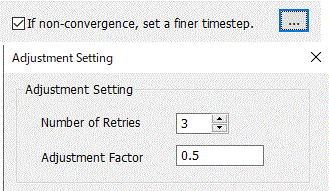
[If non-convergence, set a finer timestep]
If the calculation didn't converge with this function enabled, the load increment is adjusted automatically and the calculation is redone
[Number of Retries] is a positive integer. (0 not inclusive)
|
||||||||||||||||||||||||||||||||||||||||||||||||||||
|
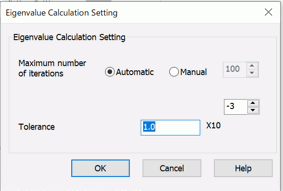
Eigenvalue Calculation |
Specify the maximum number of iterations for the eigenvalue calculation and the convergence tolerance. If the [Maximum number of iterations] is automatic, the iterations are set automatically.
|
||||||||||||||||||||||||||||||||||||||||||||||||||||
|
Stress Analysis/Piezoelectric Analysis Setting |
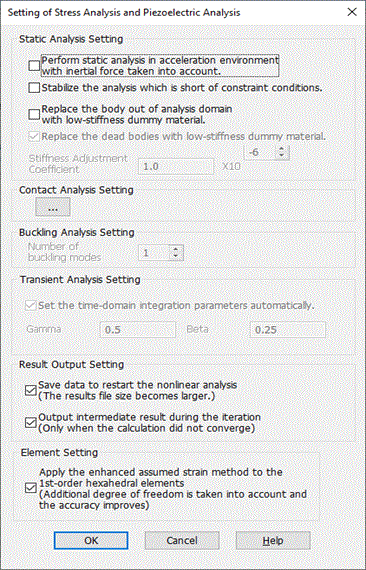
[Static Analysis Setting]
If [Perform static analysis in acceleration environment with inertial force taken into account] is selected, The density is required to be set on the [Density tab]. This is available for the static stress analysis and the piezoelectrostatic analysis. For detail, see technical note [Balance of Forces and Torques in the Static Analysis].
If [Stabilize the analysis which is short of constraint conditions] is selected, the analysis is stabilized even when there are bodies short of constraint conditions.
If [Replace the body out of analysis domain with low-stiffness dummy material] is selected,
If [Replace the dead body with low-stiffness dummy material] is selected,
Refer to [Stress-Static Analysis] of the Technical Notes for the details of birth/death.
[Stiffness adjustment factor] can be changed if [Replace the body out of analysis domain with low-stiffness dummy material] or [Replace the dead body with low-stiffness dummy material] is selected.
[Contact Analysis Setting]
[Buckling Analysis Setting]
[Number of buckling modes] is set. The number is a positive real number. (0 not inclusive)
Transient Analysis Setting
If [Set the time-domain integration parameters automatically] is selected, the integration parameters of Newmark method are set automatically. If deselected, the parameters (Gamma and Beta) can be set manually.
[Result Output Setting]
Some nonlinear analyses (elasto-plastic, creep, viscoelasticity, and contact) require intermediate data for restart analysis.
If [Save Data to Restart Nonlinear Analysis] is selected, nonlinear analysis which requires intermediate data can be restarted.
[Output intermediate result during the iteration] When selected, the intermediate result is output if the calculation did not converge. The result file size becomes larger. If deselected, the intermediate result is not output. The last non-convergent result or diverged result is only output.
[Apply Enhanced assumed strain method to 1st-order hexahedral (rectangular) elements] If selected, Enhanced assumed strain method is applied to increase the simulation accuracy for 1st-order 3D hexahedral or 2D rectangular elements. (Not supported for piezoelectric analysis) If deselected, formulation of enhanced strain is disabled and the calculation speed will be faster but the simulation accuracy may be much poorer. See Enhanced Assumed Strain Method of technical note for more information.
|
||||||||||||||||||||||||||||||||||||||||||||||||||||
|
Surface-to-Surface Radiation Setting |
In the thermal analysis, if [Surface-to-surface (accuracy prioritized)] is selected for the radiation setting,
A solver to calculate the radiation is specified in [Radiation Solver]. If [Face - Face (Time Prioritized)] is selected, the calculations will be faster, but the accuracy will be deteriorated. If [Point - Face (Accuracy Prioritized)] is selected, the accuracy will be higher, but the calculations will take longer time. The default setting is [Face - Face (Time Prioritized)].
A solver to calculate the radiation is specified in [Radiation Solver]. If [Face - Face (Time Prioritized)] is selected, the calculations will be faster, but the accuracy will be deteriorated. If [Point - Face (Accuracy Prioritized)] is selected, the accuracy will be higher, but the calculations will take longer time. The default setting is [Face - Face (Time Prioritized)].
[Radiation Surface Check Method] allows you to directly specify the method for checking radiation surfaces. Only if [Face-Face (Time Prioritized)] is selected, the Hemibube method can be selected.
The accuracy of the mapping method can be adjusted in [Mapping Method Setup].
In [Hemicube Method Setup], the Hemicube resolution can be adjusted. You can specify it only if the Hemicube method is selected in [Radiation Surface Check Method]. The resolution is the number of pixels per edge of a face of the hemicube (64 by default). Higher resolution will improve rendering accuracy to increase calculation accuracy. High-performance discrete GPUs can shorten calculation time.
If [Evaluate the difference between triple-loop and mapping methods] is selected, the both methods are performed in the radiation surface check, and the difference (unit: %) between them is obtained. This setting is available only when the radiation solver is set with [Point - Face (Accuracy Prioritized]. The thermal analysis following the radiation surface check uses the results of the triple-loop method.
See Technical Note [Radiation Surface Check].
In [Calculation Method of View Factor], the method to calculate the view factor of the radiation surfaces. If the solver is set with [Face-Face (Time Prioritized)] and the mapping or Hemicube method is used, this setting is not required because the view factor is calculated by the mapping method or Hemicube method without element surface integration. Surface integral is required to calculate the view factor. There are analytical integration and numerical integration for the surface integral. Analytical integration provides high accuracy. Numerical integration provides fast calculation.
Depending on the state of the radiation surfaces, either analytical integration or numerical integration is automatically selected in [Automatic (analytical integration and numerical integration jointly used)] .
The default setting is [Automatic (analytical integration and numerical integration jointly used)] .
|
||||||||||||||||||||||||||||||||||||||||||||||||||||
|
Thermal Analysis Setting |
Set the correction factor for convection. The factor adjusting heat dissipation by natural or forced convection is set in this dialog box. It is also used for non-air fluids such as water and solvents. The factor is 1.0 for the heat dissipation into air at 25 °C. ・Automatic Calculation Select a fluid for heat dissipation. The correction factor of convection is automatically calculated based on the Femtet material database information of the selected fluid material. For the coupled analysis with the simple fluid analysis, the menu of fluid selection will not appear. Instead, the fluid material selected in the material property setting is set to the fluid for heat dissipation. If [Temperature Dependency Taken into Account] is selected, the temperature dependency will be taken into account for the calculation of correction factor for convection. Refer here for the equations. The material properties of the selected fluid material can be edited for more detailed material properties. For instance, the temperature dependency data of density is not registered in the material database in Femtet. If the temperature dependency data of density is input in the material property setting, the correction factor for convection can be calculated more accurately. See [How to Set Body Attribute/Material Property] or [Density Tab] for the editing.
・Manual Setting The correction factor is used to match the simulation result and the measurement result. The correction factor can be fixed by performing a simulation and making a measurement for a reference model and comparing the results. Refer here for the setting.
This setting is applicable for thermal analyses [Watt] or Watt-coupled analyses under the natural-convection (automatic calculation) boundary condition also for simple fluid-thermal analyses [Pascal-Watt]
Result Output Setting
When selected, the intermediate result is output if the calculation did not converge. The result file size becomes larger. If deselected, the intermediate result is not output. The last nonconverged result or diverged result is only output.
|
||||||||||||||||||||||||||||||||||||||||||||||||||||
|
Matrix Solver |
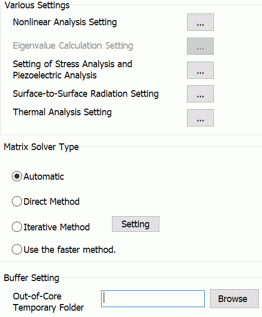
Matrix Solver Type
The iterative method of the algebraic multi grid is performed in the analyses below for fast calculation. ・ Thermal Analysis ・ Simple Fluid Analysis
The iterative method of the domain decomposition is performed in the analyses below for fast calculation. ・ Stress Analysis (Static Analysis)
Note that the domain decomposition method is not applicable under the conditions below in the stress static analysis. ・ Contact surface, simple contact, joint load, spring connection, rigid face, or bond boundary condition is applied. ・ Shell elements are applied.
The algebraic multi grid method requires an optional license. The domain decomposition method requires an optional license.
|
||||||||||||||||||||||||||||||||||||||||||||||||||||
|
Buffer Setting/Memory and Buffer Setting |
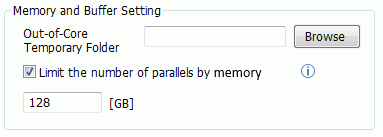
The direct method takes the large memory space during the calculation. Therefore a certain portion of the main memory of the PC is allocated to perform the direct method. "Buffer size" is this allocation size.
[Out-of-core temporary folder] is used in such a case.
[Limit the number of parallels by memory]
The memory usage will be increased in proportion to the number of parallels when Parallel discrete sweep is performed in the harmonic analysis.
|
||||||||||||||||||||||||||||||||||||||||||||||||||||