


|
Home / How to Set Analysis Condition / List of Analysis Condition Tabs / Setting Motion Equation Coupling
Setting Motion Equation Coupling
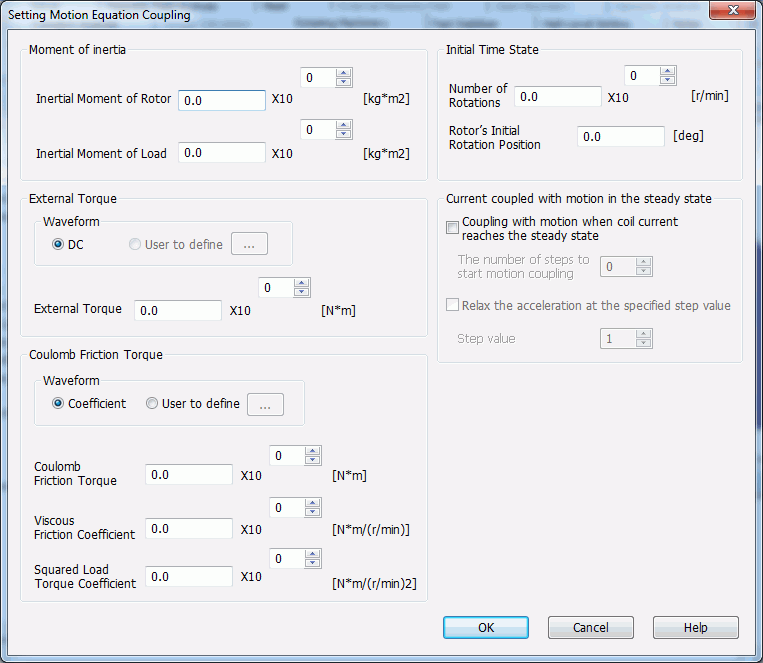
Conditions are set for the motion equation coupling of the rotational movement in the rotating machinery analysis of the magnetic transient analysis (Luvens).
See also [Rotating Machinery tab].
|
Setting Item |
Notes |
|
Moment of Inertia |
Inertial Moment of Rotor Specify the inertial moment of rotor.
Inertial Moment of Load Specify the inertial moment of load.
|
|
External Torque |
Applies the external torque forcibly. Even for a partial model, enter the full external torque. Enter negative value for the load torque. The positive rotational direction is
Waveform DC
User to Define Defines the desired waveform for the external torque. Available only when [Coupling with motion when coil current reaches the steady state] is selected. Fill in the table. Click the Graph button to see the graph of entered data.
External Torque Enters the external torque value if the waveform is constant.
|
|
Coulomb Friction Torque |
Enters Coulomb friction torque (load torque). Plus/minus signs will be automatically assigned for the reverse direction of the rotation to reduce its speed.
Waveform Coefficient
User to Define Defines the desired waveform for the Coulomb friction torque. Available only when [Coupling with motion when coil current reaches the steady state] is selected. Fill in the table. Click the Graph button to see the graph of entered data.
Coulomb Friction Torque Select this if the waveform is Coefficient. This is not dependent on the number of rotations of the Coulomb friction torque. Plus/minus signs will be automatically assigned for the reverse direction of the rotation to reduce its speed.
Coefficient of Viscous Friction Select this if the waveform is Coefficient. This item is proportional to the 1st power of the number of rotations of the Coulomb friction torque. Plus/minus signs will be automatically assigned for the reverse direction of the rotation to reduce its speed.
Squared Coefficient of Load Torque Select this if the waveform is Coefficient. This item is proportional to the 2nd power of the number of ratations of the Coulomb friction torque. Plus/minus signs will be automatically assigned for the reverse direction of the rotation to reduce its speed.
|
|
Initial Time State |
Specifies the rotor's state at the initial time.
Number of Rotations Specifies the number of rotations of the rotor at the initial time.
Rotor's Initial Rotation Position Specifies the rotor's rotation position at the initial time.
|
|
Current Coupled with Motion in the Steady State |
Coupling with motion when coil current reaches the steady state Executes the coupled analysis with motion after the coil current reaches the steady state. An example would be characteristics analysis of synchronous motor rotation near the steady state. To obtain the balanced 3-phase AC current of coil, correction is applied either by the simplified 3-phase AC TP-EEC method or the three-phase AC ETF method. [Fast Stabilizer Tab] needs to be set.
The number of steps to start motion coupling Specifies the number of timesteps that start coupling with motion.
Relax the acceleration at the specified step value Relaxes the acceleration by multiplying acceleration by the proportional constant α within the specified timestep value after the number of timesteps reaches [The number of steps to start motion coupling], where 0≦α≦1.
In A≦C≦A+B timestep C will define the proportional constant α= (C-A)/B where A is [The number of steps to start motion coupling] and B is [Step Value].
Step Value Sets the step value mentioned above.
|
 on the modeling window.
 displays the