


|
Home / How to Set Analysis Condition / List of Analysis Condition Tabs / Magnetic-Thermal Analysis Tab
Magnetic-Thermal Tab
Analysis conditions for the magnetic-thermal analysis are set on this tab. The solvers are Gauss and Watt.
It is in the [Analysis Condition Setting] dialog box. See also [How to Set Analysis Condition].
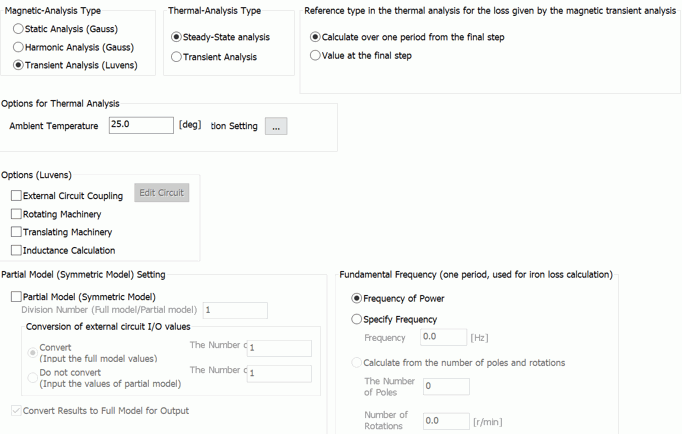
|
Setting Item |
Notes |
|
Analysis Type (for magnetic analysis) |
Static analysis The constant load, voltage or current is applied.
Harmonic analysis The sinusoidal load, voltage or current is applied.
Transient Analysis Transient states are analyzed. (Note) The magnetic-transient analysis is available in an optional package.
|
|
Analysis Type (for thermal analysis) |
Steady-state analysis There is no time dependency.
Transient Analysis Transient states are analyzed.
|
Options (Thermal Analysis)
|
Options |
Notes |
||||
|
Ambient Temperature |
Sets the ambient temperature. Ambient temperature can be used for various kinds of temperature settings. ・Ambient temperature and ambient radiation temperature on the [Thermal tab]. ・Unless specified individually, the ambient temperature set here is used as the ambient radiation temperature. |
||||
|
Radiation Setting |
Enables the settings relating to the radiation. - Outer boundary condition setting ・Default value of emissivity ・Emissivity of each body attribute ・Emissivity of each boundary condition Click |
||||
|
Reference type of the loss given by the magnetic transient analysis. |
In the transient analysis, select a type from the following.
Calculation over one period from final step In the magnetic analysis, the loss is calculated at the timesteps over one periodic cycle covered backward from the final step of the fundamental frequency. If the iron loss is set for the material, calculation is allowed only with this type. (Because iron loss calculation requires the magnetic flux density distribution for one period.)
Periodic time is calculated by [1/fundamental frequency] For the details of fundamental frequency, refer to [Fundamental Frequency] on the [Iron Loss] tab.
Losses are calculated as follows.
Value at the final step In the magnetic analysis, the loss is calculated at the final timestep. The result is referred to as the heat quantity (constant over the time) in the thermal analysis. Value at each step Selectable for the transient thermal analysis. The iron loss is calculated at each time step in the magnetic analysis. The result is referred to as a heat quantity at each timestep in the thermal analysis.
|
 to show [
Options (Magnetostatic analysis)
|
Options |
Notes |
|
Calculate the inductance |
Calculates the self-inductance, mutual inductance, and impedance. If deselected, the calculation of multiple coils will be faster. It is recommended to deselect this option unless it is necessary. Selectable in the harmonic analysis.
|
|
Calculate the torque |
Calculates the torque of the electromagnetic force. Available for the 2D or 3D static analysis. |
Options (Magnetic Transient Analysis)
|
Analysis Options |
Notes |
|
External Circuit Coupling |
Executes a coupled analysis with the external circuit.
Click
|
|
Rotating Machinery |
Analyzes rotating machinery such as motor and generator. Refer to [Rotating machinery tab] for detailed setting. |
|
Partial Model (Symmetric Model) Setting |
See [Magnetic Analysis] > Options (Transient analysis) > [Partial Model (Symmetric Model) Setting]. |
|
Fundamental Frequency (one period, used for iron loss calculation) |
See [Magnetic Analysis] > Options (Transient analysis) > [Fundamental Frequency (one period, used for iron loss calculation)]. |
 and launch
 The Relating Tabs
The relating tabs are [Open Boundary], [Harmonic Analysis], [Transient Analysis], and [High-Level Setting], [Monitoring].
How to Modify Analysis Conditions
To modify the analysis conditions, go to [Model] tab

and click [Analysis Condition]  . The dialog box will appear.