Femtet Help/Manual
 

Home / How to Set Analysis Condition / List of Analysis Condition Tabs / Harmonic Analysis Tab

Harmonic Analysis Tab

Analysis conditions for the harmonic analysis are set on this tab.

It is in the [Analysis Condition Setting] dialog box. See also [How to Set Analysis Condition].
 

Setting Item

Notes

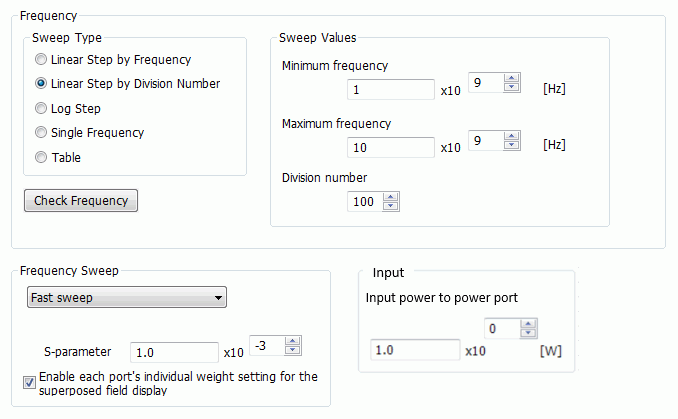
Frequency

Sets the frequencies for analysis.

There are five sweep types.


Linear step by frequency

The frequency is swept from the minimum to the maximum over the specified frequency steps.


Linear step by number of divisions

Sweeps the frequencies from the minimum to the maximum over the specified frequency divisions.

Enter a positive integer up to 10000 in "Number of Divisions".

For example, with the setting of minimum frequency = 10000[Hz], maximum frequency = 30000[Hz], and number of divisions= 2,

the analysis will be performed at the frequencies of 10000, 20000, and 30000[Hz].


Log step

Sweeps the frequencies from the minimum to the maximum over the specified number of frequency divisions in logarithm to base 10.


Single frequency

The analysis is performed at one frequency.


Table

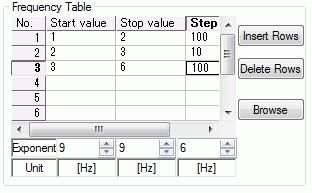
Specifies the frequencies on a table. It is useful when the frequency interval is not constant.


Sweeps the frequencies from the start value to the stop value at the specified frequency interval.

The multiple number of rows can be defined, so the interval is variable.

The table contents can be imported from an Excel csv file through the [Browse] button.

You may paste the copied contents on the table.


The frequency is a real number greater than 0.

Make sure that maximum frequency is equal to or greater than inimum frequency.

If Maximum frequency is equal to Minimum frequency, the analysis will be performed at the single frequency.


Check frequency

Checks the sweep setting.


Time Domain Setting

Available when "Convert to TDR" is selected in the harmonic electromagnetic analysis.
It converts the time domain setting for TDR to the frequency setting for the harmonic analysis.


Frequency Sweep

Specifies the sweep method.

Fast sweep is available for the electromagnetic analysis, piezoelectric analysis, and acoustic analysis.
Interpolation sweep is only available in the electromagnetic analysis.

[Parallel Discrete Sweep] is also selectable if Accelerator is enabled.
Features of each sweeping methods are as follows.


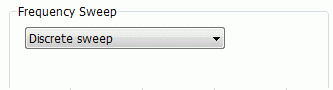
  • Discrete sweep

    Calculates the frequencies one by one. It takes time but gives high accuracy.


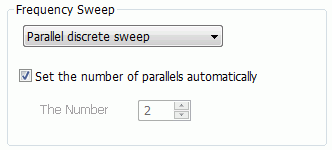
  • Parallel discrete sweep

    Calculates multiple frequencies simultaneously.
    It is expected to obtain the result as accurate as the discrete sweep in less time than the discrete sweep.
    If Set the number of parallels automatically is selected, it is automatically set from the number of available cores, available memory, and memory to use.

    If you want to set the number of parallels yourself, deselect Set the number of parallels automatically and enter the number of parallels.

  • The needed memory for calculation is proportional to the number of parallels.
    Too many parallels may result in the memory shortage and prolonged calculation time.

  • If the number of parallels is set automatically, the limitation on the number can be set so that
    the memory to use becomes less than the specified memory. See [High-Level Setting tab] for the details.


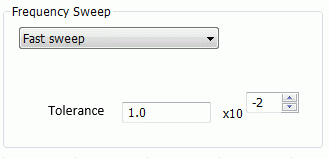
  • Fast sweep

    Predicts the results of entire frequencies from the partial result of the sweep frequencies.
    The analysis time is expected to be shorter than the discrete sweep because a part of the sweep frequencies is only calculated.
    To judge convergence of the fast sweep, it is required to set Tolerance or S-parameters tolerance.

    Tolerance: In the acoustic or piezoelectric analysis, the field tolerance is calculated at each frequency.
    If the calculation results for all the analysis frequencies are within the tolerance, the calculation stops.

    S-parameters tolerance: In the electromagnetic analysis, S-parameters are updated for all analysis frequencies every after a frequency was calculated.
    If the S-parameters' difference before and after the update is within the S-parameters tolerance, the calculation stops.


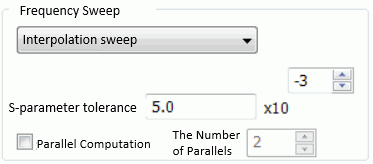
  • Interpolation sweep

    Predicts the S-parameters of all frequencies by interpolating the S-parameters for some frequencies,
    Unlike the fast sweep, the interpolation sweep does not predict nor output the field values.
    The analysis time is expected to be shorter than the discrete sweep because a part of the sweep frequencies is only calculated.
    Also, the memory usage is expected to be less than the fast sweep, as the field values are not output.

    S-parameters tolerance: S-parameters are updated for all analysis frequencies every time one frequency is calculated.
    If the S-parameters changed before and after the update within the S-parameters tolerance, the calculation stops, as it is judged to have converged.

  • The interpolation sweep is also applicable to the propagation constant and the characteristic impedance to predict the results of all analysis frequencies.
    The S-parameters tolerance is used for the convergence judgment.

  • The interpolation sweep is not applicable to the analysis which uses incident wave, current port, and voltage port. The S-parameters are not output with such analysis.


Parallel Computation is also selectable if Accelerator is enabled. Multiple frequencies are calculated in parallel. The interpolation sweep is expected to converge in shorter time.


Input

Sets the average value of input power from the power port in the electromagnetic analysis.

Enable each port's individual weight setting

for the superposed field display


Enables the field superposition function.

See the Field Superposition Setting for the detail.