


|
Home / How to Set Analysis Condition / List of Analysis Condition Tabs / Magnetic-Thermal-Stress Analysis Tab
Magnetic-Thermal-Stress Analysis Tab
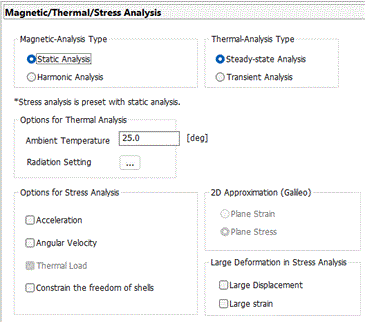
Analysis conditions for the magnetic-thermal-stress coupled analysis are set on this tab. The solvers are Gauss, Watt and Galileo.
It is in the [Analysis Condition Setting] dialog box. See also [How to Set Analysis Condition].
|
Setting Item |
Notes |
|
Analysis Type (for magnetic analysis) |
Static analysis The constant load, voltage or current is applied.
Harmonic analysis The sinusoidal load, voltage or current is applied.
|
|
Analysis Type (for thermal analysis) |
Steady-state analysis There is no time dependency.
Transient analysis Transient states are analyzed.
|
|
2D Approximation |
To perform the 2D analysis, select either one below.
Planar strain If the object is fixed in the Y direction, there will be no displacement in the Y direction. Then we can take into account the X/Z components of the strain only. This is called the planar strain approximation.
Plane stress If the object's Y dimension is considerably smaller than the X/Z dimensions and the object can deform freely in the Y direction, we can assume that the stress has X/Z components only. This is called the plane stress approximation.
|
Options
|
Options |
Notes |
|
Ambient Temperature |
Sets the ambient temperature. Various temperatures can be set for the ambient temperature. ・Ambient temperature and ambient radiation temperature on the [Thermal] tab. ・Unless specified individually, the ambient temperature set here is used as the ambient radiation temperature. |
|
Radiation Setting |
Enables the settings relating to the radiation. ・Outer boundary condition setting ・Default value of emissivity ・Emissivity of each body attribute ・Emissivity of each boundary condition Click |
|
Large deformation |
Analyzes the geometric nonlinearity involving large deformation.
Large deformation means large rotation and strain of elements. See Technical Note Analysis of Large Deformation (Geometric Nonlinearity for details.
- Select "Large displacement" to have large rotation involved. The total Lagrangian formulation with Green-Lagrangian strains is used.
- Select both "Large displacement" and "Large strain" to have large rotation and large strain involved. The updated Lagrangian formulation with logarithmic strain is used. It is recommended to select "Large displacement" when you are selecting "Large strain".
- Select "Large strain" to have large strain involved. The updated Lagrangian formulation with logarithmic strain is used.
Iterative calculations will be performed for large deformation and the simulation will take longer time. Available for the static analysis only. |
|
Acceleration |
Takes the weight of the model into account. Not selectable in the resonant analysis. |
|
Angular velocity |
Takes the centrifugal force into account. Available for the axisymmetric or 3D static analysis. The rotation axis is fixed to Z. |
|
Thermal load |
Takes the thermal load into account. If selected, the thermal load can be set on the thermal load tab. |
|
Constrain the Freedom of Shells |
Available for the 3D analysis. If selected, the freedom of displacement in the rotational direction can be constrained on the mechanical tab. |
 to show [
The Relating Tabs
The relating tabs are [External Magnetic field], [Open Boundary], [Harmonic Analysis], [Transient Analysis], [Step/Thermal Load], [Acceleration], [Angular Velocity], [High-Level Setting], and [Monitoring] tab.
How to Modify Analysis Conditions
To modify the analysis conditions, go to [Model] tab for

and click [Analysis Condition]  . The dialog box will appear.