|
Home / How to Set Analysis Condition / List of Analysis Condition Tabs / Transient Analysis Tab (Automatic)
Transient Analysis Tab (Automatic)
Analysis conditions for the transient analysis are set on this tab.
It is in the [Analysis Condition Setting] dialog box. See also [How to Set Analysis Condition].
Automatic timestep setting varies depending on solvers.
|
Solvers |
Notes |
||||||||
|
Stress analysis Acoustic Analysis Fluid Analysis |
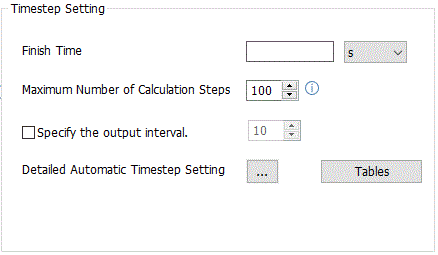
Specify [Finish Time] or [Maximum Number of Calculation Steps] before analyzing.
Solvers each set its proper timestep automatically. The calculation continues until the finish time is reached; however, the calculation is aborted when the maximum number of calculation steps is reached.
Each solver determines its timestep as follows.
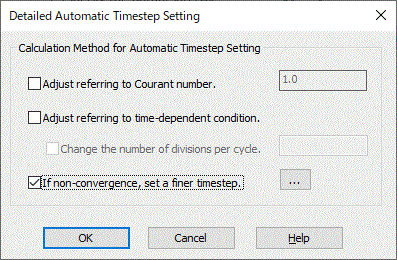
Thermal Analysis: If [Adjust referring to time-dependent condition] is selected in [Detailed Automatic Timestep Setting], the timestep is calculated based on the time dependency (Weight Function) of the heat source or the frequency of the voltage waveform in the electric-thermal analysis. When the waveform is input, the timestep is defined as one cycle divided by 12. To change the number of divisions, select [Change the number of divisions per cycle]. If [Adjust referring to time-dependent condition] is not selected in [Detailed Automatic Timestep Setting], the timestep is calculated based on the body size and the thermal diffusivity inside the body.
[Transient Analysis Using Resonant Mode] not selected in the stress and piezoelectric analyses: If [Adjust referring to time-dependent condition] is selected in [Detailed Automatic Timestep Setting], the timestep is calculated based on the weight function of displacement or voltage. If [Adjust referring to time-dependent condition] is not selected in [Detailed Automatic Timestep Setting], the timestep is calculated based on the body size or the elastic wave speed inside the body. In [Detailed Automatic Timestep Setting] with [If non-convergence, set a finer timestep] selected, if a calculation does not converge, set the timestep finer and redo the calculation.
[Transient Analysis Using Resonant Mode] selected in the piezoelectric analysis: [Adjust referring to time-dependent condition] will be automatically selected in [Detailed Automatic Timestep Setting]. The timestep is calculated based on the results of resonant frequencies in the resonant analysis or the time dependency (Weight Function) of voltage or displacement . One cycle is calculated based on the maximum resonant frequency. The timestep is defined as one cycle divided by 10. To change the number of divisions, select [Change the number of divisions per cycle].
Explicit method is used in the acoustic analysis: [Adjust referring to Courant number] will be automatically selected in [Detailed Automatic Timestep Setting]. The timestep not incurring numerical instability is calculated based on the Courant number (CFL number) that is determined by the mesh size and sound speed.
Implicit method is used in the acoustic analysis: [Adjust referring to time-dependent condition] will be automatically selected in [Detailed Automatic Timestep Setting]. The timestep is calculated based on the frequency of the input waveform of the speed boundary condition or other conditions. When the waveform is input, the timestep is defined as one cycle divided by 20. To change the number of divisions, select [Change the number of divisions per cycle].
Fluid Analysis: If [Adjust referring to time-dependent condition] is selected in [Detailed Automatic Timestep Setting], the timestep is calculated based on the time dependency (Weight Function) of the flow velocity. If [Adjust referring to Courant number] is selected in [Detailed Automatic Timestep Setting], the timestep is calculated such that the flow travel distance per time meets the requirement associated with the specified Courant number. In [Detailed Automatic Timestep Setting] with [If non-convergence, set a finer timestep] selected, if a calculation does not converge, set the timestep finer and redo the calculation.
In some cases, the automatic timestep setting may not be appropriate. If the automatic calculation is not satisfactory, select [Manual] instead of [Automatic] to try the manual entry.
Selecting [Specify the output interval] and specifying the interval can limit the output result and downsize the result file. If 10 is specified, the result is saved in a file every ten times.
Click the Table button. The Time Table window will appear. You can see the relationship between time and the weight function that is set on the mechanical tab, thermal tab, electric tab of boundary conditions, or the heat source tab of body attributes.
|
||||||||
|
Magnetic Transient Analysis (By default) |
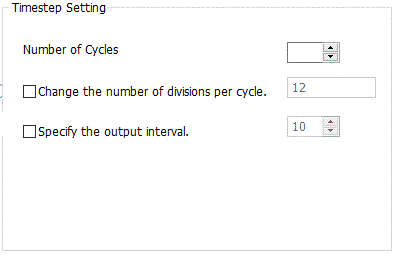
Specify [Number of Cycles] before analyzing. * Magnetic-transient analysis is available in an optional package.
The timestep is defined as one cycle divided by 12. If [Change the number of divisions per cycle] is selected, the default number of divisions can be changed.
Selecting [Specify the output interval] and specifying the interval can limit the output result and downsize the result file. If 10 is specified, the result is saved in a file every ten times. |
||||||||
|
Magnetic Transient Analysis |
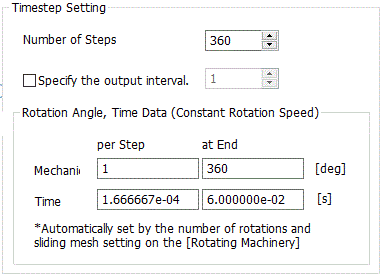
It is available when [Constant Velocity] is selected for the rotational movement on the [Rotating Machinery] tab in the rotating machinery analysis of the magnetic transient analysis. * Magnetic-transient analysis is available in an optional package.
Specify [Number of Steps] before analyzing.
Selecting [Specify the output interval] and specifying the interval can limit the output result and downsize the result file. If 10 is specified, the result is saved in a file every ten times.
|
||||||||
|
Magnetic Transient Analysis (Translational Machinery) |
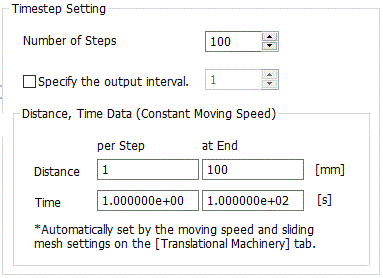
It is available in the translational machinery analysis of the magnetic transient analysis. * Magnetic-transient analysis is available in an optional package.
Specify [Number of Steps] before analyzing.
The translational machinery moves translationally by (Division Size in Traveling Direction) * (Traveling Quantity per Step) of the [Translational Machinery] tab per step.
Selecting [Specify the output interval] and specifying the interval can limit the output result and downsize the result file. If 10 is specified, the result is saved in a file every ten times.
|
||||||||
|
Electromagnetic Analysis |
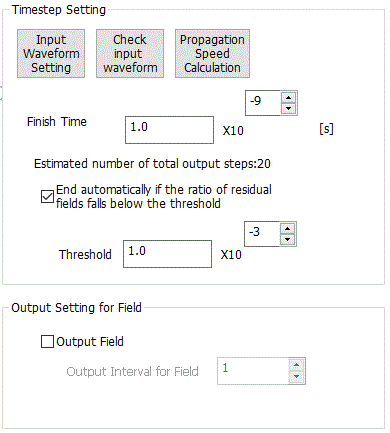
This is available for the electromagnetic-transient analysis. *Electromagnetic-transient analysis is available in an optional package.
|