Home / Tutorial / Electromagnetic Analysis (2D Waveguide Analysis) (Hertz) / 03.Set the Analysis Conditions
03.Set the Analysis Conditions
We set the analysis conditions.
Procedure
-
On the [Model] tab, go to
 , ,
and click [Analysis Condition]  . .
The [Analysis Condition Setting] dialog will show up.
|
|
-
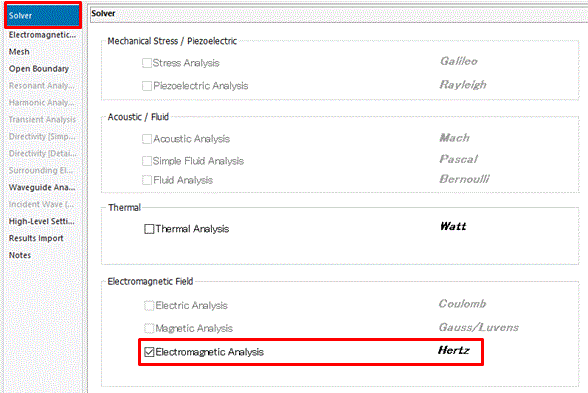
On the [Solver] tab,
select [Electromagnetic analysis "Hertz"].
|
|
-
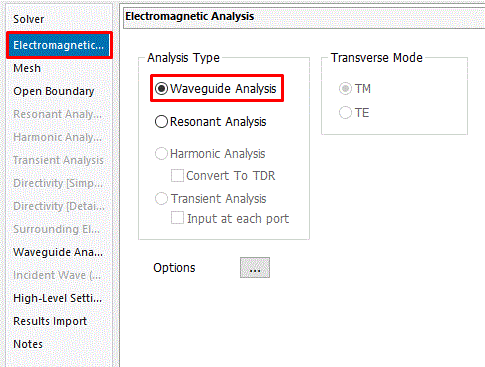
Go to the [Electromagnetic Analysis] tab.
Select [Waveguide analysis] at [Analysis Type].
|
|
-
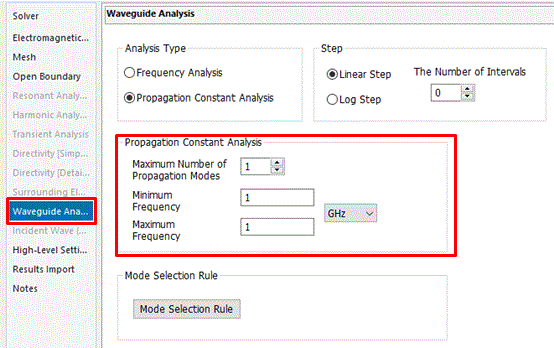
Go to the [Waveguide Analysis] tab,
and set up as follows:
Minimum Frequency: 1[GHz]
Maximum Frequency: 1 [GHz]
|
|
-
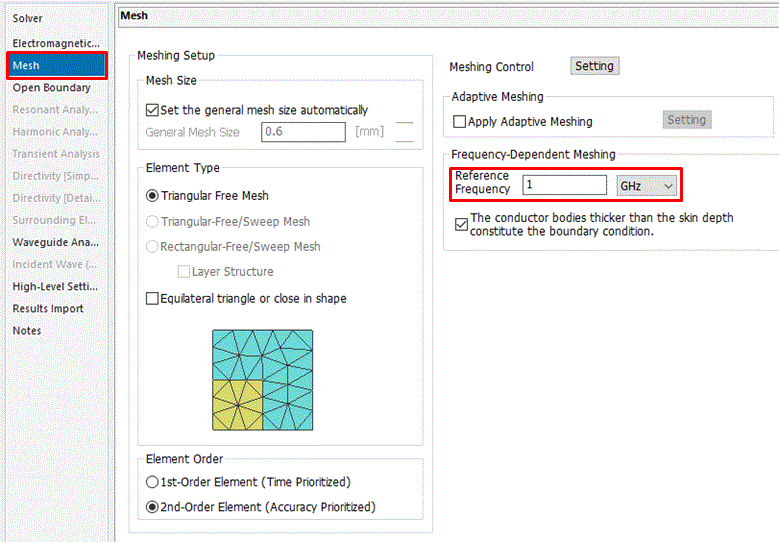
Go to the [Mesh] tab.
Set Reference Frequency: 1 [GHz]
Click  . .
|
|
|
The analysis conditions have been set. |
|


 Prev
Prev