Home / Tutorial / Electromagnetic Analysis (2D Waveguide Analysis) (Hertz) / 07.Run the Mesher and the Solver
07.Run the Mesher and the Solver
Run the solver.
Procedure
-
Set the mesh size.
On the [Model] tab, go to  , ,
and click [Analysis Condition]  . .
The [Analysis Condition Setting] dialog box will show up.
|
|
-
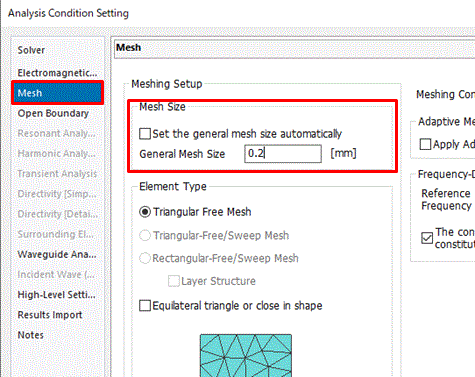
Click the [Mesh] tab.
set the [General mesh size] to 0.2
and click 
-
Mesh size The models are divided by triangles for meshing in Femtet.
Smaller meshes are required to represent the curving structure better.
In this example, we set the mesh size to 0.2, as it is small enough in comparison to 1, the radius of the inner circle.
In order to judge whether the mesh size is adequate or not, you need to try the simulation with different mesh sizes and confirm that the results are similar.
-
The calculation accuracy varies depending on the mesh size and other settings.
Details are described at [How to Optimize the Simulation Accuracy].
|
|
-
On the [Model] tab, go to ,
and click [Run Mesher/Solver]  . .
The calculation will start.
|
|
-
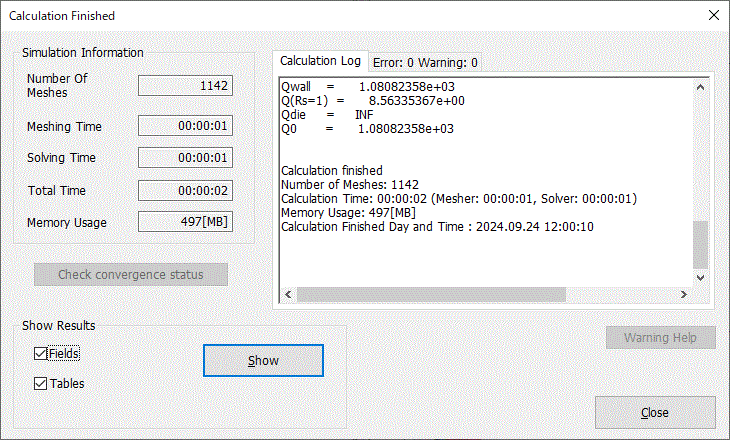
The [Calculation Finished] dialog box will show up when the calculation finishes.
Select [Field]
and click  . .
|
|
|
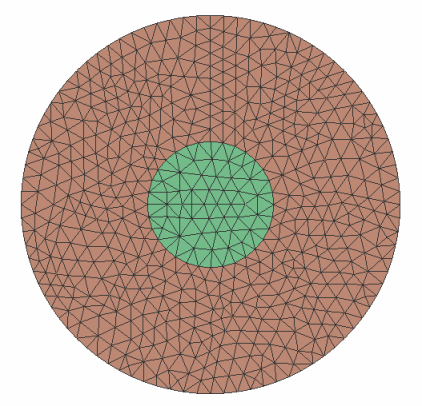
The screen will change to Results Window,
and the meshing result will show up.
|
|
|
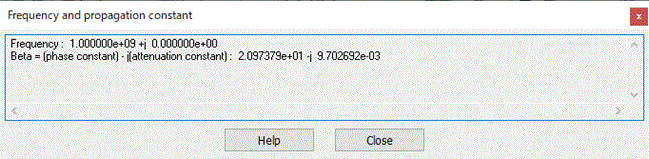
The [Frequency and Propagation Constant] dialog box will appear too. |
|


 Prev Next