


|
Home / Parametric Analysis / Output setting
Output Setting
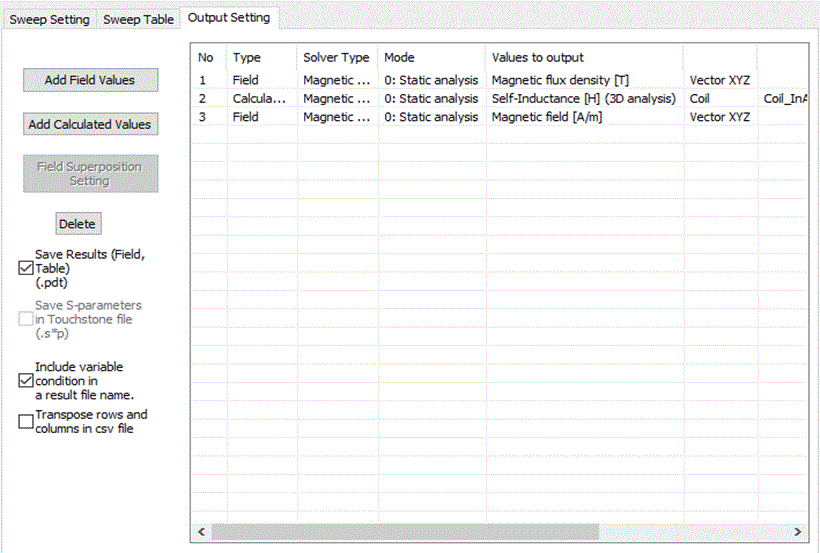
The output contents for the parametric analysis can be arranged on this tab.
The specified items will be saved in the csv file after the calculation.
It is a part of [Parametric Analysis] dialog box.
On the [Model] tab  ,
,
click ▼ at the bottom of [Run Mesher/Solver]  and click [Execute Parametric Analysis]
  .
.
See [Parametric Analysis] for the overview.
See [How to Proceed with the Parametric Analysis] for the procedure.
|
Setting Items |
Notes |
|
Add Field Values |
Shows the dialog box for output setting of the field values. [Output Setting of Field Values] manages the output arrangement of the results such as stress, electric field, temperature, etc. |
|
Add Calculated Values |
Shows the dialog box for output setting of the calculated values. [Output Setting of Calculated Values] manages the output arrangement of the results such as external/reactive force, capacitance, inductance, etc. |
|
Field Superposition Setting |
[Field Superposition Setting] dialog box will appear. It is applicable for the electromagnetic analyses. |
|
Delete |
Deletes the selected setting the list. |
|
Save Results (.pdt) |
Saves the whole results. Double click on each results item on Project Tree to check it. |
|
Save S-parameters in Touchstone file (.s*p) |
Selectable for the 3D electromagnetic-harmonic analysis. Also selectable for analyses other than piezoelectric-harmonic analysis.
If selected, the results are saved in the Touchstone file (.s*p). For the electromagnetic analysis, S-parameters will be saved, and for the piezoelectric analysis, impedance or admittance will be saved. The file is saved in the Results Folder.
|
|
Include Variable Condition in a Result File Name |
If it's ON, the following will be entered in the result file name.
Analysis model name_Parametric1,1.0,1.0,1.0.pdt Analysis model name_Parametric2,1.0,1.0,2.0.pdt
If it' OFF, the result file name will be as follows.
Analysis model name_Parametric1,.pdt Analysis model name_Parametric2,.pdt
|
|
Transpose Rows and Columns in CSV File |
Saves the results in a csv file. |